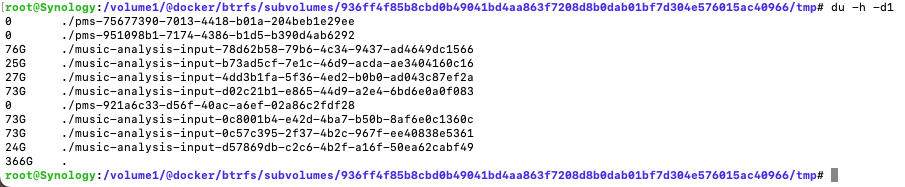
My Docker hard drive is a 128GB drive, and the Docker shared folder is using less than 20GB. However, there are often many audio files that appear in the path
/volume1/@docker/btrfs/subvolumes/d3068d1d8eb24c315a49aa30ae84e92277180cb019ecee0da5df0d72ebd2b97e/tmp/music-analysis-input-046a3a75-b34b-438d-aa6e-975aac29cd1a
which fill up the entire hard drive and cause the system to become unusable.
Why do you use Docker for PMS and why use a 128GB subvolume for the container when you have the entire Volume1 ?
How many items are in your music library?
Is it trying to ingest it all at once?
[quote=“ChuckPa, post:2, topic:876723, full:true”]
Why do you use Docker for PMS and why use a 128GB subvolume for the container when you have the entire Volume1 ?
How many items are in your music library?
Is it trying to ingest it all at once?
[/quote
Because I was using a different NAS system before, I’m more accustomed to installing Plex using Docker. I believe Docker and the suite require faster operation speeds, so I installed all Docker containers and Synology packages onto a solid-state drive (SSD). I happened to have an idle 128GB SSD, so I put it to use.
My music/audiobooks are about 3TB in size, but they are stored in another storage space (composed of two 16TB mechanical hard drives). I tried to install Plex separately onto the mechanical drive, but it didn’t improve the situation.
This issue occurs about three times a week, and it just happened again, but the file path has changed to:
/volume1/@docker/btrfs/subvolumes/d3068d1d8eb24c315a49aa30ae84e92277180cb019ecee0da5df0d72ebd2b97e/tmp/music-analysis-input-1
1e0da7b-4c4a-42f4-bfc5-57fb6c5f04dc
Thanks for sharing and explaining.
Using the SSD does help a great deal with the database speed.
My thinking is:
- Create a SSD JBOD (single drive) SSD volume
- After you install PMS (the code)
- Control Panel - Shared Folders - EDIT “PlexMediaServer” and move it to the SSD volume.
The code stays on HDD, the data stays on a native full volume (not subvolume) which is the SSD.
Make sense?
I am concerned with it running out of space and all those files ‘hanging there’.
I know it will clean them up when done.
I wonder if you might need to add folders to the library section one piece at a time?
Also, those temp files have got to be hard on your SSD (We can trick things at the command line if need be)
Thanks for sharing and explaining
I’m not quite clear about what you mean. Are you suggesting moving this folder to a shared folder located in the storage space of the mechanical hard drive? I have tried this operation, but it did not solve the problem.
ps:I have also tried using JOBD-formatted volumes, but that did not resolve the issue either.
This is what I mean about moving a shared folder to a different storage pool/volume.
I see where you have plex under docker
If you make plex its own shared folder (create shared folder and move the contents then edit the docker config to use /plex instead of /docker/plex,
you can then edit the storage location (like this)
(The shared folder is on Volume1, I can select Volume2 and DSM will move everything for me automatically)
Would this help?
I have only moved plex to volume2 alone without solving the problem, I could try to move the whole docker there, but that seems to be against my original intention 
at this point, I would stop plex and erase the junk it’s left behind.
make it start over.
I only have about 250 GB of ripped audio and don’t see this type problem.
I have tried 512g SSDS as docker storage before, but similar things still happen, but at that time there seems to be no jam problem, I think the problem may be due to the size of some of my audiobooks themselves exceed the size of my hard drive, it takes the files to the SSD for analysis 
That might very well be the case.
Maybe you keep it on HDD until after analysis is done then move it?
My SSD are all 1TB and 2TB. My only smaller SSD are for small things like the Linux boot drive.
My files are added intermittently , there is no way to solve the problem through this way. Thank you very much for your help to solve this problem. Later, I will try to replace a 512 hard disk to see if this problem will occur again
Hello, long time no see, I came again, I replaced the 512g ssd according to your suggestion, and deleted the audiobooks larger than 200g, but at three o 'clock Beijing time today, the previous problem occurred

It seems that I’ve resolved the issue by mapping the temporary folder (tmp) to a larger mechanical hard drive. However, over time, this folder has grown to 3TB.