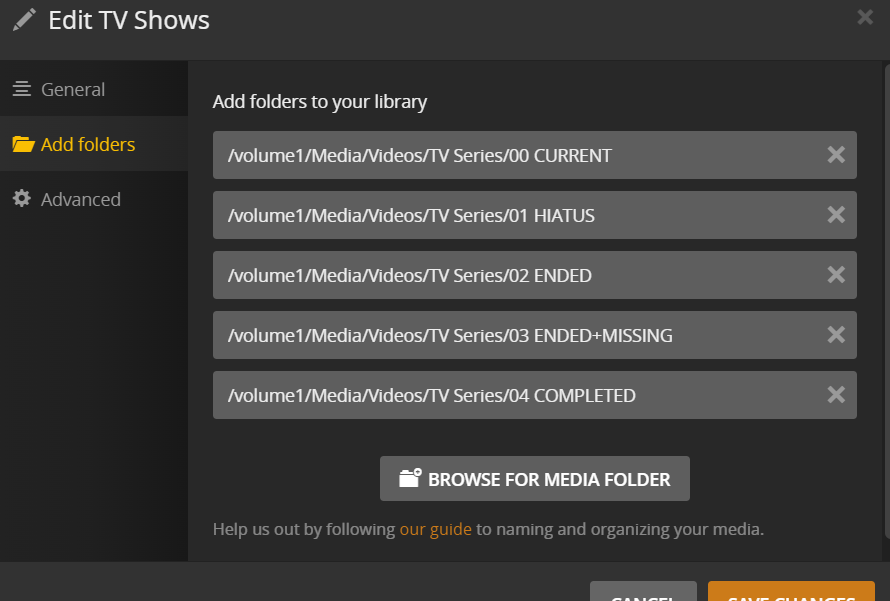
Within each of these 5 folders, I have 1 folder each for every TV show in the format “/ShowName/Episodename”. This setup helps me easily find out which TV shows are currently running and which are on a hiatus, etc.
The issue that I have is that whenever I move the folder of a show that has gone on hiatus from the ‘00 CURRENT’ folder to ‘01 HIATUS’ folder, the show again shows up in the front of the recently added list of my Plex Media Server.
Is there any way to prevent from the TV Shows from showing up again at the front of the ‘recently added list’ when moving the show folder from one place to another?
Make sure the show’s metadata is updated (to avoid Plex from considering it a different show when it’s added from a different folder).
Make sure to disable automatically emptying the library trash after every scan.
When you move your files to one of the other library folders, Plex should associate the files with the existing show – not as a new addition. Worked like a charm when I moved some of my movies/shows to a new HDD.
As for your “format”… the closer you stick to the naming schema suggested by Plex, the less hiccups you should generally see.
library folder   <- e.g. 00 CURRENT
  Show Name (year the show first aired)
    Season XX
      Show Name (year the show first aired) - sXXeYY - optional episode name.ext
Apologies, I think I was not able to properly explain the issue that I am having.
I am not moving all my data to a new location
I have 2 existing folders ‘00 CURRENT’ and ‘01 HIATUS’ and both these folders have been added as 2 folders to the same library
I am simply moving the data folders (cut n paste) for some of the TV Shows in the ‘00 CURRENT’ to the ‘01 HIATUS’ folder
The reason why I have deviated a bit from the Plex suggested folder format is coz I want to understand which TV shows are currently running and which are on Hiatus when I directly look at the ‘TV Series’ data folder
The show(s) metadata is updated and when I move the data folder for the TV show, I don’t need to do anything to the metadata …i.e. Plex remembers the metadata
My only problem is that the TV Show(s) for which I move the data folders show up again at the front of the ‘Recently Added’ list. Is there any solution to help with this?
I understood that – maybe the linked support article was a bit misleading.
But generally that’s the same story (moving the entire library or just a single show). When following that procedure, none of my existing media showed up under Recently Added.
Edit: You’ve the correct procedure. We were typing replies at same time.
Note the support article says copy, then delete, not move.
Since you’re not moving the entire library, modify things a bit:
Copy the show to the new folder.
Scan to pick up changes. Plex will show it as a duplicate.
Delete the show from the original folder.
Scan to pick up changes. Plex should no longer list it as a duplicate.
When finished moving media, Empty Trash and Clean Bundles.
I suppose the order in which Plex accomplishes things may cause Plex to think you added a new show. If you cut and paste, Plex will detect a file LOSS in one location, and a file ADDED elsewhere. If the file loss is processed first, and you enabled Empty trash after each scan, then Plex will also delete the references to the shows existence in it’s database. Then, it processes the detection of a new file/folders in the new location, and starts all over with its New file added process.
I THINK that disabling the Empty trash after each scan option in Plex settings will fix this. But the best way to be sure that Plex associates the existence of the show in one location has been moved to another, is to temporarily duplicate the show, and then remove the old files. (This is what FordGuy suggests)
Thanks for this suggestion !!
As a test, I unchecked the checkbox for ‘Empty trash automatically after every scan’ and then moved (cut + paste) the data folder for another TV Show. N amazingly, it worked as I had wanted and that TV show did not show up in the ‘Recently Added’ list
I understand that the ideal way is to “copy + paste + delete source” but it becomes time consuming with large folders and thus prefer the ‘cut +paste’ method.
For now, I will stick with the current state i.e. keeping the checkbox for ‘Empty trash automatically after every scan’ as UNCHECKED.
Can anyone help understand what will be the short-term / long-term impact of leaving the checkbox for ‘Empty trash automatically after every scan’ as UNCHECKED. ??
You shouldn’t need to cut & paste – with Empty trash automatically after every scan, simply moving the file should do the job.
The only impact of disabling the empty-trash option is that you’ll need to manually trigger Empty Trash if you actually deleted some files (otherwise their items stay in your library, displaying a trash-can icon on their posters.