there are 2 related ‘hacks’ for linux, in regards to nvidia/linux/plex/transcoding.
there is a nvidia driver hack, which will let consumer cards encode more than 2 streams. (this is less important than DECODING, decoding 4k is the hard part, not encoding x264).
there is a plex transcoder hack for linux, which is simply a wrapper/script which forces nvdec on current plex server.
they are completely separate, but related for use in plex transcoding.
the new transcoder preview plex server, does not need the plex transcoder hack to use nvidia cards for decoding in linux.
Oh ok I was aware of the non-quadro mod to unlock the limit. I recently gave up on my Linux instance unfortunately. Glad to see them making progress for native hw transcode.
OP When you say not using enough CPU do you mean not well threaded enough? Are you sure you don’t have a single cpu maxed out? audio and subtitles can burn a whole cpu as a single threaded task and you are cpu bound even though you have lots of available cycles on others.
What I mean is that the UHD movies like despicable me 3 that don’t have the buffer issues use 50-70% CPU over all cores/threads, however other movies like the lego movie 2, only uses about 30% on 1 cpu. It’s a behaviour I’ve noticed any time a uhd movie is having issues transcoding. I’d expect that if it was a cpu limitation it would be pinged at 100%.
I’m running windows 10 pro. I know the gtx970 has a hybrid support for h265. Which basically means it’s all done on the cpu. The 1650 is the card I’m most likely going with as it sits in a nice price point. I’m not too concerned with VRAM as I would only ever have a max of 2 4k transcodes but chances are only 1.
why not spend the little bit extra to get the true turing encoder (1660 or better) chip? better performance and quality. Do you happen to have Tautulli installed? it helps with more details on what is getting streamed and what is transcoded. I can install plex server on my desktop (i9-7900X with Win10 and GTX1070) and try that movie.
I’ll have to check that program out when I get home. The 1650 at about $150 was looking nice. But I do see some sales on the 1660. I did just notice it has 2GB more vram and supports b frame. It might be worth it considering everything.
Thank you for the recommendation on Tautulli. Very cool tool. Monitoring the stream/bandwidth/transcode information it appears that with the troublesome movies the transcoder speed is stuck at 0.4 whereas other uhd movies that dont have issues move from 0.9 to 1.7.
The only real distinction between the movies that do and dont have issues is the original HDR format. It seems that movies that had Dolby Vision do not have the issues, and movies that have HDR10 are the ones with the problems… But from my understanding dolby vision is basically a base layer of hdr10 with an additional layer on top that adds another 10bits of color… I understand that MKV does not retain the second layer… BUT If it has the hdr10 base layer shouldnt they behave the same anyways?
In either case it appears that my system is teetering on the edge of playability for transcoded UHD blurays, So I suppose the best solution would be to slap a 1660 in her and call it a day…
I just wanted to post an update since I got the gtx 1660 in. Its slaughtering the UHD remuxes with no effort. 11% decode usage and 6% encode usage transcoding to 8mbps. Side note the colors dont look that washed out. Very happy overall.
Wanted to give an update. There for awhile it was doing okay. I’ve recently started experiencing issues transcoding again, even on the 1660. I think the most frustrating part of this whole thing is the cpu/gpu usage. If it was pinged out at 100% and struggling I could understand. But when the decode on the gpu wont move past 8% usage and the speed stays at .9 its very aggravating. I’m basically giving up since it seems plex refuses to use my hardware properly and I cant change any configurations besides the 3 options under transcoding.
Thanks, I would really like to get to the bottom of the issues. Here’s a screen grab playing the new Joker Movie. I guess I’m still confused as to why the transcoder is having issues when it doesnt max my GPU.
As a reminder the remaining issue you are trying to solve is buffering?
You expected to see the server work it’s CPU and GPU harder than it does now, and acheive a stream transcode speed of greater than 1.0, leading to smooth playback.
It appears to be correctly decoding via NVDEC, and encoding via NVENC. The audio stream is DD 5.1, faily easy to muscle through, even if it must be done via CPU and if it must be done single core.
Do you have any virtualization involved? docker? You have confirmed no single cpu core is maxed out?
And your disks, you don’t one that is strugling to meet the IOPS (queue length is growing)
I would add your current logs, as some folks are quite good at evaluating them, and it may point out your bottleneck.
I agree with @mervincm with a slight nuance, I would expect to see 5x speed and transcoder throttling not 1.0 speed at those GPU+CPU percentages. From the picture on the left you’re getting 0.6x speed which isn’t right as he said.
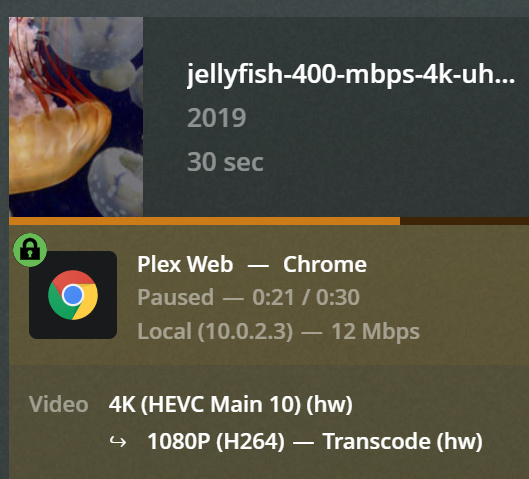
Would you test with the standard jell.yfish.us 140Mbps file please? jellyfish-140-mbps-4k-uhd-hevc-10bit.mkv
It includes a 5.1 audio track too.
Post some log showing a PMS restart, 6min of doing nothing, then playing that jellyfish, then download the logs.
It should be quick enough to spot if there’s a big error, and 140 Mbps is plenty for that.
Thank you sir