yes but it only mentions linux servers, my plex server is on win11.
I see, that makes sense. I just wanted to be sure it wasn’t something wonky. Ideally, it would be nice if these DVR transcodes were set to 10Mbps(H264) or even 8Mbps(HEVC) given that OTA and CableCard bitrates from my experience typically average 10-15Mbps.
@MowMdown what hw device do you use?
@manderss99 i missed that, sorry. I have update the known issue to reflect the fact we are seeing the issue across all servers.
Eureka! Yes, this does resolve the crashing issue with the “old player” on my devices.
The only hiccup I’m noticing specifically on the AppleTV HD now is that if the transcoded HEVC is above 10-12 Mbps (per the Technical Details Screen on the plex client) audio starts to lose sync. If I drop to to 10-12Mbps or lower everything looks good.
The default quality that the AppleTV HD is selecting is showing as “Convert to 4K” and in the technical details it’s showing as 1920x1080 @ 10Gbps. Is there a way to default the transcodes for the AppleTV HD devices to 10Mbps for HEVC playback? Maybe via XML profile or server side for the older devices?
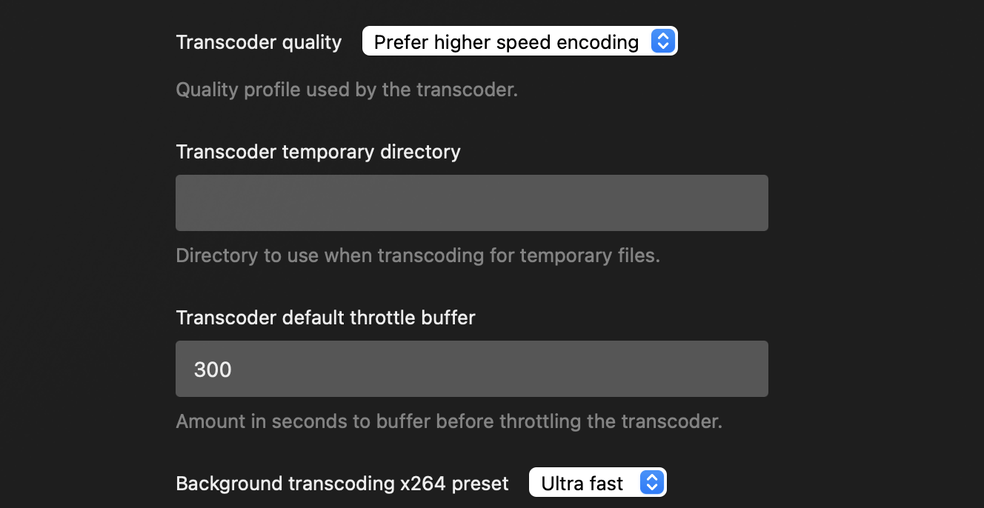
Server side settings:
Logs attached.
Plex Media Server Logs_2024-09-27_13-26-14.zip (4.2 MB)
Thanks for all the hard work!
@dklein it fixed it on both devices?
Just wanted to pass along the feedback that this is all working like a champ from my Unraid docker to my old LG OLED B8, especially with HEVC encoded anime that has ASS subtitles. Too bad it still transcodes because of the container (MKV > MPEGTS) and subs.
Great work Chris and everyone at Plex making this happen.
Yes, I can confirm that the “old player” crashing has been resolved on both AppleTV HD and 4K, as well as iPhone 13 Pro in my tests. Colors also look good.
The only “issue” is on the Apple TV HD it looks like the default transcode quality is a bit high for the device. I’d recommend setting it to the 10Mbps preset as the player was struggling with the 10Gbps (or whatever the actual data rate is. It struggles with anything higher than 12Mbps HEVC).
Thanks
@chris_decker08 For hardware I use the Arc A310 GPU.
How did you add the ENVs to the docker? Is it adding the two separate variables? PLEX_DOWNLOAD and VERSION?
It also looks like the build you had me test today has cleared up the SDR tone mapping issues on my Fire TV devices. The server is transcoding UHD HDR and UHD HDR/DOVI files to 1080p SDR when needed:

I just want to also give another DVR scenario for those with Comcast Cable and CableCards.

Comcast (at least in my area) is already converting and compressing ALL (seriously every channel) to 720p H264 - leaving us with overly compressed and soft images.
So in terms of not knowing the original live bitrate, it’s totally understandable and in cases such as mine, the bitrate is very low to begin with – of course nothing close to the low-bitrates and quality potential of using a codec like h265.
like @chris_decker08 and others, the bitrate’s are low and I’ve only tested this latest Preview build on one 30 minute series (The Office). One episode was recorded with Conversion enabled, the next without.
Yes, the HEVC bitrate is still higher, not but as large as with the initial Preview release.
I did notice one thing and I can confirm it later when I have fewer things recording, but the Converted (H265) .ts file does not contain subtitles, whereas the standard version does include them.
Has this the case for other’s who use are Converting DVR with this latest Preview?
I also got this log with errors on the Converted episode: (full log attached)
BlockquoteStrange video pts step of 0.09343 instead of 0.01668 at frame 20586
[ac3 @ 000000000175b180] invalid coupling range (6 >= 5)
[ac3 @ 000000000175b180] error decoding the audio block
Strange video pts step of 0.07174 instead of 0.01668 at frame 21835
Frame 30106 (503.637s) - Black frame with brightness of 16,uniform of 0 and volume of 2909
Frame 30107 (503.654s) - Black frame with brightness of 16,uniform of 0 and volume of -1
The Office (2005) - S04E13 - Dinner Party.log (2.5 KB)
HEVC - The Office (2005) - S04E13 - Dinner Party.ts.MediaInfo.txt (5.1 KB)
AVC - The Office (2005) - S04E15 - Night Out.ts.MediaInfo.txt (6.8 KB)
Unfortunately I’ve discovered a new issue with today’s test build, it’s color shifting SDR content to a pink/red when transcoding to an HEVC file on Apple Devices.
I’m not seeing the issue with HDR content, only 1080 SDR.
I know it’s hard to tell from a photo, but here’s an example of the color shift with the transcode:

And here is an image of the clip without the transcode:

I’m able to replicate with multiple SDR media samples.
Thanks
Here are some actual screenshots from my iOS client where the color difference is easier to see between a direct play and HEVC SDR transcode (using experimental player):
Direct Play:

HEVC Transcode:

@dklein I too am noticing this behavior transcoding SDR content. It does appear red-shifted. I also noticed it’s not using my GPU to do the transcoding either. It fell back to the CPU. At least in my case with my Arc A310
This behavior does not exist on version 1.41.1.9043-2ace0d939 and appears the behavior occurs in version 1.41.1.9055-b04314b19
For anyone else using pms docker here’s how I installed the latest forum preview in my existing pms plex container. (Procedure taken from the subtitle burn-in forum preview thread)
docker exec -it [plex_container_name] /bin/bash
Then execute
./plex_service.sh -d
curl -o /tmp/pms-PlexMediaServer-1.41.1.9055-b04314b19_amd64.deb https://artifacts.plex.tv/plex-media-server-experimental/1.41.1.9055-b04314b19/debian/plexmediaserver_1.41.1.9055-b04314b19_amd64.deb
dpkg -i /tmp/pms-PlexMediaServer-1.41.1.9055-b04314b19_amd64.deb
echo PlexMediaServer-1.41.1.9055-b04314b19> /version.txt
./plex_service.sh -u
Replace and update the version number in the string and redo the procedure when the next version comes out and you want to update.
My setup reproduces this behavior as well on my apple devices on the new player. iOS/macOS 18 on iPhone 14 Pro and MacBook Air m1. Latest forum preview 1.41.1.9055-b04314b19. It did not occur on 1.41.1.9043-2ace0d939.
I’m on rocket lake, 11th gen intel cpu/ quick sync.
Does this red shift only occur on apple clients?
No, the same happens on my LG TV with webos.
edit: also worth mentioning, the same happens with transcoded SDR content whether hevc is enabled or not.
I’m able to replicate it also on my Fire TV devices with SDR content.
Logs:
Plex Media Server Logs_2024-09-28_07-47-46.zip (5.2 MB)
EDIT:
I can also confirm that it is happening with transcoding SDR content with h264 HW encoding similar to what @bytat is seeing when HEVC is disabled.
I’m using the build that Chris posted here yesterday: HEVC Encoding Forum Preview - #304 by chris_decker08
