Interesting, I always assumed that just had to do with SW transcoding, I need to play with those settings to see if it affects QSV as well.
Just some notes from my attempts to use the HEVC preview with an Nvidia 1650 Super on Ubuntu 24.04 (kernel 6.8.0-48-generic):
nvidia-driver-560 caused errors s4032 when attempting to direct play hevc through Chrome (a transcode from hevc->hevc would play, even hdr->sdr) as well as when transcoding to h264 to play in Firefox. H264 would direct play on both. All transcodes would buffer for ~10 seconds initially and any time the transcode buffer was exceeded (skipping back/forwards). I would occasionally get s1001 errors as well, usually when skipping ahead. Transcode speed as reported by logs and tautulli was normal/as expected for this card.
nvidia-driver-555 solved most of the s4032 errors in chrome, though some users still had occasional issues. Fewer s1001 errors. Transcodes still had longer than normal initial buffers/etc.
nvidia-driver-535 has, as of now, solved the buffer issue and I cannot force an s1001 error like I could before. I haven’t heard from the users that had s4032 errors in Chrome.
Latest build should address the metadata issue as well as contain the PGS subtitle improvements previously mentioned.
In the last two versions the option to transcode to HVEC has disappeared from the settings menu.
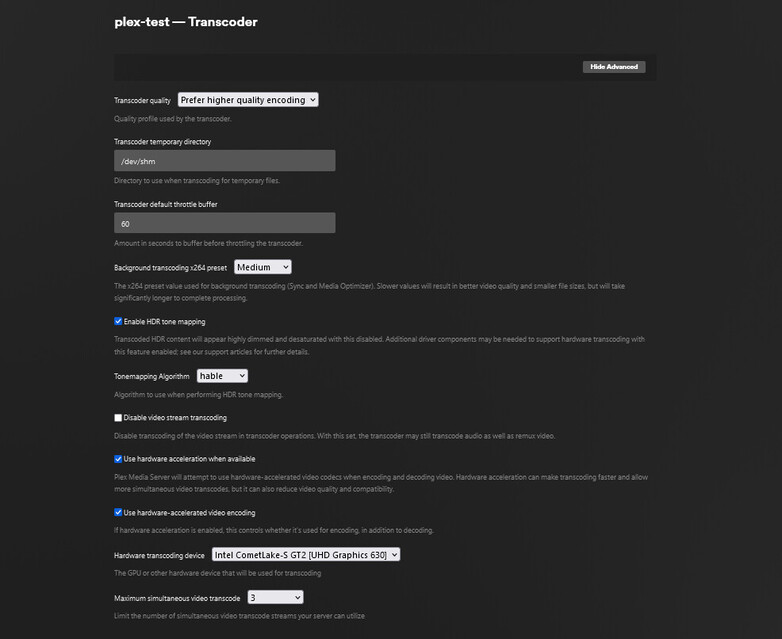
Also, hardware transcoding has stopped working and it uses CPU transcoding even though the iGPU is detected by plex.
When I switch back to version 1.41.2.9122-a91e359b7 the HVEC options appear and HW transcoding works.

Currently running the preview in a docker container within an Ubuntu 24.04 VM under Proxmox on an i5-10600.
Weird, I’m on 1.41.2.9213 and I see the settings.
Just installed 9213 and seeing the same as kesawi. Don’t see the HEVC settings for whatever reason.
Just spun up a new docker container with 1.41.2.9213 and a new library. HVEC settings missing and it won’t HW transcode.
Using production version 1.41.2.9200 HW transcoding works, and pre-alpha version 1.41.2.9122 both HVEC encoding and HW transcoding work.
@kesawi can you send logs?
@chris_decker08 see attached logs for 1.41.2.9213.
Plex Media Server Logs_2024-11-16_23-24-56.zip (825.7 KB)
This was playing a 4K DoVi file to the Windows Plex player, then adjusting the bit rate down so it would trigget server transcoding.
@kmfurdm what GPU are you using?
Dropping the logs just because.
Intel iGPU Comet Lake-S GT2 UHD Graphics P630
Version 1.41.2.9213

FWIW, I didn’t see HEVC transcode settings w/ 1.41.2.9213 either. I was trying it for the first time, using a Docker container w/ my GPU enabled (NVIDIA Quadro RTX 5000).
I thought it may have been keying off something related the “Hardware transcoding device” list, as mine only ever shows “Auto” even though hardware transcoding works fine with the card.
I can’t get the macOS build. Current link is in redirection loop
Try specifying version 1.41.2.9122-a91e359b7 for the Docker container and see if the HVEC option appears and the HW encoding works. This is the last version that worked for me.
Thanks. Unfortunately there seems to be a 301 re-direct loop on the download currently as @Haldir31 saw. Once that clears I’ll give it a shot.
@Haldir31 we are currently experiencing some issues on our artifact backend (its driving us crazy too).
@GlowingBits the issue kesawi is experiencing is only for certain intel devices (and i will post a version that addresses it as soon as the above mentioned issue is addressed) and thus reverting to the version indicated is unlikely to solve your problem. The fact that you only see “Auto” is our biggest clue, did you set the NVIDIA_VISIBLE_DEVICES and NVIDIA_DRIVER_CAPABILITIES environment variables?
@chris_decker08 I’ve actually tried two methods for GPU support via Compose to see if it made any difference, but with either I only see “Auto” in Plex – even though HW transcoding does work (verified via Plex dashboard, nvtop, and my CPU not being crushed  )
)
Route 1 via “runtime”:
    runtime: nvidia
    environment:
      NVIDIA_VISIBLE_DEVICES: all
      NVIDIA_DRIVER_CAPABILITIES: compute,utility,video
Route 2 via “deploy”
    deploy:
      resources:
        reservations:
          devices:
            - driver: nvidia
              device_ids: ["all"]
              capabilities: ["compute","utility","video"]
I also tried the “runtime” route with NVIDIA_VISIBLE_DEVICES: 0 and the “deploy” route with device_ids: ["0"] to set things explicitly, but no change. (The machine only has the one NVIDIA card)
While I can’t see how it would matter, this is Docker running under TrueNAS Scale (which is basically Debian 12 - Bookworm). I use the same Compose config with a Frigate container which is able to see the GPU, report its name, real-time GPU stats, etc.
Thanks…
Edit: Just a screenshot of transcoding running under 1.41.2.9200 (which it’s currently running until the 301 loop is resolved). Only “Auto” shows for Hardware transcoding device.

Relax your specifications there.
The inode passthrough
 devices:
  - /dev/dri:/dev/dri
For the container, you’ll want ( I use LXC instead of docker – translate these)
config:
  nvidia.driver.capabilities: all
  nvidia.require.cuda: "true"
  nvidia.runtime: "true"
devices:
  gpu:
    gid: "110"
    type: gpu
which aligns with:
[chuck@lizum ~.2018]$ ls -la /dev/dri
total 0
drwxr-xr-x   3 root root        140 Nov  8 18:21 ./
drwxr-xr-x  22 root root       5800 Nov 19 13:28 ../
drwxr-xr-x   2 root root        140 Nov 19 13:28 by-path/
crw-rw----+  1 root render 226,   1 Nov 19 13:28 card1
crw-rw----+  1 root render 226,   2 Nov 19 13:28 card2
crw-rw----+  1 root render 226, 128 Nov 19 13:28 renderD128
crw-rw----+  1 root render 226, 129 Nov 19 13:28 renderD129
[chuck@lizum ~.2019]$ ls -lan /dev/dri
total 0
drwxr-xr-x   3 0   0      140 Nov  8 18:21 ./
drwxr-xr-x  22 0   0     5800 Nov 19 13:28 ../
drwxr-xr-x   2 0   0      140 Nov 19 13:28 by-path/
crw-rw----+  1 0 110 226,   1 Nov 19 13:28 card1
crw-rw----+  1 0 110 226,   2 Nov 19 13:28 card2
crw-rw----+  1 0 110 226, 128 Nov 19 13:28 renderD128
crw-rw----+  1 0 110 226, 129 Nov 19 13:28 renderD129
[chuck@lizum ~.2020]$
I’m currently running 550.120 successfully
@ChuckPa thanks for the clues! Adding /dev/dri seems to be the key.
I saw that mentioned in the “Intel Quick Sync Hardware Transcoding Support” section so I figured that was just for Quick Sync – which I don’t have. Especially when NVIDIA HW transcode was “working” outside of the device not showing up in the list. But adding /dev/dri now has my NVIDIA cards showing on both systems I run. 
Hopefully that lets me try the HEVC release once the 301 loop clears. 
Just checking(maybe I missed it), however on macOS as my server, I am NOT seeing the available/selected GPU. Is this expected behavior? I am running the preview build on an M4 Pro Mac Mini. I see the other options for HEVC, just not a GPU selector and had assumed it’s because it only has the built-in one.
