@GlowingBits i’m glad to hear that! We can give minimum support if a container such as docker isnt “properly” configured for gpu passthrough, however HEVC is the first feature that makes it obvious. We have previously relied on users to configure this themselves but with HEVC we are developing documentaion to help with this.
@EWING apple servers are only compatible with apple igpus so there is no selection provided.
Thank, Chris! For once, I assumed correctly. 
Windows 64 bit download link not working.
Finally decided to try this one out. Spun up a new container this weekend with the latest test build (1.41.2.9213-1722f08ca) running Ubuntu 24.04.1. CPU is an i7-12700K (UHD 770).
As an initial test file, I used the highest bitrate movie in my library, Trainspotting (1996).
- 4K DoVi/HDR10 (HEVC Main 10) @ 96.7 Mbps
- DTS-HD MA 5.1 @ 1536 kbps
- PGS Subtitles
-
First client tested was an Apple TV running Plex Version 8.42. I cycled through all the quality presets and didn’t notice anything unusual through the entire movie. HDR was preserved and the only buffering was an initial 5 - 10 seconds when switching presets, which felt a little longer than the H.264 transcoder, but not significant. It looks like the bitrates are the same as the H.264 transcoder, based on the Dashboard:
- 4K High (40 Mbps)
- 4K Medium (30 Mbps)
- 4K (25 Mbps)
- 1080p HD (20, 15, 12, 10, 8 Mbps)
-
The second client tested was an M1 Pro Macbook (Plex Version 1.104.0.241-2164c90a) which only had 1080p transcode presets available to choose from, but I had no issues there, either.
-
The third client tested was the worst case scenario: Chrome on the aforementioned Macbook. Even with Convert (Maximum) and PGS burn-in, it worked perfectly. Super promising.
As far as simultaneous transcodes go, I found some other high bitrate 4K movies and was able to ratchet the transcode quality up to (2) 12 Mbps 1080p transcodes before buffering set in, and, curiously, (3) 12 Mbps 1080p transcodes as well. I couldn’t get four 4K → 1080p streams going without buffering, even at the lowest 8 Mbps preset. And anything past 20 Mbps 1080p was a no-go.
Not sure if this is just the higher computational requirements of the HEVC encoder or if there’s more optimization to be done, but this does seem like a significant drop-off in transcoding headroom. Assuming a 12 Mbps H.264 stream is ~roughly~ the same quality as a 8 Mbps HEVC stream, this new engine mostly just drops my simultaneous streams from 6+ to three. HDR retention is nice but I’m not sure if it’ll be worth it for my users who seem to be content with the SDR tone mapping.
Overall, pretty smooth sailing for a pre-alpha build. If there’s anything that needs further clarification or testing, let me know and I’ll try it out.
This is probably related to the use of a pre-Alpha build for this HEVC Preview, but in this release, any movies I add to my collection with Movie Title {edition-xyz}.mkv are not being recognized in PMS (Windows) with the Edition field already filled in.
Just to follow-up, the 301 redirect loop seems to be gone so I installed 1.41.2.9213-1722f08ca. I can see the HEVC options and enabled them. All seems to be working well so far w/ my NVIDIA card. 
I am having issues where my node ain’t able to process and transcode some media. From what i’ve found it seems to be only HEVC that is not getting hardware accelerated transcoding from my iGPU. The CPU is an intel 12500 which means it does support both decoding and encoding of HVEC content. Is this maybe something that is just not supported by Plex yet or could there be anything I’ve done wrong?
Since I am running a Talos node with kubernetes I tried to switch my image from plex to plex-beta but that didn’t change or open up any of those HVEC transcoding settings spoken about in this thread so maybe I’m missing something?
repository: ghcr.io/onedr0p/plex-beta
tag: 1.41.2.9200
Thanks
Are you passing -device: /dev/dri=/dev/dri ?
Are the UID/GID (username) for the container also members of the group which owns /dev/dri on the host ?
Are you passing
-device: /dev/dri=/dev/dri?
Yes I believe I am but not like this as I’m running a helmrelease which is passing the GPU to plex like so:
  values:
    controllers:
      plex:
        annotations:
          reloader.stakater.com/auto: "true"
        containers:
          app:
            resources:
              limits:
                memory: 40Gi
                gpu.intel.com/i915: 1
   defaultPodOptions:
      nodeSelector:
        intel.feature.node.kubernetes.io/gpu: "true"
Are the UID/GID (username) for the container also members of the group which owns /dev/dri on the host ?
Tbh I’m not sure about this one as I don’t really know how to verify that 568 which is the owner of all media on the NAS has rights for this.
    defaultPodOptions:
      securityContext:
        runAsNonRoot: true
        runAsUser: 568
        runAsGroup: 568
        fsGroup: 568
        fsGroupChangePolicy: OnRootMismatch
        supplementalGroups: [44, 10000]
        seccompProfile: { type: RuntimeDefault }
You’re not running the pre-alpha version which has HVEC transcoding. The ghcr.io/onedr0p/plex-beta repository just pulls the public beta which doesn’t include HVEC transcoding, as it isn’t in the main release yet.
I’m not familiar with that particular repository, but unless you can configure the container to download and install the pre-alpha version linked in the first post when the container starts, then you won’t be able to access HVEC transcoding.
To access the pre-alpha with docker you need to use the image lscr.io/linuxserver/plex:latest and add the environmental variables PLEX_DOWNLOAD=https://artifacts.plex.tv/plex-media-server-experimental and VERSION=1.41.2.9213-1722f08ca to the container. This will force the container to download the pre-alpha version rather than current public version when it’s created.
I’m not sure how it works with kubernetes as I don’t run it.
This functional branch seems to have been progressing for some time. Do we have an idea of when it might be merged with the main branch? Kinda tired of my plex client telling me I’m not up to date when I’m on 1.41.2.9213 but the beta branch is on 1.41.2.9200. Per the math that I was taught, it shouldn’t be evaluating 9200 as a greater value than 9213.
BTW, I’ve been using hevc with PMS on linux and accessing with the native linux client, a roku, an LG tv plex app and the web client. Other than the web client choking, which none of my users utilize, it seems to run just fine.
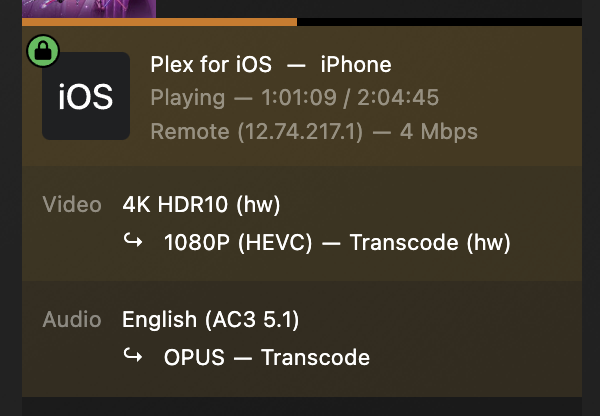

Hi,
On version “1.41.2.9213,” Plex does not play SRT subtitles in web browsers (Firefox and Edge), whether in transcoding or direct play. However, it works perfectly in the apps.
Plex Media Server Logs_2024-11-21_18-34-47.zip (5,2 Mo)
This is normal operation and nothing new.
I’m sure others can extrapolate on my answer with more, but it’s already been answered in this thread.
I have updated the download links to fix hw transcode issues with Intel PNV, WHL, CML, and RPLU devices.
Note: This will likely be the last update of the preview
@ranger671 What I can say is that we have locked in PMS 1.41.3 as the minimum version which will be required once we go public. Once all clients have also addressed their issues it will be up to product/marketing to decide when we release publicly and as far as I am aware they have no yet settled on a date.
Hi Chris,
Does that mean we should not expect the remaining Known Issues to be resolved before going public?
- Cannot play HEVC transcodes of liveTV on apple devices
- Old player on apple devices cannot play HEVC transcodes
- Android downloads HEVC files when not supported by the device
It’s not recommended to be running this as your production Plex Media Server and that it be run independently (see below). Pre-alpha means there will almost certainy be things that annoy you that are primarily cosmetic.
