I have my PleX server setup on my local network from my laptop accessible on my LGTV - how do I go about entering the server and streaming content on my desktop? They’re connected to the same network, but the desktop doesn’t have PleX installed. It should be accesible direcly from the browser, right?
Shouldn’t I be able to enter directly through just writing the server IP in the browser from my other devices? I have allowed access for unauthorized users.
Even if you’re using the hosted web app, that’s just the „client“ part. It’ll connect to your local server locally.
You can also use http://[PMS IP address]:32400/web … that’s literally the same except you’ll be using the version of the web app that’s bundled with your server (and usually several releases behind).
Some client apps have an option to configure a manual connection by entering the server’s IP address. The more comfortable approach is to link the server/clients with your account and let them deal with figuring out the connection.
Got it working - typed the IP wrong, but it kept bothering me even after this so I simply ended up allowing ‘default gateway : subnet mask’. I can now enter from both my phone and desktop.
Thanks for the feedback! Often what you need is just a little push in the right direction.
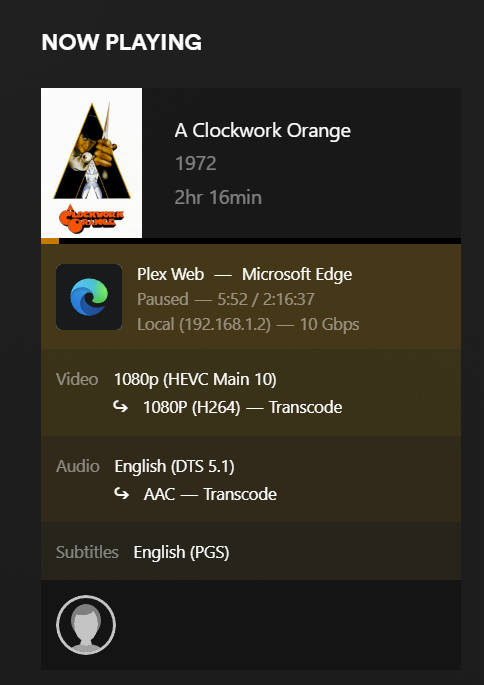
One problem solved and another appears. Now even though my browser supports x265 (Edge with x265 extension and Microsoft official x265 extension) it still transcodes the video without Direct Playing
With or without such an extension… a browser is one of the most limited / limiting playback experiences and among the least capable players.
Native apps tend to be significantly more capable when it comes to codec support etc.
As for the specific issue at hand…
Transcoding isn’t necessarily triggered by the video. There’s other limiting factors that will go beyond the capabilities of your browser (e.g. playback of multichannel/surround audio or image-based subtitles.
This was indeed the issue - disabling them made it perfectly fine so the video now has Direct Play, while the audio being DTS 5.1 needs transcoding and absolutely ruins it
Doesn’t change a thing - it still opens in the web app and begins transcoding despite making sure Original Play is allowed. I tried downloading HTCP and I am probably going to stick with that since it seems to be the only player wanting to play the media smoothly other than my LGTV. I guess Plex just isn’t optimal for usage on a browser.
Plex Desktop is not Plex Web. They may look the same, but they are very different.
This is Plex Desktop playing a 4K HDR movie on my Windows PC. The display is an old 1080p Vizio TV. Plex Desktop is scaling and tone mapping the video. It is also decoding DTS audio (the TV supports Dolby Digital & PCM audio).
I see. So there’s actually three versions to choose from - Plex Desktop, Plex Media Server (simply redirects to Plex Web) and Plex HTCP (home theater version).
This is great - thanks for the help! Couldn’t have gotten this far by myself
The Plex Media Server is just that, a server. To access the server, you can easily access it via the web client it is hosting. It is not a player client, other than the web client it hosts itself. This is probably what happens if you attempt to “run” the server executable, it probably launches a web browser to the server’s IP (127.0.0.1, local host).
If you have a server on another computer, but install it locally on your computer as well, you are technically running two servers now.