Plex scans my hard drive and it is pulling down files from one drive filling my hard drive.
how do I stop plex from using one onedrive,
Are these folders that you have setup with libraries?
Plex only uses the drives you set up.
I did not set up the onedrive folder to be used. I set up a folder called TUNES and another one called VIDEOS, they are both in Root C:|. I am using Windows 10 Pro Version 20H2.
Is it Videos that OneDrive is downloading?
The folders C:\Videos and C:\Tunes?
They are not the default Windows media folders under your user name?
Are the files being added to a Plex Library?
what type of files? scans don’t move media files from where they are.
It is downloading MP3 files from OneDrive. If it does not pull down why is my hard drive filling up? Onedrive shows what is being pulled down from onedrive storage.
Plex scans files and leave them where they are the it gets online metadata from wherever depending on the type of library it is. Plex does not have any OneDrive functionality. I don’t use one drive so not sure how it works.
C:\Videos and C:\Tunes are local folder on the C drive with local media files on them or are they One Drive mounts?
The files are on OneDrive until you try to use them. Then they are pulled from OneDrive to your local drive.
If you want these files included in your Plex music library they will get pulled to your local drive. If you don’t want them downloaded to your local drive remove them from your Plex library.
If you want to keep your media in the cloud Plex sells that service.
C:\Videos and C:\Tunes are not OneDrive mounts, I created them and loaded my music and videos on them. OneDrive does not use them. I will find the onedrive logs to show you that Plex has downloaded from onedrive.
get the server logs.
I did not find my logs from yesterday, I deleted them. I did not point Plex to use the folders in one drive. I have been using OneDrive since it came out. I am a retired network administrator and I have earned several MCSE certificates.
Where are the Plex server logs?
Info on how to get logs here. Plex Media Server Logs | Plex Support
the scanner logs would have info on which directories it is scanning
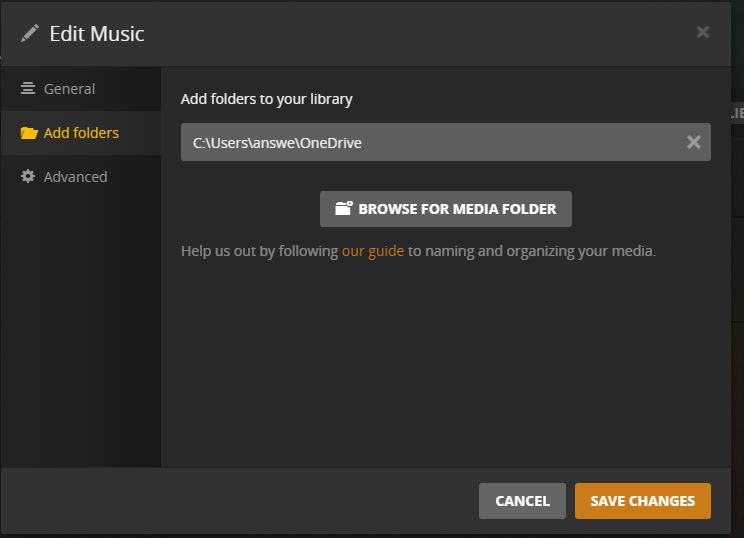
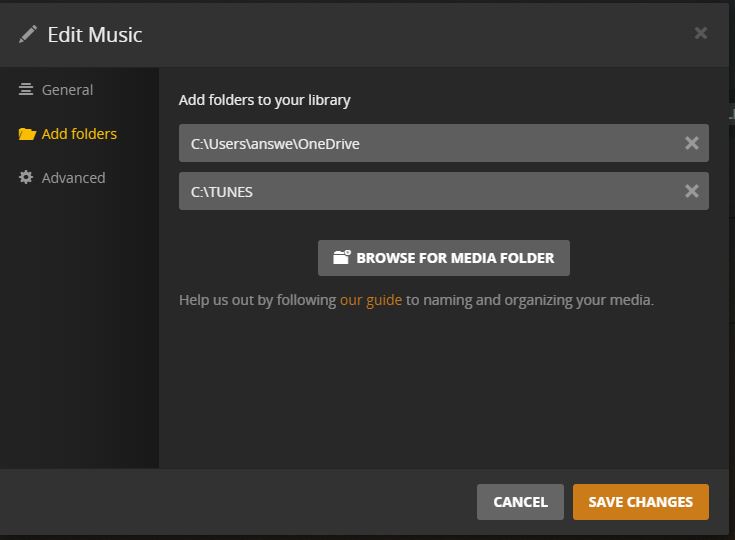
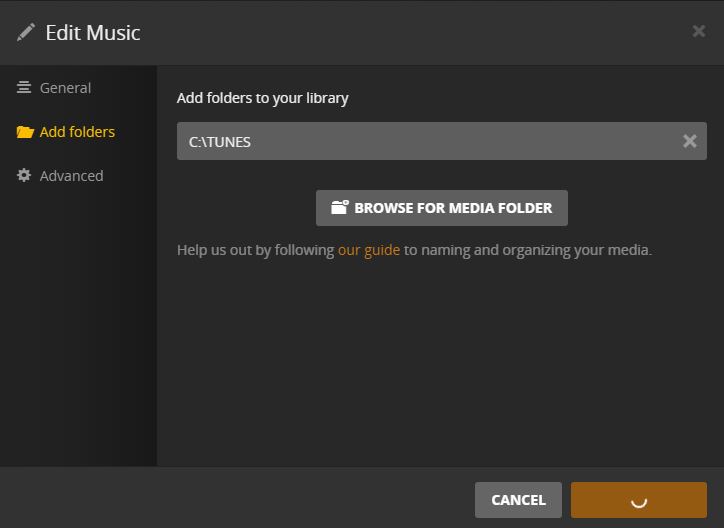
Here are three screen clips.
P1 is when I first opened plex and checked library locations.
P2 is when I added C:\tunes to my library.
P3 is when I removed C:|Users\answe\OneDrive
NOTE: if I shut down Plex and restart plex it defaults back to the O
Your scanner logs are full or errors I am guessing because it is trying to scan incomplete files coming down from OneDrive and probably what is causing issues changing the folders in the library.
I would delete the library and create a new one. Rather than trying to change the folders on the existing library.
Thanks, I will try that.
This topic was automatically closed 90 days after the last reply. New replies are no longer allowed.
