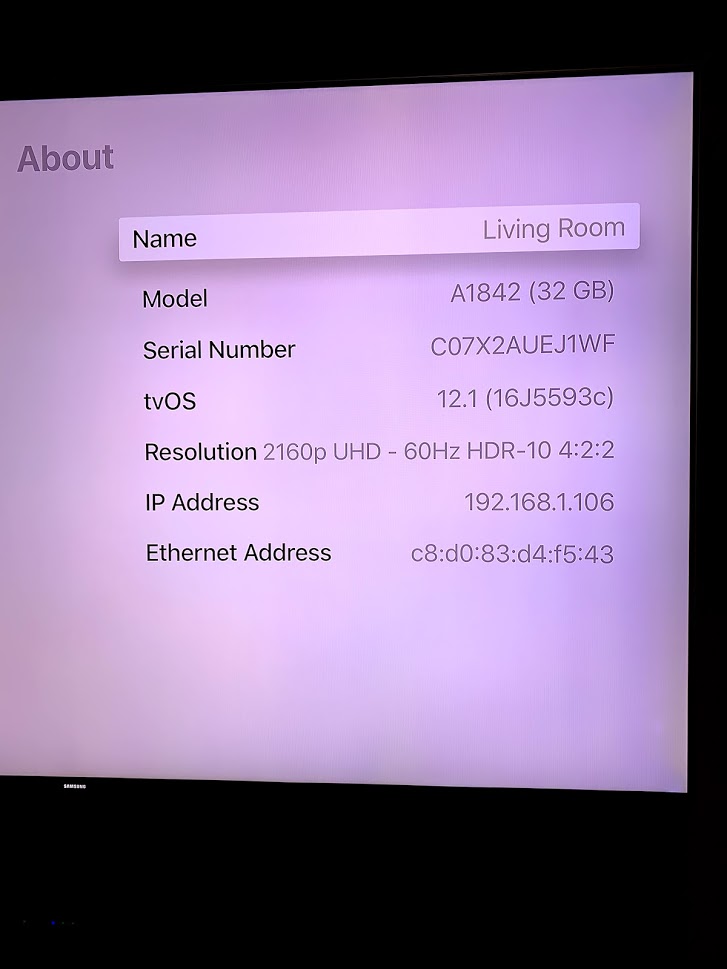
@FordGuy61 both the Roku and the Apple TV are 4K see details below:

@ComplexMediaPlex apparently the Roku Premiere+ does support it, see Will the Roku Premiere+/Ultra direct play high bit rate HEVC(around 60-70 Mbs) w/o buffering?
What’s the make/model of your TV? Just wondering if you have to use a specific HDMI port or something similar to support HDR.
Also, you might try testing with videos from Jellyfish Bitrate Test Files or 4K Media. Jellyfish has 1080p and non-HDR 4K files at varying bitrates. 4K Media has HDR demos from Sony, LG, etc. The files are small and easy to download (vs a 2 hr movie), and will give you another data point or two.
@FordGuy61 it’s a Samsung KS9000 (UN65KS9000), it has 4 HDMI ports 2.0 (ARC; CEC; MHL) I don’t know the difference between them the Apple TV is connected to the ARC
Apparently the issue is the HVEC code, I will download one that uses x264 or X265 and try with that one and see if that makes it to work
I did a quick scan of the TV User Manual. It mentions a “UHD Color” setting for each HDMI port. Might double check and make sure it is enabled. See pics below.
FYI, ARC is Audio Return Channel. If you have a soundbar, home theater receiver, etc it would attach to the ARC port. That lets the TV feed audio to the sound system over the HDMI cable (instead of an optical or coax cable like in the pre-ARC days).
CEC is Consumer Electronics Control. It lets the attached devices send power on/off, volume up/down, etc commands to each other. For example, I press a button on my Shield TV remote and it also powers on my Denon receiver and LG TV.
Nothing to worry about if you’re not using the features. It won’t interfere with using the HDMI ports for something else.

So you’re saying there HDMI audio would be better than optical cable? Currently I have the sound bar connected to the AnyNet+ device using the Optical Output port I though this one was better than HDMI
From an audio point of view, ARC and optical (toslink) support the same formats. It is basically a way to run one less cable.
@FordGuy61 got it, thanks, I checked the HDMI setup for HDR and all of them are in ON so that’s not the issue, I am downloading a x265 version right now if that one goes fine then the issue is my processor and the video card not supporting HVEC decoding
If things direct play it does not matter what type of CPU/GPU you have in your Plex server.
Not sure why the video is not direct playing. The TV, AppleTV 4K, and Roku all support HEVC/H.265 video. It really should “just work.” That’s why I was asking about the settings.
@FordGuy61 so … DirectPlay does not use hardware decoding at all? It does not rely on the CPU nor the video card?
Download some of these sample files:
Your issue is not your server, it is your clients not allowing direct play. If you are going to the trouble of downloading 4K HDR movies, then you definitely want to watch them in the original format, without any conversion or transcoding.
You need to try and play a 4K HDR HEVC encoded file without using Plex on your Apple TV or Roku. Try Netflix or a sample from the above site. If it doesn’t work then there is an issue with your HDMI set up. Could be cable, or TV settings.
How are Direct Play, Direct Stream, and Transcoding different?
Correct. Direct Play streams the video/audio unaltered to the Plex client.
Direct Stream is OK too. The server is just repackaging the video/audio.
Example: The AppleTV does not support MKV files, but does support MP4/M4V files. If you stream a MKV file to an AppleTV, the server will repackage it into a MP4 file. This takes a bit of CPU, but it does not alter the video or audio formats.
Transcoding is where you run into trouble, especially with 4K. That means the client does not support the video or audio format and the Plex server must change (transcode) it to a supported format.
Transcoding is very CPU intensive. Also, Plex transcodes 4K to 1080p, so if you’re transcoding 4K, you not only lose resolution, you lose HDR as well.
As mentioned earlier, all your parts (TV/Roku/ATV) support 4K HDR. That is why it is confusing that things are not direct playing. It is probably a setting somewhere, but not sure where to look at this point.
@umaradam unfortunately that is not the issue either I have tried a 4K UHD movie on Netflix on the Roku and the AppleTV and both play the movie without issues. I will download a sample HVEC file and try to reproduce them directly from both devices and see if they work from there.
Correct, direct play means the file is sent as-is the the player, very easy to do for the server.
Direct stream is similar, except it gets cut up in chunks. Very easy for a server.
Transcoding HEVC 4k files is VERY hard.
I’m this case, there is something wrong with your player/tv/receiver/cable making it transcode.
The key here is to try a HDR file playback locally. Did your TV notify HDR content when you try to play for example, Jessica Jones on Netflix?
Have you successfully played any HDR content before? I’m chancing a guess that your HDMI connection is the issue. Try different hdmi ports and reset the uhd colour settings & make sure you are using a high speed HDMI cable 2.0 compliant.
@umaradam I am playing Jessica Jones in this right minute from the Apple TV without any issues however I am not seeing anything indicating this is an HDR content. I never tried HDR before just wanted to get som advantage of the TV and it’s features which I didn’t til now.
I am trying to get Plex working before goes and buy a Blueray player with 4K HDR support (which are expensives) if I can’t get Plex to work then I wont need it.
When you choose Jessica Jones on Netflix does it show the HDR icon? If not then it isn’t HDR.
I think you should try tinkering with your HDMI settings as I mentioned. Also try downloading some of those sample files directly onto an SD card and play on the Roku. This will help you to find the problem.
@umaradam ahh you mean that, yes, it does display as HDR and my Roku Premiere + does not have a USB port not sure how I can reproduce a file directly there
@ReynierPM Isn’t there a Plex app for your TV? Have you tried using it?
With Netflix, if it can play in 4K or 4K HDR, it will be shown on the video listing.
Check this video at the 1:58 mark. https://www.youtube.com/watch?v=tB2JnfaXPa4
It shows the 4K markings for Netflix. There’s similar markings for HDR.
Also, not sure about Samsungs, but my LG has a small “HDR” pop up on-screen for a couple of seconds when playing HDR material.