Assume the following scenario:
I’m on the bus, on a cellular network using Plex on my iPhone to stream my movies from my NAS. I only decide to watch two minutes of my movie before I need to get of the bus. The question is, how much has Plex buffered of the movie that I never watched because I got of the bus?
I sometimes get the feeling that it buffers very much, data that is wasted (very relevant on cellulator network) because I might not even come to that point in the movie.
I can’t find any setting for this.. ?
Plex will buffer a few minutes maximum.
If the playback is transcoded (which it usually is in a bandwidth-limited remote playback situation like on mobile networks), then this setting is relevant:
“Transcoder default throttle buffer” (default: 90 seconds)
You can find it under
Settings - Server - ‘Show Advanced’ - Transcoder
I attach a screenshot from me transcoding a tvshow… The gray area in front of the current position, is that actually buffered content or something else? That looks more than 90 seconds to me. The gray bar is always alot ahead of the position even if I’m not transcoding so perhaps it’s something else…
But according to your explanation, if you’re not transcoding (even on cellular), the buffering should only be for a few minutes ahead of current position)?

How large is the file?
Which target bandwidth was used by the transcoder when you took the screenshot? (Look it up on the Plex Dashboard, in the web app, during playback)
The file is about 800MB. I configured transcoding to 480p and something like 2mbps. Local bandwith says 0 and remote says something between 6-13mbps.
The bandwidth graph is not very comfortable to use.
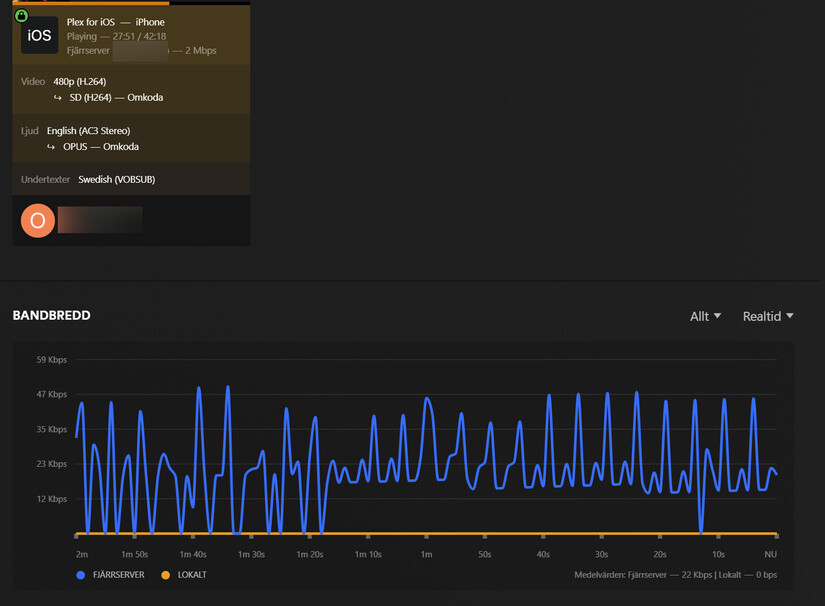
Use the Now Playing at the top. Activate the detail view.
Example included.. First I played a few minutes (cellular).. The I activated the detailsview (for screenshot) but as you can see, the bandwidth is extremly low now (because rest of the file, 14 minutes has been buffered already?), it was a few mbps the first few minutes but then it went to kbps instead..
Second example, transcoding a 1080p movie instead. It must be something wrong here, looks like it buffers too much (I’ve got the throttle buffer set to 60seconds). If you look at the movie and the gray bar, that is much more than 60 seconds buffered.


I did a quick check here on my iPad.
To add to Ottto,
- Here is first at 20 Mbps 1080p. You can see it holds a bit in its playback buffer.

- I next further decreased quality to 4 Mbps 720p. You can now see the lengthened playback duration using that same fixed storage buffer in the app.

To answer your original question:
How much will you get?
- How fast can it transcode ?
(This buffer filled to the indicated level in less than a minute) - How fast is the local WiFi / LTE service to get a jump start on loading that buffer. ?
- Which device do you have ? (Each device has a different buffer size).
– How much RAM is in the device ? (actual RAM, not app/data storage)
( which is the key part of how much the app can buffer )
To add to Otto above.
-
The transcoder itself will either “sloth mode” or “active transcode” based on the buffer setting (with 60 seconds being the default in the PMS transcoder settings)
-
The amount of data held locally by the app is up to the app.
-
If PMS is in ‘sloth’ mode (waiting for the app to ask for more), and the app drains that 60 second buffer held by PMS then PMS will go active and fill its Transcoder Output Buffer
Not sure how to interpret your answers to be honest.
That 60 second buffer, that is configurable in Plex Server… Does that actually mean that it can “preload” currentPlayPosition + 60 seconds? Assuming buffer is filled, and I watch one minute of movie, total two minutes of movie has been loaded?
Just so I don’t waste cellular data… If I watch a few minutes at a time of a 500MB tv-show-episode and ends up streaming total of 5GB or something of “wasted” cellular data because it preloads too much everytime and I’m on a 5G network or something…?
I’m using an iPhone14Pro, on 5G network (or 4G). My PMS is on a Synology DS923+…
My test here shows you how far the device can buffer ahead of playback need at those resolutions and bit rates.
I use / see the ‘60 second buffer’ as “how far ahead of sending data” the transcoder will get before it pauses.
If you use a bucket in this analogy.
- The transcoder fills the bucket
- The app reads from the bucket
- The bucket will hold 60 seconds of output data once the app stops asking for it (The app / device’s buffer is full )
In operation, when that output buffer gets below 50% full (less than 30 seconds of data in it), the transcoder will show “Getting back to work”.
It will fill it up again and then sleep until needed again.
How much playback you can get before “Getting on the bus” is entirely a function of
- Your transcoding speed
- Your wifi speed
- The local capacity of the device.
I probably have to read that a few times to get it… 
Just to break down the “problem”… The gray bar during playback, does that represent data that is actually loaded to my device (but not yet played?)
- The yellow bar is what you’ve played.
- Yes, The gray bar is data which is already present on the device.
So I’ve probably misunderstod something here, but how do we explain the very long gray bars on my screenshots then? I’m probably on a pretty fast cellular connection but it still shouldn’t buffer more than 60 seconds ahead of current location?
Think again. Mobile data connections are not rock-solid. They often are either slowing down or sometimes break down completely. If you want to keep on playing your media while out & about, it is a good thing to have a bigger buffer.
I got that. But I probably don’t want it to buffer 30 minutes that hasn’t been played yet and might not even get played, on cellular connection it’s just a waste? I assume the buffer is cleared aswell when stopping the movie so if I start watching the movie again, it’ll start to buffer it all over again or?
The buffer is on the server not the client.
Äh no? A buffer on the server side would have no sense at all.
There are 2 buffers. One on the server, one on the client.
The buffer on the server is only used when the transcoder is involved in the playback.
The location of “Transcoder temporary directory” in the server settings is that buffer.
So, the gray bar actually shows data present on device… Still doesn’t understand why it can be more than configured 60 seconds then.

