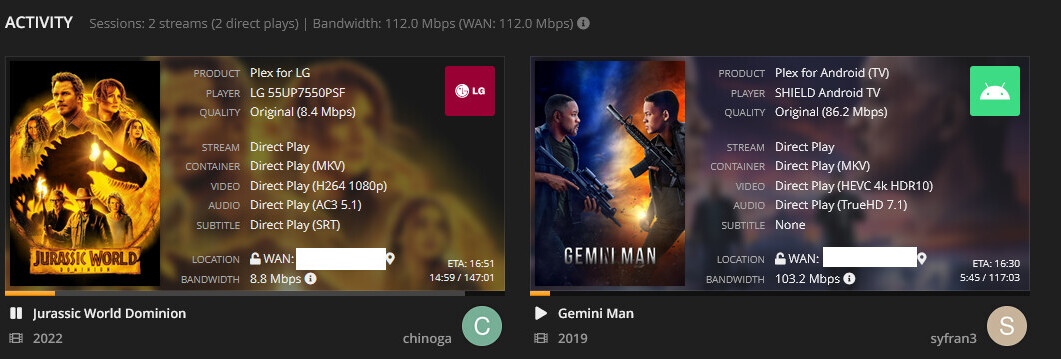
I’m looking at how my different clients are streaming off of my Plex server. Why is it that some of them have so much available space for buffer in such a way that the stream is downloaded almost completely while the user is watching, while others do not? For example, the LG webOS client in the left of the picture has the movie downloaded almost completely and saved in the client’s buffer (represented by the grey bar) while the Nvidia Shield client in the right doesn’t have at all.
You are comparing apples to oranges.
One is a bandwidth-reduced FHD movie with bog-standard AC3 5.1 audio,
while the other is a 4K UHD HDR remux with TrueHD 7.1 audio.
The left movie has only 8.4 mbps bandwidth, while the right has more than 10x of the bandwidth.
Which means that the amount of data is much less on the left side. And so of course has a higher probability to fit inside a rather small buffer memory.
Just go and compare the file sizes of the two items.
I see. Let me get another screenshot when my LG TV users are streaming off of my server. It’s almost happening with the LG TV’s.

If you mean the grey part of the progress bar – AFAIK that is not the amount of minutes buffered inside the memory of the playback device. It is merely the amount of packets which the server has already prepared (but is storing on the server) for transferring them to the client.
AFAIK this is partly controlled by the transcoder preference “Transcoder default throttle buffer”. Default value here is 90 seconds.
Which value is there in your server’s settings?
All of the above only applies to Direct Stream and Transcoding playback modes.
With Direct Play, you can’t really control it.
Oh ok. I was assuming that that grey part of the progress bar is the buffered part of the video playback. Why would the server prepare that amount of packets when direct playing though (as shown in the screenshot) if not saving it in the buffer of the client?
I never changed that setting and it’s set to 60 seconds in my server. I also checked a newly installed plex server and it’s also set at 60. Are you positive that it should be 90 seconds?
The setting should not affect Direct Play mode.
Right but why the difference in grey bar between the two playback events above?
Unfortunately I have no idea. The Developer of Tautulli might know best where this information is drawn from.
-
The grey bar is transcode progress, not client buffer. It tells you this when you hover your mouse over it.
Frequently Asked Questions · Tautulli/Tautulli Wiki · GitHub -
There shouldn’t be any grey bar for direct play.
-
Both coloured bars should match the Plex dashboard. Check if it is correct there first.
I see. Where is the transcoded video being saved, in the server I assume? And why do I still see grey bars for when they are direct playing as shown in my pictures?
That’s the “Transcoder temporary directory” location.
