Hi all, anyone here in March 2021?
I can’t access the software… can anyone put it online for me please?
Hello. I know some people are having trouble finding the software recently. I have not been able to find it either. My guess is that this software just modifies the routing table within windows? I am quite happy to modify this manually but I’m not sure what addresses need access. Does anyone know of where I can find a list of the ones I need to reroute around my VPN?
FYI, as others have said on this post already, the bypass built into pia doesn’t seem to do anything. My plex server is accessible remotely with the VPN off but as soon as I turn it on, the remote access stops working. If I add plex to the PIA list of exemptions, it makes absolutely no difference to anything.
If you want to do it manually, then why not use the steps from https://www.reddit.com/r/PleX/comments/62h6ae/want_to_use_plex_behind_a_vpn_look_here/?
I used this for a long time without issues, but am currently using the PIA client as for me, split tunneling works without issues in the PIA client.
Thanks for the information. Are you able to tell me which version and build of PIA you’re using so I can check if I’m using the same. Also, did you just add the plex app to the split tunnelling list in PIA or have you added any IP addresses or other apps?
I’m asking because I’d much rather use this method if I can get it to work.
Version 2.8.1 buld 06335 which is the latest. And I just added Plex media server in the application list, and didn’t add any IP addresses there.
@PlexThaMan it seems the software is still available albeit not for free any longer, here is the link I found where it can be purchased from: VPN Bypass – Thronic Software
*Edit: Checking again it looks like the software has been made freely available again 
You can see the details and download link on thronic.com | software under the VPN Bypass section, here is the current link to the Windows zip version
1 Like
How/What did you do to get it to work with CyberGhost VPN?
I actually didn’t get it to work, it did momentarily then nothing. I tried a few VPN’s and the VPN Bypass, never worked correctly. I just ended up creating a Virtual Machine to keep the 3 programs i needed the VPN for separate from Plex.
1 Like
Like Wilhelm said, for anyone using PIA….update to the latest version. V2.8.1 (build 06335)
The previous version would not use the split tunnel feature properly for certain apps
Some apps worked and some didn’t. Plex might be one of them.
For instance, I added the YouTube TV app to bypass the VPN but I was getting an error message and it wouldn’t let me connect.
I added the split tunnel feature to a browser and accessed it that way with no problem
The split tunnel feature seems to work great with browsers but not with all apps.
After I updated the PIA app it all worked fine.
Also for people with remote access issues
If your server has a green check mark saying remote access is enabled and working but you still can’t access the server outside your network…
Double check that the port you’re trying to use for Plex is actually open
I can second Jaysplex7 statement update to v 2.8.1. I will add be careful with kill-switch and leave it on Auto and use the default PIA DNS.
I use WireGuard and have speeds very close to as without VPN
First of all thanks to OP for this great solution, VPN Bypass has been working perfectly for me the past 18 months in combination with ExpressVPN on Windows 10.
Annoyingly over the past 3 weeks I seem to have an issue that hasn’t come up before. The remote access works fine on all devices outside of my home network, I have been using it extensively across Fire TV, iPhone etc.
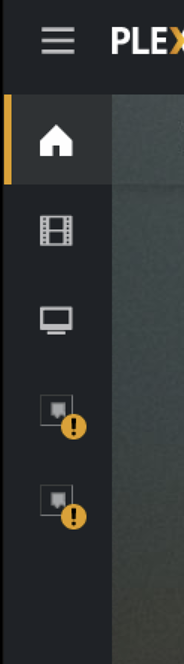
However, on the server PC itself with VPN Bypass running, I cannot access Plex.tv on any browser, it doesn’t seem to be able to recognise any other users (I have 5 home users other than my own) & when I try to login and it doesn’t even access Plex’s own Movies and TVs shows (less of a concern but still).
This means it has broken the auto server update feature as well.
I have attached screenshots of my VPN Bypass settings.
Solutions I have tried to no avail:
- Changing the auto metering on my TCP/IP settings to 1
- Removing and restarting the VPN Bypass service multiple times
- Checked hosts file security (read/write is enabled)
- Updated Plex server to latest version (Version 1.23.6.488)
- Restarted the PC way too many times.
Anyone have any ideas of what I might be able to try? Thanks in advance for all your help!
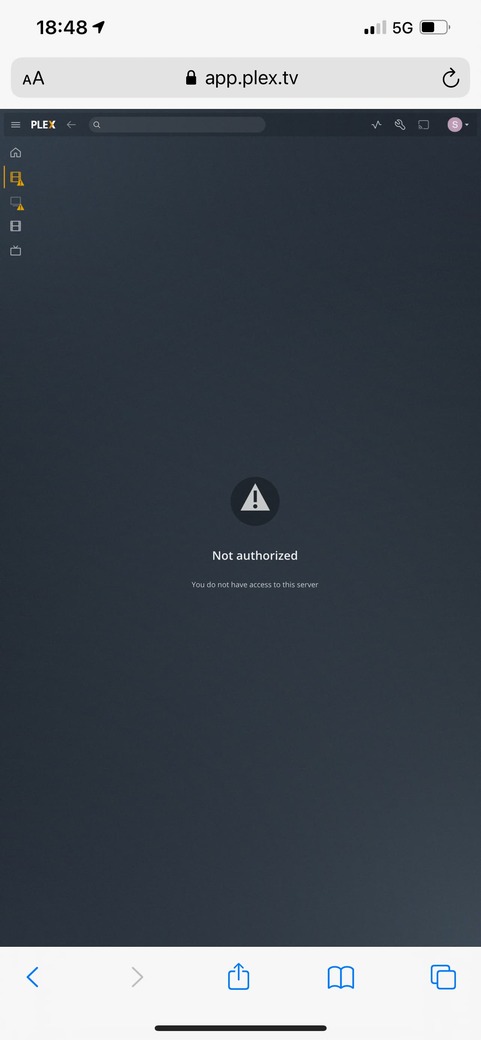
EDIT: This behaviour also shows up in another odd way when I try to login into plex desktop via safari on my iPhone. I see all the users as normal but when I login it says I do not have access to this server. The plex ios app works fine though. It’s very bizarre.



1 Like
This topic was automatically closed 90 days after the last reply. New replies are no longer allowed.
