Server Version#: 1.18.0.1944
Player Version#:
Is there a way to limit the number of posters and background images the plex agent
downloads for each movie.
Currently for each movie in my collection, the agent is downloading as many as 10 images for both posters and background images. I want to limit this because i have a large collection of movies and the download images are taking up too much space disc space.
Thanks
There may be a way to do what you want - and there may not.
What most people do that is a lot easier is to move the data folder to another local drive with ample space - and then don’t worry about it:
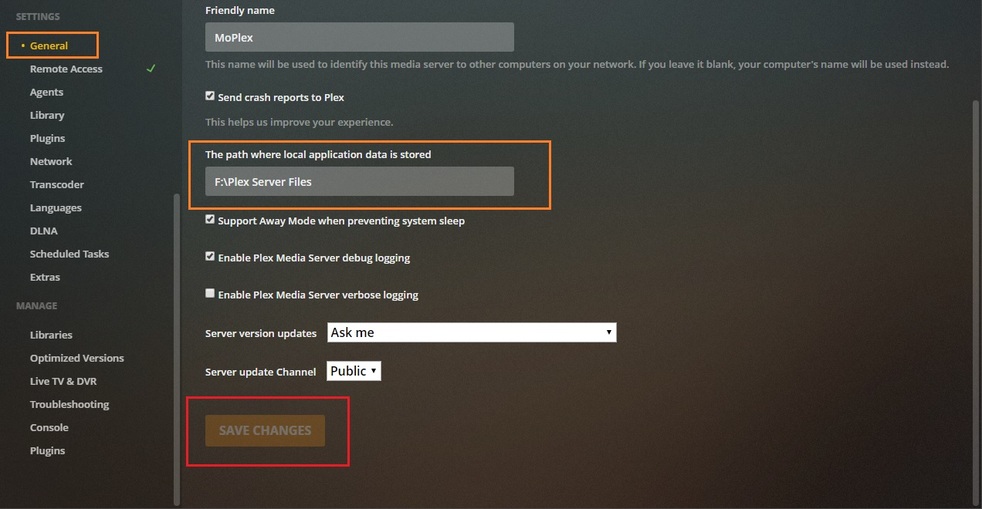
Good To Go:

If, for any reason, you simply can’t do that (if you don’t have any LOCAL Drives, for instance - 'cause it won’t work otherwise) - you’ll have to wait for more advanced help.
Note: If you’re battling Plex now over a few KB - that war has just begun - your Data will ONLY get bigger, and bigger and bigger. Considering my Data is now about 240G - I ran out of C: Drive space a LONG time ago. 1.2TB, however is plenty.
You may want to look at this first: https://support.plex.tv/articles/202529153-why-is-my-plex-media-server-directory-so-large/
A post was split to a new topic: Movies qui n’ont pas leur jaquettes
Thanks. Your response suggests that, unless i choose to do this manually, i don’t have granular control of the number of images that are download. I’ve tried with both the plex movie agent and the movie database agent, with similar results. Anyhow even if disk space wasn’t an issue, i find the number of images the agent downloads unnecessary, and the quality of some of them are a bit iffy.
Settings - Server - Agents - Movies - Plex Movie
and
Settings - Server - Agents - Movies - The Moviedatabase
disabling all lines except ‘Local Media Assets’ should at least prevent the download of additional posters. (Although it might also lead to no available posters on some items.)
I can’t argue that point - as I’m currently moving my Data to a New Drive I installed last month, preparing for another replacement - and am about halfway through the transfer of 3/4 million (literally) teeny files.
In case you do undertake the move, following these instructions to the letter it took (me) about 3 hours - see note:
Note: Babysit the operation, at least until the files are being copied (they will be ‘discovered’ first) in case you have any corrupt bif files (like I did) - wherein the thing just sits there for an hour doing nothing until I tell it to skip those and all those like it!
Otherwise, without issue, but I’m hanging onto that old data for a while - never know.
Elapsed time: 3hrs (for me)
Could have been 2, but, yea…lol
This topic was automatically closed 90 days after the last reply. New replies are no longer allowed.
