I have a movie on Dvd and wanted to put up for my family to watch it and the movie has 4 parts to it and everytime i try to add it only one it shows kind in the correct way
Movie:
The Bible (2013)
(Has 4 discks)
The Bible - 1x01 - Beginnings.mp4
The Bible - 1x02 - Homeland.mp4
The Bible - 1x03 - Hope.mp4
The Bible - 1x04 - Mission.mp4
In this case, it looks like either TheTVDB or TheMovieDB default order will work for you (you do look to be missing the last episode, number 5 called “Passion”).
Based on that you would want to name them as follows:
The Bible (2013) - s01e01 - Beginning.mp4
The Bible (2013) - s01e02 - Homeland.mp4
The Bible (2013) - s01e03 - Hope.mp4
The Bible (2013) - s01e04 - Mission.mp4
The Bible (2013) - s01e05 - Passion.mp4
Additionally in the link that I posted for naming your files, refer to the “Episode Ordering” section, which explains how to change the ordering either at the library or series level.
The underlying files need to match that format but it can help in instances where the DVD order is different than the aired ordered (and the DVD is preferred since the aired is the default).
Also… make sure the content is actually linked to a tv-show type library.
It appears your files match episodes 1-4 (of 5) of the aired order listed on TMDb and TVDb.
The DVD order which is available on TVDb can be used (see the link posted by @shark2k – but it appears that is listing the show as 10 episodes of 50 minutes instead of 5 episodes of approx. 90 minutes for the aired orders. Based on your names given, it appears you’re good with the aired order (which is the default unless you manually overrode it).
@MarkV1320 – I don’t think Plex recognizes the matching hint for tvmaze.
Thanks for reply.
As i am new to this and also ripping some of my dvd’s i used MakeMvk soft and i think i did not extract all the episodes. On the cover it say 4 discs and includes all 10 episodes, plus exclusive special features. So here what i extracted now and of course will have to convert to mp4 using Handbrake.
On discs 1 – 3, I think what you have are the separate episodes in the C… files, and one large file B… which combines all episodes. (See how neatly the file sizes of the C files add up to the size of the B file.)
With disc 4 you need to watch these files. My first assumption would be that the B file is the last of the 10 episodes and the rest is bonus content or advertising trailers.
Which means that your discs contain indeed the 10-episode configuration of the series.
Use a desktop player and look out for chapter markers in the ripped files. If you used makemkv, it should have preserved those chapter markers from the discs.
Tip: MPC-HC instead of VLC.
Using this you can confirm my assumption about disc 1 – 3.
If I’m right, you can discard the B files and only use the C files.
(this is a pattern that you might see on many, but not necessarily all discs with series)
It is a matter of experience. After you have ripped some more discs, you might develop a sense for identifying of what is what.
Now to identify which episode file is which episode number is more tricky.
The order of the files is not necessarily the correct order of the episodes (though it might sometimes be just like that).
Again, you need to play those files and look for clues – mainly title cards. You may find these usually either right at the beginning, or after the intro, or right at the end as a preview of the next episode.
The response by @shark2k above contains valuable information about how to name series episodes. The link in there explains the necessary folder structure, which you should follow closely.
Here is the documentation about Plex libraries. (Series in Plex go into a completely separate library than movies.) https://support.plex.tv/articles/categories/plex-media-server/libraries/
Took me a little to figure this out and testing, testing, testing i manage to make it work.
I think one mistake was not choosing “tv show” category when i was pointing to the files as they will not appearing in plex player, but it did when i edit the library to “tv show”
Had to convert all to .mp4 with right names.
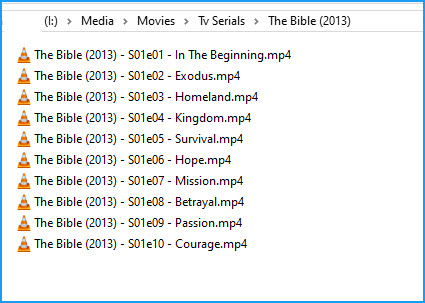
This is how i have it now:
I used MKVToolNix to split the files on chapter markers. Then watched the disks to make sure I had the start of each episode identified.
I don’t remember how these disks split up exactly, but say the new files (split on chapter markers) all started as new episodes from the disk. I then named the files appropriately as to what episode number they were.