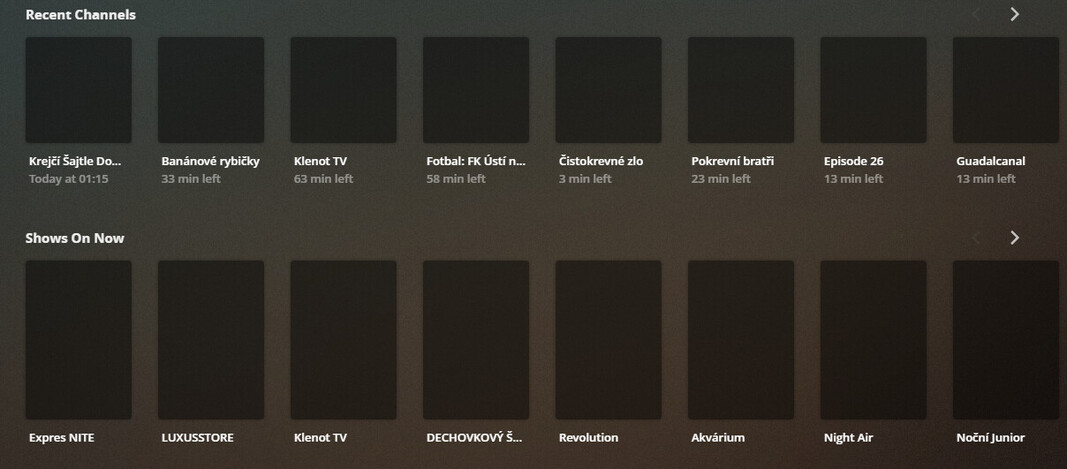
Today is the day when the awful, terrible, no good, very bad idea that is a change to Home Screen customization becomes mandatory for all users, and with it I’ve found that my home screen has become utterly unusable much like many others. While questions like “What were they thinking?” or “Why fix what isn’t broken?” may be the first to come to mind, that is not what this post is about.
After browsing other threads and digging through the settings menu I managed to get library customization to work correctly, since all I care about is “Recently Added” and I want all libraries to be merged on the home screen so that there are only the two rows for “Recently Added TV” and “Recently Added Movies”, and of course, “Continue Watching” at the top. That’s fine, those are the three rows I want.
What I don’t want, but can’t seem to find a way to remove, are the other three rows on my home screen. “Recent Playlists” is acceptable, I guess, but I would like the option to remove it from home. The real issue is the two rows related to live TV. I never use live TV on Plex, I only use the DVR function then watch shows once they have finished recording. With this update, I now have the two immovable rows for “Recent Channels” and “Shows On Now” stuck in the middle of my home screen.
Now, while what I really want is the ability to remove these three rows entirely, I would settle for the ability to reorder how the rows appear. currently it has the two “Recently Added” rows at the bottom, under the three problem rows. Yes, I can just scroll down to get to the content I actually want, and yes, it’s just a minor nuisance, but it is an artificial and unnecessary nuisance. What reason is there to restrict home screen customization? Is it possible to remove these now and I am just not seeing the option?
If there is an option that I am too blind to see, please let me know. If not, then I sincerely hope that the next update will introduce/bring back the ability to hide/show these three rows and/or to reorder the rows on the home screen.
Because it broke player apps regularly. Because most devices have crap memory to remember all the millions of ways someone might configure them. So it is saved on the server instead which also allows for some control of what rows your shared users see from your server libraries
Currently the only way to not have the DVR rows on the home screen is to not pin DVR to the home screen but I am told it is being looked into.
Thinking on how the home screen seems to be directly tied to what is pinned to the sidebar now, your reply gave me an idea. What if the order of the rows on the home screen is tied to the sidebar as well?
Well, it is. By moving “Live TV & DVR” to the bottom of the pinned items in the sidebar, it moved those two rows, “Recent Channels” and “Shows On Now”, to the bottom of the home screen, below “Recently Added TV” and “Recently Added Movies”.
So, there you go. For anyone else looking for a way to reorder the rows of the home screen, it matches the order of the sidebar, which can be changed easily.
I still hope that further customization options will be returned in a future update, but this serves as a fix for now.
I purposely keep my home screen different than the order of my sidebar. I keep friends on deck (at least used to) closer to top than my own libraries on the sidebar. I usually watch my own content. Occasionally, if i went looking at one of my 5 friends servers (movie/tv/some music) and found content, the content I started would be in my home screen on deck near top of home.
How do I unlink sidebar from controlling my home screen?
You can’t. as I mentioned above having all the customization saved on the client broke them often when x library didn’t load in time or whatever so part of the reason to was to move to server and give server owner some control which allowed for things like putting custom collection on home screen of their shared users.
So there’s also no way I can set my kids devices for content they want versus the adults in the house? They are shared accounts, but I share with 15-20 other adults (and kids) across the nation.
If your kids/friends have no interest in some libraries they can unpin those libraries or move the ones they want to the top of the pinned libraries.
Right now the server owner controls which rows show up when a library is pinned. Like if a server owner want to push “My Favorite Christmas Movies” to their shared users they can do that. If the shared user doesn’t want it they can either call their friend and say “can you please turn that off” or unpin the library
I’m pretty sure my kids (in ‘home managed’) can’t adjust pins. (Admittedly, I’ve not logged into the home user accounts in some time)
As for pinning unpinning, that just doesn’t seems ideal.
Store the view on user profiles rather than server owner. This way, each user can see the content they want, instead of forced into views they may not want or, as you put it, have to ask the server owner to change.
I understand the technical limitation now you’ve mentioned it.
Pushing it on server owners instead of each individual shared user’s storage isn’t ideal, especially for those of us with more than a household or have more than our own server…
I have 5 servers shared with me. The order I put them on the side bar should not affect the way I set my personal home screen.
Please ask your teams to reconsider that option.
From the sounds of it, I’ll rarely use my home screen anymore due to the ‘dynamics’ and trying to find where the last thing I watched or wanted to watch moved to, especially if a specific row was not ‘shared with me’ from the server owners. I’ll just browse to each library individually.
My 4 pinned libraries, plus 10 others shared (approximately), will be a mess.
Apologies for hijacking this thread, but, overall, it’s relevant, as I was wondering how to move items in the home screen also.
user accounts/profiles are stored on our servers and for privacy reasons we don’t want to know what your libraries are and minute details like what is pinned or not. Though all your users may only have the one server you share with them, many folks have access to multiple servers so to save all the for each it would need to be on ours for the app to load a single profile
I don’t want to have “Recent Channels” and “Shows On Now” from my Live TV on my home screen, but there’s no way I can set it, all I can do is unpin it, but then I will need to press more buttons if I ever want to go to Live TV…
Why can’t I manage the Live TV the same way as libraries, for the items it automatically adds to the home screen when pinned? I want to uncheck the Recent Channels and Shows On Now.
Why can’t we remove the over supply of rubbish on the home screen [web shows, Movies & Shows (On Plex), Live TV (On Plex)] but still have them on the sidebar to access easily when we want?
Instead to clear them from the home screen we must unpin them from the side bar, then you need to go through multiple clicks to the ‘Unpinned’ list to be able to access them. Some quite unique logic here. How about some focus on Accessibility?
The programmers might do it this way because it’s easy for them but why do we, the users, have to suffer?
I really like that things are more configurable on the server side.
I really, REALLY REALLY don’t like that Live TV & DVR isn’t one of those “libraries” that can be configured so I don’t have to see the “Recent Channels” and “Shows on Now” recommendations.
Agreeing with the posters above, having to unpin the DVR from the pinned access menu to get rid of ‘shows on now’ isn’t a great solution.
I did just find if you unpin & then re-pin the DVR link it will move to the bottom of your pinned list, and the ‘Shows now on’ will move to be the last row on the front page, which is a workaround for now.
Why not pin Live TV and DVR to the bottom of your list? That way it’s always pinned so you can access it in few clicks, but it’s at the bottom of your main home page. Unless you turned off pretty much everything on your home page, there should be a row or two, which is enough to push “On Now” to below the scroll, and you won’t see it unless you actually scroll yourself down there.
I agree that the ability to customize what Live TV & DVR pins to the homepage is VERY necessary though.