Server Version#: 1.41.3.9314
Player Version#: Many platforms
As there are a number off oddities in my Plex Server on WIN10, I’ve thought about a fresh reinastall. But I have 2,000 items in my library, many of which have custom choices in the metadata for naming, art, etc. I have searched the forums but so far don’t see anything on point to preserve the data that has taken years to accumulate. Auto-tagging will leave me with days of work to clean up manually. Is this even possible?
Most likely it won’t help to reinstall Plex server alone.
However, if you insist on trying, ensure that you are NOT using any kind of “uninstaller” or “registry cleaner software”. (Using this kind of software will destroy your Plex data after uninstalling Plex server.)
A regular uninstallation via the Windows Apps control panel leaves the Plex data intact.
What you should try instead of the above is repairing your database.
- ensure there is plenty of free space on drive C:
(It must never fill up completely, or your plex server database very likely will get damaged.) - open a cmd.exe window and start this .bat file in it: PlexDBRepair/Windows at master · ChuckPa/PlexDBRepair · GitHub
If I misunderstood you above, and you are actually thinking about reinstalling the whole machine, including Windows, you should create a backup of the registry branch and the whole plex data folder: https://support.plex.tv/articles/201539237-backing-up-plex-media-server-data/
Create the backup while Plex server is stopped (i.e. the Plex task tray icon is gone).
Thanks for the interesting reply. It’s not really on point for my situation but informative for possible future decisions.
In my case, I’m seeing strange server log errors, and unexplained differences in player failures on (and only on) AppleTV (all other players working fine), while the failing AppleTV works fine against other servers with the exact same content. So, I’m gathering information on possible avenues in case further anomalies occur spontaneously or because of my tinkering.
I am supposing that my database is at least mostly fine, as the unaffected players are happy as clams. (But are clams actually happy, or just unable to complain?)
In any case, here’s a server log taken while attempting to play content with the AppleTV is generating fails. Again, the same player plays the same content error-free on essentially identical server/data sets… and all other players play the same content fine on both. And until recently, the failing AppleTV had no issues at all for any server
Plex Media Server.log (55.0 KB)
. Seems an unlikely situation, one I’d like to fix.
Your log is suggesting that you have a Haswell CPU in your server, which doesn’t have support for transcoding HEVC video. But that shouldn’t matter if the source video is using H.264
There is another error in there, related to Dolby Digital Plus audio. See if you can find a codec which allows decoding that. Normally Plex should download a codec automatically, but it can onyl do that if the server is signed into a Plex account properly and nothing is blocking the network request.
See if installing Releases · Nevcairiel/LAVFilters · GitHub does make a difference.
There are also errors about accessing the NAS device, which appears to be only supporting the old SMBv1 protocol. Something claims that is too security critical and prevents access.
Then there is this:
Feb 01, 2025 00:42:59.817 [2344] ERROR - [Req#3c97] Failed to delete session directory (boost::filesystem::remove_all: Access is denied [system:5]: "C:\Users\John\AppData\Local\Plex Media Server\Cache\Transcode\Sessions\plex-transcode-nv4f3arbyd4x2mkqy0mp9zfr-8f9abd83-1317-4ea2-990d-3c1a8e4a7809\chunk-00093")
which suggests that something is blocking access to the chunk of video. See if you can train your anti virus software to keep its nose out of the transcoder folder.
Overall, you have debug logging disabled on your server, so your log doesn’t contain too much useful things.
Again, much appreciated input.
I have primarily H.264 with some H.265 content, plus a few AVI. All play via Roku and Windows and Android (Shield and phone) players. All content did play fine on AppleTV, until about a month ago (same content that now fails did play before).
The server is signed in to my PlexPass account (as always) and no network changes to note. I hesitate to play with manual manipulation of codecs that appear to function for players other than my AppleTV until I can understand the issue.
The NAS (actually a samba share to a music repository) was removed as a library over 3 years ago when it stopped working. I saw that reference too. Part of why I consider a reinstall, since the server seems unwilling to forget past transgressions.
The only antivirus running is Windows Defender, which I doubt can be trained. I manually cycle Malwarebytes monthly, but do not leave it running as the popups appear on the Windows player, running on the same server. Any other thoughts of how to clear this session directory thing? And would it in any way result in the AppleTV anomaly? Any chance that turning off Defender for a time would allow this to clear?
I had server logging turned on (not verbose). Checked just now and it was off. How can there be server logs to share if it was off? Until I turned it on last week, there were no logs, and the logs I shared reflected the immediate test period before download… what am I missing?
One more time, your comments are highly informative and hugely appreciated.
Maybe one of your libraries is still referencing it on its “Add Folders” tab?
Still, consider the DB repair script as a first measure. It might not only be able to remove weird remnants of old things, but also speed up the whole DB a bit.
I will do that, it seems safe… though not likely to explain the AppleTV fails.
I’ll let you know what results.
Is it safe to attempt to find and manually delete the session that persists?
Yes, you can tell it to stay out of certain locations. It’s somewhere in the settings of Windows, under Windows Security.
If you stop plex server beforehand, you can empty out the whole transcode temp folder if you want.
After terminating the Server (and player) and verifying they were gone using Task Manager, I went to the Transcode folder in CACHE and it was already empty.
I ran DB repair bat:
NOTE: This script is being replaced with the PowerShell script DBRepair-Windows.ps1,
which aims to better emulate DBRepair.sh (more options, interative mode, etc).
Consider moving over to the new script.
13:37:13.12 – ====== Session begins. (Sat 02/01/2025) ======
13:37:13.36 – Exporting Main DB
13:37:34.96 – Exporting Blobs DB
13:37:58.37 – Exporting Complete.
13:37:58.38 – Creating Main DB
13:38:08.10 – Verifying Main DB
13:38:10.82 – Main DB verification check is: ok
13:38:10.82 – Main DB verification successful.
13:38:10.84 – Creating Blobs DB
13:38:14.52 – Verifying Blobs DB
13:38:14.84 – Blobs DB verification check is: ok
13:38:14.84 – Blobs DB verification successful.
13:38:14.85 – Import and verification complete.
13:38:14.85 – Reindexing Main DB
13:38:17.90 – Reindexing Blobs DB
13:38:18.49 – Reindexing complete.
13:38:18.49 – Moving current DBs to DBTMP and making new databases active
1 file(s) moved.
1 file(s) moved.
1 file(s) moved.
1 file(s) moved.
13:38:18.51 – Database repair/rebuild/reindex completed.
13:38:18.52 – ====== Session completed. ======
Then I rebooted, verified logging was on, and attempted to play an H.264 file that’s been played often before, on the APPLETV. Fail.
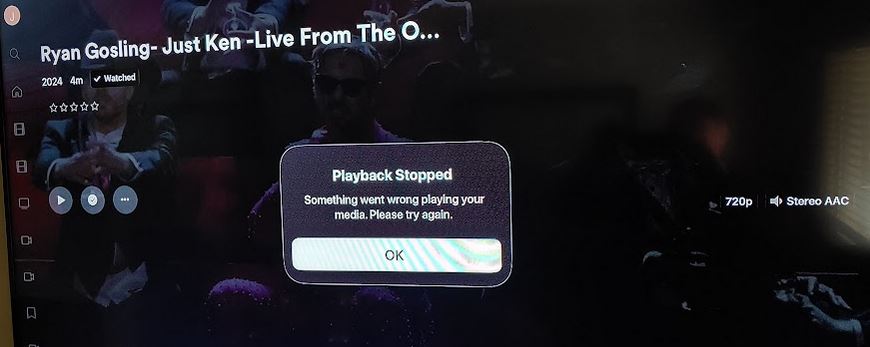
Then I selected the same video with Roku, and it immediately played normally.
I downloaded the log, and in it at time code 13:49:40 got this: Feb 01, 2025 13:49:40.777 [1116] DEBUG - Failed to stream media, client probably disconnected after 688128 bytes: 10054 - An existing connection was forcibly closed by the remote host
Full log here:
Plex Media Server.log (733.6 KB)
I note another anomaly that appears unrelated, but…
In the Windows player ONLY (which is co-located on the server), three of my libraries are not shown pinned and are unavailable. These are visible on all the other players (AppleTV, Roku, Android) all on the same user account (mine). I can see the libraries in settings/manage libraries, and ADVANCED there shows they are set to appear on home and global search. I see no way to add them on my Windows home screen… only ways to REMOVE the ones that are there. Huh. They used to be there…
BY THE WAY, I discovered that the MUSIC library “existed” but was empty and unpinned. Removed it, and the samba error should be gone now.
“Pinned” state is not necessarily synchronized across all clients (types).
https://support.plex.tv/articles/customizing-the-mobile-apps-2
https://support.plex.tv/articles/customizing-the-apps
https://support.plex.tv/articles/customizing-plex-web
Your AppleTV just on’t take the file as it is. It has to be transcoded for some reason. And your server is having a hard time doing that. It starts out with a meagre speed of 0.4x times playback speed. Which might trigger a timeout because the ATV doesn’t wait too long for its data.
Feb 01, 2025 13:49:39.427 [1196] DEBUG - Request: [127.0.0.1:50151 (Loopback)] PUT /video/:/transcode/session/0EDFE76D-5356-46E0-BCDA-FBDB69053236/1a06de18-caa1-4cba-ac29-dd87d9c3f86c/progress?progress=0.0&size=-22&remaining=-1&vdec_packets=14&vdec_hw_ok=9&speed=-0.4&vdec_hw_status=1 (9 live) #20d Signed-in Token (johnmnagy) (range: bytes=0-)
I see the source is an mp4 file.
I wonder if things improve if you would optimize this mp4 for streaming. Plex is a streaming server after all.
You can do this in a number of ways. The easiest if you don’t want to enter a command prompt is to use mp3tag
drage the file into mp3tag, then right-click on the file and pick “Utils” - “Optimize MP4”.
It may take a while to complete, because the whole file needs to get rewritten if it’s not optimized yet.
After it finished, trigger “Analyze” on the item in Plex.
Then repeat the playback test.
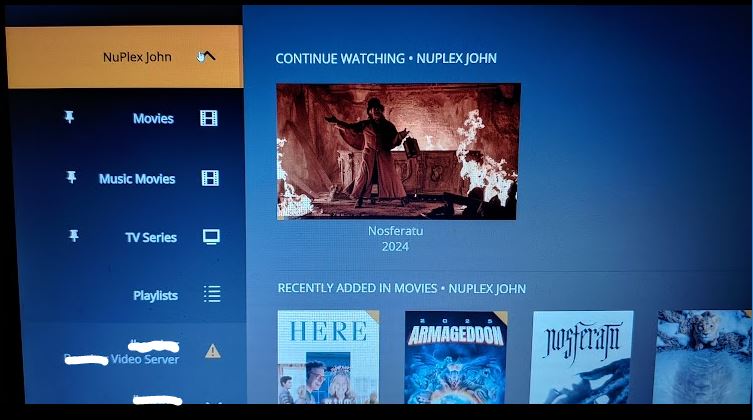
Pinning: The article is either out of date or my install is broken, or I just am daft. The one for Windows player says to use the “EDIT button on the sidebar” which does not exist in my player. It suggests finding the unpinned libraries in the MORE section (which does exist) but the libraries are not shown there. HOWEVER, I find if I go to LIBRARY MANAGEMENT and click on the missing library name, I see the content… and a hamburger menu at the top DOES offer PIN (and unpin). Using that DOES put the library in place on the pinned menu, but generates a warning error which if navigated to results in an error message that hangs the entire app, which can then only be closed by ending the process in the Windows Task Manager. See images attached. (I know this is going astray of the topic name, but it’s hard not to think these things are related…)
The Transcode thing: This seems unlikely to be the cause, as the exact same file, on a different server, plays fine on the same AppleTV, and the exact same file USED to play fine on the AppleTV. And nearly all my library now fails on that AppleTV, here on the same LAN as the server. I can’t imagine manual reprocessing over 4,000 files (movies, TV series, home video, etc)… how could my entire library need to be transcoded now? As for timeouts… the same file, streamed from a companion WIN10 server 40 miles away, appears immediately on the same AppleTV… like it used to here. I understand you are passing me best practices… but… but… arg.

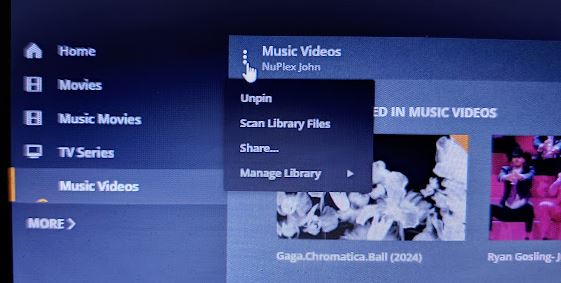
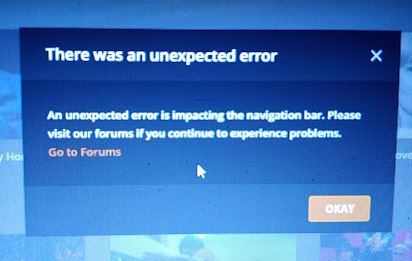
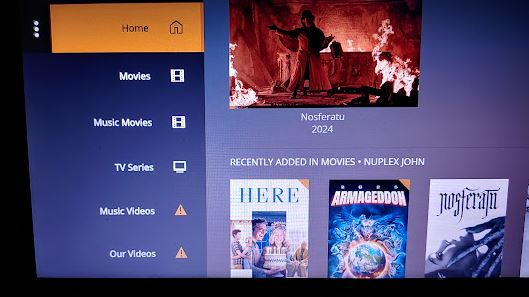
It was merely an experiment to prove a hunch of mine.
Maybe you should kick the app a bit.
Settings - Plex for Windows - ‘Show Advanced’ - General - “Reset Customization”
This should trigger the 1st run wizard, which allows you to pin all libraries at once.
P.S. now your screenshots came in, and I assume you are not talking about Plex for Windows, but rather Plex HTPC. Or are you still using “Plex Media Player” perhaps? That would explain the weirdness, as its long out of service.
Or is this even the old Windows Store (UWP) app? 
Checking, the app indeed identifies as “Plex Media Player”. Which variety should I get instead? PLEX FOR WINDOWS? From the plex site?
It depends which mode of PMP you were actually using.
The Desktop or the TV mode?
These two modes are now separate apps.
The TV mode is now “Plex HTPC”.
The desktop mode is “Plex for Windows”.
https://www.plex.tv/media-server-downloads/?cat=plex+desktop&plat=windows#plex-app
Thanks, the right player made all the difference. Odd that I missed this update…
Anyway, back to the AppleTV. It seems the fail has been progressive - at first only a couple files failed. Then more, then most, now literally all files in every library of every type get the same fail. I note that when selecting an item and pressing PLAY, the spinner appears for only about 3 seconds before the fail notice. If I try again on the same file, the spinner stays up for 45 seconds before dropping to the fail notice. Then I go to MORE, choose the remote mirror system, and it can play every file every time with no trouble and minimal spinner time.
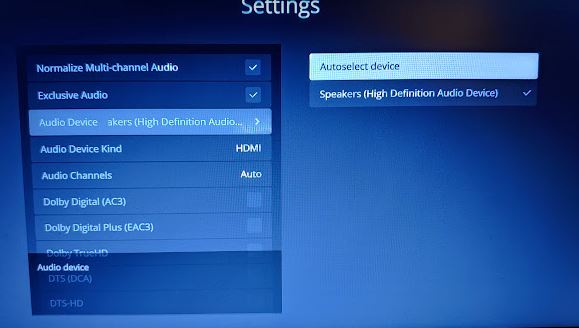
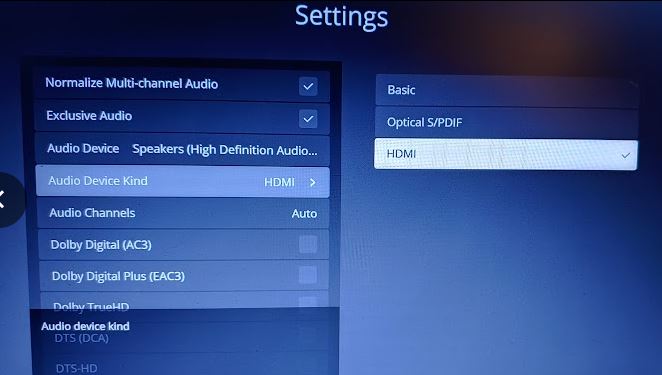
Arg again. The HTPC app isn’t letting me send audio out the HDMI port. Even though it is selected, the computer plays through its speakers. Damn. Now that I get this far, I think I tried HTPC when it came out and found this issue, which sent me back to Plex Media Player.
After selecting the HDMI output interface in the settings,
set the output type to HDMI.
After doing so, a number of additional checkboxes become available, which allow you to enable audio passthrough for the various audio codecs.