Hmm you are really close. I’m trying to figure out where I might have skipped a step in the guide or your permissions are wrong.
Yeah FX and ls -l sees them under /data/media/0/Drive but not /data/media/0/Mount.
That is expected.
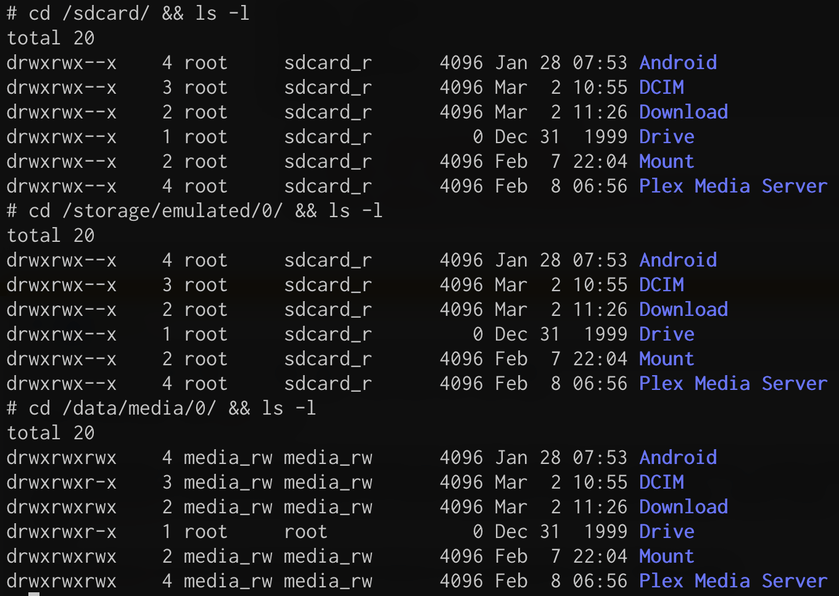
/sdcard (/storage/emulated/0) shows same as plex visualisation.
This is true even with FX or ls?
Is the owner critical for the fbind because you specify media_rw in your doc but I could only get the rclone to mount to Drive when its owner was set to root despite having --allow-other flag?
Same here. When rclone mount is enabled the permissions are changed to root. Take a look:
/storage/emulated/0/Drive is the main filesystem available to all other apps. I think it also represents the wrapper file system for /data/media/0/ so that all Android apps can read natively without root access.
Try creating the folders in /data/media/0/ and set the proper permissions. Does Plex see both folders without rclone mount enabled?
Do I need to manually create the Drive and Mount folders under /storage/emulated/0 because no, neither is appearing there.
No. With cd /data/media/0 && mkdir test I can see test in Plex under “Internal Shared Storage”. It also appears in /storage/emulated/0/ and /sdcard/ without changing any of the permissions. It sounds like this isn’t true for you, so something deeper must be going on.
Do you have an external drive mounted as internal storage maybe?
Hm ok. Either try removing the USB key (you don’t need it for this anyway, files get cached and are removed when the stream ends) or if you need to keep it try creating the folder manually on /storage/emulated/0/ and launch your rclone / fbind on there.
Yeah, tried that also but ran short of time because was just visiting my friend. I have a Shield also so might root that and try it there myself. You need the USB key for the metadata for Plex. If I replace my VPS server, based on that it will require about 100 GB for the Plex metadata (without video preview thumbnails).
The fbind command doesn’t seem to do anything when I run it, it seems to give me a few new spaces and < at the end like it is looking for more from the command. I have ran fbind -b /source/path /dest/path & and also the fbind -b /destpath /sourcepath & and when do a listing of the /sourcepath it gives me the files but not on the destination path. No other applications can see the files. Can anyone tell me what I need to do to correct this? I am using version 7.2.3 of the dev build so I have root. I haven’t been able to get the adb root commands to work but from what I read I need a version lower than 7.2 to get this to work.
It seems to me that the fbind command is just hanging. I also tried to mount the partition with a terminal emulator and as su -M and it produces the same results. Do I need any special user parameters or anything?
I ran into similar trouble with fbind and other applications “seeing” the rclone mount folder because of Android’s locked permissions. You are restricted to the directories you can mount to. I haven’t figured out how to do it another way.
You need to make sure your /destpath is in a folder that is replicated as a readable/writeable folder in Android. Did you follow the instructions exactly or are you trying to change the directories?
For me, everything is viewable in /storage/emulated/0/ but I’m not actually modifying that directory at all because /data/media/0 (not rewriteable) is replicated in /storage/emulated/0/ (rewriteable).
I updated the guide at the request of a few people clarifying some things. The guide still works with the latest version of everything. Apparently, SDCardFS is coming to the Shield in future releases which might change things substantially.
I do not understand what am I doing wrong, does this changes with v8.0.1?
I can only see gdive content in /data/media/0/Drive but its permission is root:root
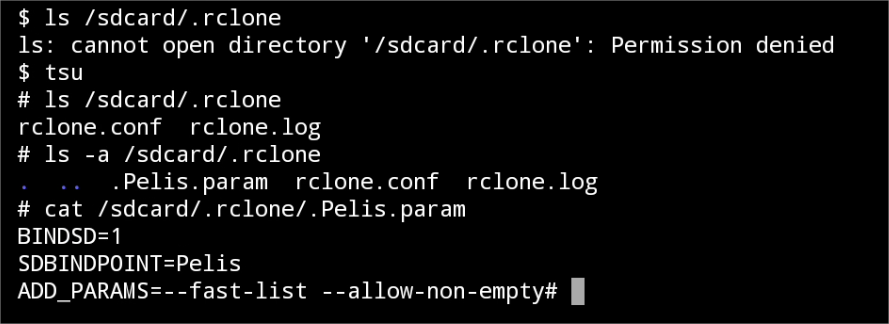
I created folders in step 5 using tsu.
Hi dude, thanks for your reply…Maybe you can help me, here is the thing : I am currently under config: PMS on VPS + Gdrive.
It does not work too badly, however I would like to have more freedom by increasing my reading capacity, and especially to avoid restarting PMS on my VPS every day.
That’s why I would like to get an NVIDIA SHIELD TV PRO. The problem being that I do not know if in addition to serving as a server it will be able to access my GDRIVE. You understood it, I would like the PMS on NSTV PRO to be able to connect to my drive without intermediary. Please help
(by the way, interesting these “total 0” isn’t it?)
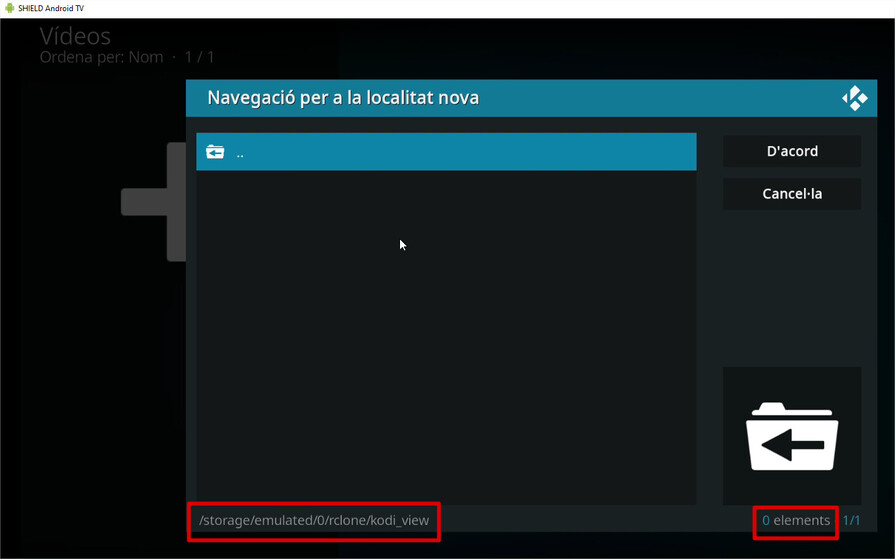
But if I want to know the user that executes kodi, with an “ps aux | grep kodi” nothing is showed (and it seems here is not showing all the process of the Android System).
Has anyone solved this?
Hi. Thanks for the response.
I used the installation of this Magisk module to execute rclone… I have to say it doesn’t work as it says:
From one hand, it’s true that it mounts automatically the remotes at startup, firstly on /mnt/cloud (mounted yes, but in a directory still not visible for the applications)
(until here, all ok. And I stopped to execute rclone mount command by myself when I discovered this, so I deleted my custom rclone folder and I located the rclone.conf on the directory they specify, and also used the custom params for an especific remote)
This is the only step that I miss and I need. I’m very close but can’t reach it.
I don’t know what I’m doing wrong… I opened an issue on their Github repo, but I see that they are not responding the issues since long time ago… hehe
Thanks for your support again
I tried this route before and had to root my shield and do all sort of all things… running rclone and encfs in nvidia shield. its a totally mess. it works but usually breaks after shield update
i just resorted having my shield as dedicated plex server and a RPI 3/4 (doing all the dirty works) on the side running rclone mount on my encrypted files on gdrive, and using encfs reverse to decrypt gdrive mount and share the final decrypted mount by samba in shield. it works really well. i havent had any problem even with shield fw upgrade or plex server update.