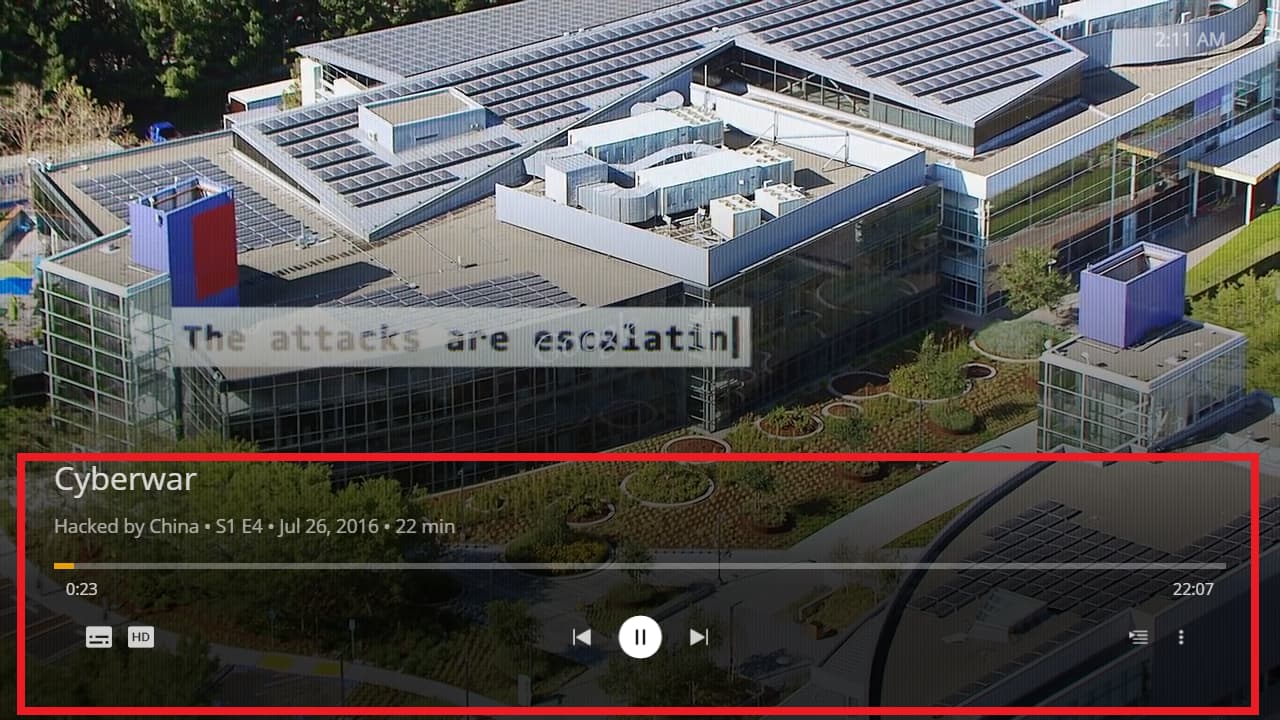
Player Version#:1.24.2.3216-59dc6103
Is there any way to disable this settings bar from popping up every time you pause a video?
On android you have to hit enter or the down button to see this
The real problem is if you hit the pause by accident when you’re trying to FF or rewind
Now you have to unpause it, then sit there and wait for the bar to disappear before you can go ahead and FF or rewind.
If you click FF with that bar up, it moves to the settings inside the bar instead of on the video timeline
What if I pause it to look at something on the bottom of the screen like subtitles? Now I can’t see them
I’ve input different keyboard commands (spacebar or P key) and used every type of default controller  you can map buttons with using flirc.
Most of the settings in that bar can be programmed with hotkeys on the remote. This seems like a feature that belongs in an app that supports full mouse control. (HTPC doesn’t)
Is there a setting I’m overlooking to disable this?
It does dismiss after a timeout. You can also dismiss it immediately by hitting the esc or any input you have mapped to the back command.
Thanks for your response @gbooker02
I know I can wait for the bar to disappear or hit more buttons to make it go away
That’s not a user-friendly option.
There is a reason this behavior is not a feature in other players like VLC or any of the other Plex apps you use on your TV.
Why is the same logic not applied here?
Pause should just pause, the same way Play just plays.
There is now 4 buttons to call up that menu bar. (Up, down, enter, or play/pause).
That seems excessive for a menu I don’t need.
I just don’t see the logic in how this functions from a users prospective.
The only reason I can see for it existing is some sort of difficulty I’m unaware of from a developers POV
I really do enjoy the features and functionality of HTPC overall and think you guys did a great job, so I don’t want this to come off as some sort of bashing.
Thanks
I agree with your assessment from a users viewpoint.
It is very atypical behaviour for a player and it annoys me (moreso the wife) as it takes over control of the remote (via keyboard or remote).
When I pause, I just want it to pause not show player controls.
Not a huge issue bit it does take away from the GUI function.
It does autohide after a few seconds but a simle pause icon would be better (like other players). I just don’t see a need to bring up that menu at all unless I am missing a need.