HW acceleration not working in docker container on DS918+

Server Version#: 1.23.1.4602 (plexpass) within Docker (installed through GUI)
Player Version#: 1.31.1.2262-74fdc6b7
DSM 6.2.4-25556
DS918+

I intended to migrate from the native Plex app on my Synology DS918+ to Plex within docker as I am under the impression that the hw transcoding is more performant running Plex through docker:

Plex have confirmed on their forum the bare version of Plex for Synology is limited in the dependencies it can install - and side-loading them on Synology is very hard. So some Synology are missing beignet/OpenCL. You may have a NAS which has beignet/openCL installed and if so then it will work fine (I think higher end Synology has this - 920+ etc)

The Docker images for Plex (seemingly both PlexInc and LinuxServer.io versions) are able to bundle the dependencies they desire including beignet and openCL. Plex staff have confirmed this is an advantage to Docker they cannot access on the native Plex app.

Source: flyingalbatross1 comments on Plex finally does HDR > SDR tone mapping - does this work in Synology yet?

I downloaded and set up the Linuxserver.io docker image but when testing, I found that hw acceleration was not working at all using it (HW acceleration was working on the native app).

Looking around I found the an older (~1 year) post that talked about special steps being required to get HW acceleration working when using Plex in a docker container: How I got Plex hardware transcoding working with docker on my DS918+ : synology

Some reading the forums here gave me the impression tho that this may not necessarily be the case anymore?

I’m hoping for two things, confirmation that running Plex through docker uses fewer CPU resources for transcoding and, if yes, information on what needs to be done to achieve it.

I’ve briefly mentioned this issue already to ChuckPa in another thread but figured I’d make a separate topic to be able to track my issue more easily.

EDIT: In case anyone finds this topic via Google, as of June 1st 2021:

-It’s impossible to get HW acceleration working in docker via only the DSM GUI, you need to use command line
-HW acceleration is more performant in docker than in the native app when HDR content is involved

Only if you want to transcode HDR media with tonemapping.

The Beignet, OpenCL, etc packages are used for HDR to SDR tonemapping.

Transcoding SDR media (DVD rip, 1080p Blu-ray rip, etc) does not use those packages, so there is no performance gain when running PMS via Docker.

Thank you for response. There are 4K HDR movies on my server that I would like to make available via transcoding. When not using the tonemapping function, does 4K HDR video get transcoded to 1080p HDR video or does the HDR layer get “stripped out” in the process? Meaning you receive a 1080p SDR without tonemapping aka washed out colors?

I’m doing some further investigation.

For those folks who are having HW tonemapping issues, Have you recently installed a DSM update ?

At least for me, it’s not tonemapping that’s causing the problem, when I use transcoding with it disabled there is still not HW acceleration.

Please do the following:

  1. Stop Plex
  2. Uninstall the package
  3. Reinstall the package
  4. Retest the HW transcoding (make sure the options are enabled before testing).

This is looking like udev rules are being reset

If reinstallation fixes the problem, then we can confirm udev

ChuckPa will help you get things working.

To answer your question:

The output of the Plex transcoder is 8-bit H.264 SDR video, irrespective of the input.

If you transcode HDR video with tonemapping disabled, you will see washed out colors. Some movies look worse than others, but without tonemapping the colors are off.

1 Like

Left: Tonemapping enabled
Right: Tonemapping disabled.

By “package” are you referring to the docker container? HW acceleration is working with the native DSM app, it’s the docker container where it’s not working at all for me.

@TrntRzr1911

Are you mapping the PLEX_GID = video ? (Same GID as the native package)

Here’s the specific code I execute for the native package.

Of interest here is – these rule files can be erased / reset by a DSM update (which does happen)

# If video group doesn't exist create it and ensure Plex is part of it. And add a udev rule for the drm group.
synogroup --get video
if [ $? -ne 0 ]; then
  synogroup --add video plex
elif [ $(synogroup --get video|grep -c "\[plex\]") -eq 0 ]; then
  synogroup --get video |grep -E '^[0-9]:|[0-9][0-9]:'|cut -d":" -f2|xargs echo|sed "s/\[/'/g;s/\]/'/g"|xargs synogroup --member video plex
fi
if [ ! -f /lib/udev/rules.d/60-fix-plex-hw-transcoding.rules ]; then
  echo 'SUBSYSTEM=="drm", GROUP="video"' > /lib/udev/rules.d/60-fix-plex-hw-transcoding.rules
elif [ "`grep -c drm /lib/udev/rules.d/60-fix-plex-hw-transcoding.rules`" -eq 0 ]; then
  echo 'SUBSYSTEM=="drm", GROUP="video"' > /lib/udev/rules.d/60-fix-plex-hw-transcoding.rules
fi

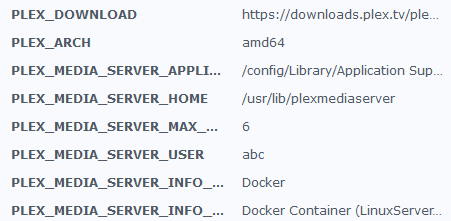
Are you referring to these variables and do I need to add a PLEX_GID entry (there isn’t one currently)?
image
If so, what value does the value need to use, or rather, how do I find out what the native apps GID is?

Where did you get those names from please?

I know the container to exist otherwise.

-e PLEX_UID=1001 \
-e PLEX_GID=1001 \

( -e sets the environment variable recognized by the pmsinc/docker package )

They are from the details screen of the docker container.

why are you using abc and not user plex (which has the permissions to write to the hardware) ?

The native package installer is what adds plex to the video group so it can access the HW.

These are default values of the linuxserver container. Do I need the change the PLEX_MEDIA_SERVER_USER entry from “abc” to “plex” in order to enable hw acceleration?

@TrntRzr1911

If you still have the remnants of user plex on DSM from the DSM 6 package then Yes.

I am still trying to find out if you need to specify the group in that container. I normally run the Plex image where I specify both UID and GID.

When I install the native package, I have the installer make user plex a member of the video group (which is what’s needed)

Don’t mean to hijack but I have a very similar issue. I installed the plex docker from linuxserver.io as, from my understanding, the hw transcoding support is more efficient there vs the synology plex app thanks to beignet/opencl. However, when playing a movie from within the plex docker container there is a lot of stuttering and very high CPU utilization. Are there specific steps necessary to get hw transcoding working from within docker?

DSM 6.2.4-25556
DS918+

@TrntRzr1911

Settings - Server - Transcoder ----- Turn it on. It’s that simple.

FYI… Make certain subtitles aren’t involved because subtitles suppress full HW transcoding benefit

The setting is enabled and I have subtitles turned off.

Edit: this posting made me assume special steps are required for hw acceleration to work from within docker: https://www.reddit.com/r/synology/comments/e4r1bu

Edit 2: this is the comment where it’s explained the docker image has a less cpu intensive hw acceleration: https://www.reddit.com/r/synology/comments/jzi7cu/_/gdkhy6r
