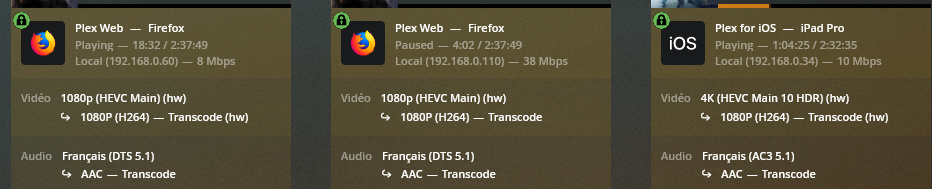
the other weid thing is when going into plex web, only 2 sessions have hw behind transcode, but all have hw behind the source video, does it mean that only 2 streams are GPU transcoded ?
even if I’m not at 100% cpu and not 100% GPU, I get a lot of buffering and not a real smooth playback
To process your files, Plex first needs to read them (decode) before transcoding them (encode).
From your screenshots it appears that all decodes happen with support from a GPU while only 2 are encoding the video using a GPU (with the 3rd one being encoded by the CPU).
As for why that is I cannot tell.
Could be a limit to the HW transcoding slots… maybe your driver hack/modification didn’t succeed or the 2x 1080p HEVC + 1x 4K HEVC decodes + 2x 1080p H264 encodes are the limit of what the GPU can deal with.
Your logs might provide more information (check out Plex Media Server.log and search for MDE: ).
I tried this patch as well, a while ago with no luck. It maybe a update on plex side that mess with this hack or Nvidia update or both. I gave up on this and will probably move to a p2000. Kinda like a luck of the draw hack to me.
the patch was not well applied to the 32b file … I did apply it again, and all is working fine …
I was able to transcode 2 4K streams to 1080p in parallel to 4 1080p High to 1080p low without any problem (and all in hw)
I still have a little of memory in the GPU and the processor load is also Ok !
This was for testing purpose only, I do not want to transcode 4k in real life, but at least the perf are there !
did you figure out the solution? you mentioned patch applied not well?? not sure what patch or what that means? I have the same errors and certain movies are buffering with that same error