Hello to all the people who are part of this community, I need help, since I cannot find the path in the settings of the plex page, before I had
the path called the path where local applicattion data is stored
But now I can’t find it anywhere, could someone send me photos or the steps to change the route? Thank you very much in advance 
It was removed from the UI some time ago. You need to edit it in the registry now. Advanced, Hidden Server Settings | Plex Support
You want to look for LocalAppDataPath
Thank you very much for answering me, the truth is that I do not handle much with these things, I know how to get to regedit and the editor part of plex, but from that part I no longer know how to enable or what values to put in an input or anything else … Will there be any video on youtube with which I can guide? or photos or something like that?
In Regedit, follow the path like you would in Windows Explorer until you reach the right path
Computer\HKEY_CURRENT_USER\SOFTWARE\Plex, Inc.\Plex Media Server
Then on the right side look for LocalAppDataPath. If you don’t see it, right click in any of the white area on that right side and select New then String Value. You’ll see a new line added to the bottom right called New Value #1. Rename this to LocalAppDataPath.
Now that you have this new value, or if it was there before, go and double click on it. You’ll get a little pop-up with a field called Value data where you can type. Put the full path of where your Plex folder to go. Keep in mind that this is the location where the “Plex Media Folder” will go.
Thank you very much to the 2, I will try to follow the steps and see if I can transfer my server to an additional hard disk, since I currently suffer from the little space that I have left on the operating system disk ^^!
Hello, excuse me, I ask you one last question ^^! I just finished following the steps you gave me to change the path of the files on the plex server, but I don’t know if the change was made or if it continues to work from the computer’s plex. … how can I verify that? Thanks in advance
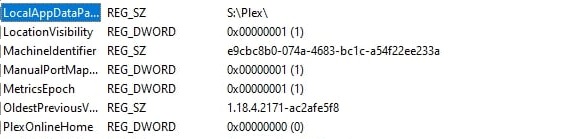
That’s how I stay Please tell me if it’s okay or if I need to change something else ^^!
Don’t post your Plex Token!
You can verify it by restarting your plex server.
Then take a look into the Logs subfolder inside of S:\Plex.
Switch to the Details view mode, so you can see the date-time stamp of the files.
If you see a Plex Media Server.log with the current time stamp on it, you can be sure that it uses the new location.
If you have “Debug” logging for the server activated, it does even list the name of the folder in the log file.
wow, thanks a lot really for the help 
Hello again, I hope you can help me, I just realized that after changing the path of plex I cannot update it with the updates that are coming out of plex, how can I change the path of the updates? And what drive name should I put? Is it that I should put the same path that I put to the LocalAppDataPath folder? or another ?, thanks in advance ^^
[mod edit] - image removed
I leave you a photo so that you can tell me which one I should modify please !!
Sorry, I don’t understand.
Changing LocalAppData has nothing to do with updates. Leave that alone, or you will lose your library data.
So that was why I couldn’t find it the other day…
Why was it removed?
There is a Show Advanced / Hide Advanced button in the UI already.

If I want to show the Advanced settings I want to show the Advanced settings.
Not have an even more convoluted way of finding out paths and settings.
