Server Version#: 1.32.5.7516
Player Version#: 4.108.0
I created my Music library and I’m adding my music albums there. I found that there’s an option to add also music videos related. I followed the guidelines explained in the support page, but even though, I cannot see the Extras section in the albums with music videos.
So, I have something like this:
But I don’t see nothing else in the Album page except the tracklist. Am I missing something? Should I enable any other feature in the configuration?
The support page has an error, explained in this post:
Following the above, your music videos will appear on the Artist page.
The only way music videos will appear in the Album page is if the video filename is exactly the same as the corresponding music file (except the extension). In the case of your screenshot, the filename should be 13 - Voulez Vous.avi.
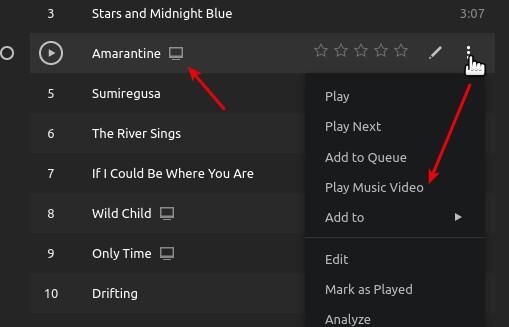
If you’ve done that correctly, you can access the music video like this:
The icon next to the track title tells you there is an associated video. You can play the video by clicking the action menu at the right and selecting ‘Play Music Video.’
Now I see the screen icon next to the song name. Seems that I have to use also the option “Refresh metadata” in the album menu for Plex to recognize the video file (I was using the option “Search for new media” in the Library but it didn’t show the icon).
What if I have a video that is not exactly a music video. For example, I have an edition of an album that came with the CD and DVD with interviews. So I ripped the DVD into a video. How should I name that video to appear in the music album in Plex?
There is no way to make it appear under the album. It will appear under the Artist if you follow the advice in the thread I linked. See the screenshots in the post I linked above for an example.
As for naming the file, the Help page that I think you said you found explains how to do that:
That page gives you several options to specify what sort of ‘extra’ it is. So if the video is an interview, you can name the video anything you want, but put -interview at the end (before the extension).
So you might name it something like this: Sting - Nothing Like the Sun -interview.avi Making of Nothing Like the Sun -interview.avi Sting interview about Nothing Like the Sun -interview
The point is, the first part of the name is whatever you want to appear as the title in the Extras row on the Artist page (best to keep it short, though). It just has to have the -interview suffix (or -behindthescenes, or any of the video types listed on that Help page. -featurette appears to work too, though it’s not listed on that page).
Just remember, the video needs to be in the Artist folder, not the Album, and it will appear on the Artist page, not the Album page.