It would seem easy and simple for a lot of people to use what other systems are using. I know In emby version tags are at the end in [ and ].
I.e. Apocalypse Now (1979) [Redux].mkv
It would seem easy and simple for a lot of people to use what other systems are using. I know In emby version tags are at the end in [ and ].
I.e. Apocalypse Now (1979) [Redux].mkv
Except that’s different. I already went into that. In every video file, for every piece there is a Name field & Class Code. This is most noticed when you are using something like handbrake & one of the audio tracks says Commentary & another says Dolby Surround. It’s part of how a video file is built. Plex, after LOTS of pressure from users eventually added those names (which are actually already there more than half the time) to the display for the audio & subtitles tracks, but only on the Web interface. Those fields exist no matter what format & wrapper the video is. The Class Code Plex has always used, that’s how it knows if it’s English or German or Togalog or Whatever. The video Metadata is different. It’s part of the container, not part of the file itself. If your file is AVI there is no real Metadata, just a notepad like blank space that can be used to simulate Metadata essentially. This is not exactly how it works, but for this discussion it is enough. I believe TS files also lack real Metadata, but I’m not sure as I always convert TS files to MP4 & never deal with them more than that. For that Metadata you have a number of fields. The one you are referring to is actually the Title. For MKV & MP4 these are similar, but not the same, but we’ll use MP4 as it’s the easiest for examples & the Plex preferred format anyway. MP4s use the same Metadata structure as MP3s. They even still retain the Album fields as part of the standard. The Title field is the name of the track. Like the name of the song for an MP3, or the name of the Video (Movie Name) across platforms. If you use iTunes iTunes uses that Metadata almost exclusively. ITunes ignores the file name entirely, relying solely on the Metadata standards. So say you put the Title of the MP4 as Director's Cut & you used the same files in both iTunes & Plex (what I did until iTunes went for the “All online, we’ll sync your iPod over the internet instead of locally” route.) iTunes would sort every Director's Cut as a different version of the movie “Director’s Cut”. If you changed the name of the movie to Fierce Creatures Plex would now list the Cut of the movie as Fierce Creatures. So that doesn’t work. Metadata can be tricky. Say you used a crappy Metadata editor program back in t the day & added the Director field with the value of Fred Schepisi in that program it would look like all is good, but when another program opens it it lists no director. Because the field is director not Director or sometimes the field could be the exact same, but the way it’s created it’s created as a custom field & not a standard field. So things like audio tracks & subtitles which have standard fields as part of the file is easy to implement because they are all the same. While any other Metadata has a purpose, & version isn’t one of them.
The problem with this is that a lot of people use those in file names. I generally use them for my [SD] [720] [1080] for files that I have multiple versions of for Out Of Plex referencing. Plus Plex made a point a long time ago about only using very specific conventions because people get files from Bittorent sites & they are named in a hundred different ways. Also with Metadata Plex when they initially took away our Metadata access said it was because those downloaded videos sometimes have links or malicious code or Spam in the titles.
If you are referring to the -TagAtTheEnd thing that’ll never happen because people often have - in file names, if that was just “Anything after the last -” a lot of people would have messed up libraries. Plus it is essentially as If/Then system. So having an infinite number of possibilities means a lot of clock cycles for your system & scanning a whole library would take thousands more units of time, resources, & chances of errors
It would still work for you. [SD Theatrical], [720p Director’s Cut] etc. Just a thought…
That wasn’t the problem. The point being that that is a COMMONLY used tag. Used by lots of people to label video files. I use it when I’m working with files to label things like [Audio Sync] or [Volume low] or [23AAC] or [Rec] or [DVD]
& while those are gone on the final version, it’s something used by a LOT of people. & usually at the end of the file name.
& I wouldn’t want it to appear as a version name. That’d be stupidly redundant as Plex shows that already. It’s used on files because sometimes files don’t, or like with MKVs sometimes they show the wrong one because it’s not detected it’s a track Metadata flag
No disrespect but your way or several peoples way doesn’t make it Plexs way, and as several people have learned the hard way its the plex way or the highway. It could be a viable solution as emby has already done.
Plex has already made it clear that those kinda changes won’t happen. It’s not about my way, I was giving an example to try to help you understand why that dead horse isn’t going anywhere no matter how many times you kick it. There are plenty of those horses that I think are actually healthy & Plex has just decided they are dead, but this is one that’s been said plainly by Plex & you can actually look at & stick your hand through the ribs.
Trust me I’ve been with plex a long time. I understood a long time ago, but what I’m curious about is if it is a dead horse why you try so hard to explain it. It’s easy to see it’s been several years on quite a few feature requests and plex neither comments or seems to pursue them. So why spend the time trying to convince others. Just curious…
I’m trying to keep the topic on possible actual ways, you just seem to be stuck on this 1 way that isn’t. & it’s not like Plex just hasn’t done it. Plex actually make an Official Ruling on a couple topics years ago saying specifically that the file naming conventions have to be very specific & gave reasons that I don’t remember verbatim, but essentially boiled down to Naming happens before Metadata is even looked at & File names can contain *soo* many things that we don't care how badly you want it, more people than you would be mad at us if we did Granted this was before Movie Special Features were added, & after they came out some of us went “Hey!” but then we saw how hinky the movie special features were & were like “Ohhhhhhh…”
That explains a lot of those very long posts 
I know I am very late to this particular party, but I definitely believe this is an issue that needs to be addressed.
That’s the only reason I started to read through the posts, look at what ideas people have come up with and throw some of my own into the mix.
I genuinely believe using metadata would be a good approach. Maybe not perfect, and yes, it might mess with the approach that other products may use, but you cannot always take that into consideration… Did Plex take that into consideration when using it for Audio and Subtitles within Plex Web? Doubt it…
And so far @LostOnTheLine, the only valid reason you have given to not use the Track Name / metadata, is because it would cause iTunes users grief. Not really a valid argument from my perspective, but fine…
At no point have I suggested using a field called version.
My suggestion has always been using the Track Name field. Or this as it is shown in MKVToolNix…
I generally populate the Name field on the Video track with an actual description of the Video… So… 6.5 Mbps x10Bit x265 1080p
But there is nothing stopping me from doing…
6.5 Mbps x10Bit x265 1080p Theatrical Cut
or…
Directors Cut - 6.5 Mbps x10Bit x265 1080p
or
God know what other Cut - 6.5 Mbps x10Bit x265 1080p
So, much like they are doing for the Audio and Subtitle tracks within Plex Web, do the same for the video track… Just read that in…
Now before you say… “That won’t work!”… Yes, it will work!.. And beyond the possibility of messing with other products, I so far see no valid reason why it wouldn’t work.
Now the question of Plex actually adopting that idea is a completely different discussion, and I am fully aware that it may never happen, however… It is certainly a better idea than using file name tagging, because it overcomes the notion of restriction…
You could literally call it anything you wanted… 12" Dodgy Directors Remix Silly Cut …
Because it is a free type text field, the world is your oyster!
That was my exact point. YES they used a system that already exists the way that system is intended to be used. It won’t just cause problems for those using iTunes, that was an example. The Metadata is a system that exists. To use that Metadata you literally have to use it as a workaround. Using a field intended for something else as a thing it isn’t intended for. For both the Audio & Subtitles those are only ever used for that. & lots of things actually encode that information on by default. Most official digital files have those names included in the file. DVD/Blu-ray has those fields as part of the video file
I said it before but I guess it got glossed over, the Audio & Subtitle fields exist on the track itself, while the name of the video track exists in the Metadata of the container. & as far as I know MKV is the only container that has that field. If you convert your video with a named subtitle track, audio track, & video track, depending on the wrapper swapping program you use they all might be lost, but as far as I know NO program will keep the video track name. From a previous discussion someone who knows more about it than I do figured out that it exists in a different part of the file. Now if that information is wrong then I’d be all behind the idea. Unfortunately from the information I have it only works for 1 file type, which would be fine if it was at least the one Plex prefers, but it’s not
Plex could just say Multiple Cuts only works on MKV files. Remux your movie if you want multiple cuts. That makes it pretty restrictive and actually time consuming for the end user to work on.
This is one of the reasons I thought maybe “Sub Folder -cut” might work. I think the biggest challenge with this is how to handle folks with all their movies in the parent library folder. I would think the scanner might need all movies to be in a properly named folder like “Movie (2000)” so it could find the movie listing from that instead of using the file name.
If that was the case they would really need to put a switch in the library settings, perhaps on a dedicated page with instructions that the movie title folders are required for the entire library when Multiple Cuts are used.
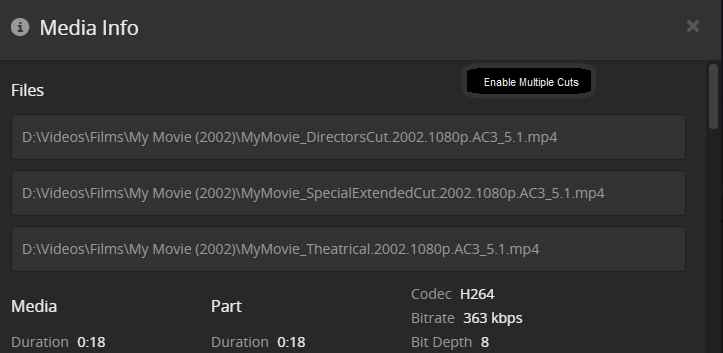
Having that would be a nice addition. I think on the edit screen having an option switch to turn on multiple cuts has a lot of merit. Plex, for some reason, doesn’t like to give us a lot of fields to control in those edit windows, & we had asked for something like that for the audio & subtitle naming. But I understand them not giving us that because the control of it doesn’t really fit anywhere. I had made the suggestion for there to be an edit screen where we could name things like [HD] but then the fact that it could hurt those who don’t use it make it impractical. But combined with your suggestion it could work.
Info TabMovie Scanner as it would be part of the server UIInfo tab or wherever else they move it you could have a toggle Enable multiple Cuts that would then open up a Text Entry below each file in the list & maybe a ticker bubble for Default
I’d personally like to be able to change the order, but Plex doesn’t like giving us anything like that, but you could name your version files to sort them as the file list is always in alphabetical order maybe
OK, I concede!
The fact that the field I am suggesting only appears in MKV containers is certainly a valid reason that my idea wouldn’t work… Dagnabit! lol
OK, so this is an idea I could get behind…
Flexible and non restrictive, which was my argument against file name tagging.
Sold !! 
The problem I see with that is how does does Plex know the difference between a cut and a version (different resolutions of the same cut) for display to the end user?
I think different cuts really need to be discoverable before you start actually playing the movie.
Is that in this thread or somewhere else?
In an old thread awhile ago.