I’m still personally not convinced that that distinction is needed. But even if it is that would be an interface decision, no need to have the Scanner handle that, it’s better for us to have that control. If, for example, they do it so that it’s a menu distinction like was suggested earlier, you would just name 2 of them the same thing, then when you select that Cut you’d have the Play Version option for that cut. I personally think Plex would end up giving us just the 1 & you’d have to name them Director's Cut HD & Director's Cut 4K but I personally don’t think that’s any worse. The only problem I could see is if you have like 3 resolutions of 4 different cuts. Then I could see it being a problem. But if you have that you’re probably never gonna be happy with any solution because you have a neurotic library to begin with
Perhaps a better mock-up…
The info screen, with the check box Enable Multiple Cuts disabled by default…
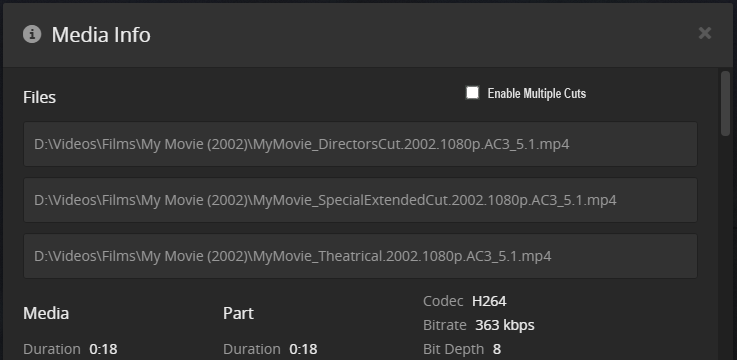
Now when you tick that box, it then enables a button against each file…

And clicking on that button would display a free type text field allowing you to type your given Cut Name / Description.
This info could then be displayed back on the Play Version popup…

EDIT: Or like this, no buttons, just a free type text field against each line…

I mean I’d imagine it being a field below each entry indented a bit, but more or less.
Mere details 
But I’m guessing this was what you were kinda aiming for…
Yeah. Essentially that’s the kinda thing I was thinking. In my head I was seeing a little slide on/off instead of the tick box, but the tick box actually makes more sense. I think ideally it’d be on the Movie homepage instead of the Play Version list, like someone suggested earlier, because if it’s different versions of the movie instead of just different files of the same version it makes more sense to be a forced choice instead of a sub-option hidden like the Play Version is. My initial thought was a "Which version do you want" pop-up when you hit Play similar to the “Resume or start from beginning” pop-up. But someone mocked up a pretty clean looking Movie title page that I thought was great
Yes I agree… If you have Multiple Cuts of a movie, then indeed it should be a forced pop-up of some kind.
Now… PLEX ??? Wha’dya think? lol
I agree with a Forced option panel
I still wish there’ll be a cut/edition handling where you can pick those right from the movie details page – not going through a version picker (as mentioned, e.g. to avoid confusion with different qualities of the same cut/edition). Adding that missing layer of “edition” between movie and their (quality) versions.
Might be wishful thinking but seems so much cleaner 
That being said… naming/associating the cut/edition label in the user interface is not a bad option. It’s actually slowly growing on me.
My first thought was it’ll be considered inconsistent when all other critical information are derived from file names / folder structures – then again… that’s not the case for collections too.
Let’s see where this goes
Has anybody realized that content rating (age restrictions) could be different for different cuts. There are use cases where you don’t even want to allow your kids to see that “adult” version of a movie, not to speak about watching it.
It will be most difficult to automatically get that metadata, but there should be a setting for each cut that gets respected by Plex user management.
Just to make things more complex
Yeah, I agree. I mentioned content rating, up  somewhere.
I’m increasingly convinced that cuts or editions should be treated as different movies, and that enhancements to collections would better address “these are cuts of the same movie” in the UI.
I also suspect that the lack of public metadata for alternate cuts is part of why Plex hasn’t done this already. 
I think if that’s something you want then you really want them as different titles anyway. It would be nice to have them each have their own information, but that makes the whole thing a lot muckier & less likely to ever happen.
But the thing is that it isn’t. The Scanner Sorting that you’re talking about determines how things get classified before Metadata is searched. Different versions being grouped together is already part of that. You don’t want to change that, you want to add another layer after that. So it really doesn’t belong in the Scanner sorting anyway. In all reality it’s something you want post-Metadata because you want the Metadata to apply to them all, then add another classification. So Order-Of-Operations wise it’d be best to be at the end.
See, that’s an issue that already exists. The Metadata Agent does not respect versions. If you want a special version you have to go in & manually change it to your settings. But in all reality this method would give you the easiest way to do that anyway. If in the Enable Multiple Cuts option next to each edition’s label there could be a Content Rating option. If left blank it keeps the original content rating, but you could specify a Cut as R or Unrated or NC-17 & have that appear next to the Choose Your Cut entry. & it would probably be harder for them to build the system, but it’d make it at least using the same Restrictions setting that you already have for your kids profile, it would just have to classify conditionally on an extra level
I’ve said as much before. But I think this system makes it workable more than any other option
With something like this in mind…

If we are going to annotate the Info page which includes all files matching the movie there would need to be a few fields and boxes.
- a check box at the top to enable the Multiple Cuts (MC) feature.
- a check box next to each file to tell the system it should be included in the MC picker.
- The title field for the custom name of each cut.
- The rating field to set a new rating.
- a check box to set the default cut.
The question is would the scanner be able to tell the difference in versions. Like say if you had:
Star Wars (1977) - Theatrical Release - 1080p.mkv
Star Wars (1977) - Theatrical Release - 720p.mkv
Star Wars (1977) - Theatrical Release - 480p.mkv
Star Wars (1977) - Special Edition - 1080p.mkv
Star Wars (1977) - Special Edition - 720p.mkv
Star Wars (1977) - Special Edition - 480p.mkv
Star Wars (1977) - Disney Release - 1080p.mkv
Star Wars (1977) - Disney Release - 720p.mkv
Star Wars (1977) - Disney Release - 480p.mkv
If you chose Theatrical Release cut, would the version picker then show you the matching versions of the cut you chose, or would it end up just showing you all files and defeating the point of choosing a cut ahead of time?
I had a suggestion a while back to have poster labels. Is that the kind of thing you mean by “naming things like [HD]”?
I think this doesn’t really make sense. Because why would you have a file if you don’t want to be able to play it?
The whole point is that the Scanner has nothing to do with it. That’s why the Info Page option is so good. Because it doesn’t require any changes to the scanner. I mean Plex just did a new scanner for movies, so not having to affect the scanner is a huge selling point. Plus, as I’ve said before, changes to the scanner are full of problems, like the Special Features mess we have. In fact, if they make it a Info Page controlled thing I’d hope, no pray, that they add a Special Features management to. Could add a drop down list for the different types of special features with an Alternate Version option at top. That would give better control over how special features are controlled as an extra bonus.
Because you have multiple versions of multiple cuts. It’s one thing to pick from three versions of a single movie, but it’s another if you have three versions of three different cuts of the movie.
It was awhile ago, If I remember correctly it was an issue where at the time the Play Version only listed the bitrate or something like that & the idea was that if we label it as HD or SD that’d be more helpful because sometimes you can have a better encoded H264, 720 file that has a lower bitrate than a poorly compressed XviD 480 file. I remember the discussion being about something like that & being told it would cause problems. Again I remember the lesson more than the topic
Scrolling between 9 things I think is a lot cleaner than scrolling between 3, selecting, going to another menu, scrolling between 3, & selecting again. If you have more than 9 files in the same movie there isn’t gonna be a solution that is gonna work for you & not hurt others more
Not necessarily if the nine things are of multiple classifications. First a viewer is thinking about which cut of the movie they want, the theatrical release or the directors cut. Then they have to decide which resolution they want based on the device or perhaps bandwidth they are using. One is more “feels”, and one is more technical. If everything lumped together it could take longer for someone to figure out the differences before deciding which they wanted.
How so?
- Theatrical 4K
- Theatrical 1080p
- Theatrical SD
- Director’s Cut 4K
- Director’s Cut 720p
- Director’s Cut SD
- Extended Edition 4K
- Extended Edition 1080p
- Extended Edition 720p
You decide which edition you want & you already know what device you are on
That takes much less than making it multiple menus. There’s no real reason to have a 2nd menu, that’s wasted effort for no benefits. If you really want them to be different then having them as different titles makes more sense
I think kamhouse’s view is not so much that you couldn’t squeeze all this in a single selection. In the end there’s tons of end users with all kinds of technical understanding (at least that’s how I’ve been reading it).
They will follow you to the point that there’s different cuts (e.g. theatrical, director’s cut, extended edition) but might be thrown off if there’s more than one.
Again… not saying there’s no target group for your use case or you don’t have a point.
The same way I have to accept that you’d prefer to see a different solution (and very strongly push for it), you’ll need to consider your use case might not apply to everyone.
As you pointed out several times… it can be a long way from a request/requirement to a design and finally a technical specification. You argue from a perspective trying to anticipate the technical specification and frame the design so it’s easily implementable – I admire that… I see where you’re coming from, e.g. trying to ease the path for a Plex developer or lowering the complexity of a change to give it a better chance to even be considered.
In my very personal opinion this approach tends to produce a result but not always a good one. I’ve experienced this several time at work when engineers tried to rush over the design phase for a product… they produced a notable result but also pinned themselves in a corner, ending up to re-do the entire process if asked for some subsequent improvements. Maybe that’s why I’m a bit defensive when it comes to your proposed solution
