Works fine with other desktops shut down. That wouldn’t make sense though if it stopped working from that, as the files in the XML all start with file:///volume1/ and /volume1 from the diskstation is not accessible over the network.
Well, damn, so it’s not the long playlist then if you’re not having a problem with a 3800 song playlist. So weird. Your 1813+ shouldn’t be too much more powerful than my 412+ that it would make that much of a difference. But, it has to be what’s causing mine to crap out.
Yeah I’ve used Synology audio station for a while, their apps are all pretty awesome. The idea of using one app for everything was attractive though, as well as the videos for parties. Maybe I’ll try making a plex playlist then to see if that works that way, although manually adding several hundred songs would take a while lol. Probably not worth that.
Just wanted to say thanks so much for that last post - I’d been struggling with it for hours, and it turns out the problem was that I needed to add that “file://localhost” in front of “/volume1/music/” in the XML file.
Hi. COngratulations to those of you who got this to work.
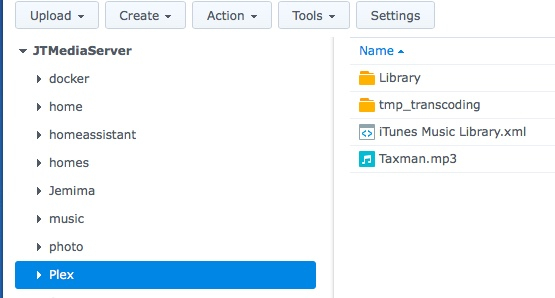
I am running PMS on a Synology NAS. I have really been struggling to get the filename format in the XML file correct. The xml file is found and read but the music filenames fail. Every format I have tried gets an error: WARN - Could not find path: /volume1/music/Keith… for format:file:///volume1/music/Keith…
For testing have put some music files in /volume1/music/. Have also tried putting a file in /volume1/Plex/ to see if the imported could find it. I have tried //volume1/, ///volume1/, //localhost/volume1/ and other variations but still get a log error of: Could not find path:
Hi. Congratulations to those of you who got this to work. I still can’t.
I am running PMS on a Synology NAS and Plex Web on Mac. I have really been struggling to get the filename format in the XML file correct. The xml file is found and read but the music filenames fail. Every format I have tried gets an error: WARN - Could not find path: /volume1/music/Keith… for format:file:///volume1/music/Keith…
For testing have put some music files in /volume1/music/. Have also tried putting a file in /volume1/Plex/ to see if the imported could find it. I have tried //volume1/, ///volume1/, //localhost/volume1/ and other variations but still get a log error of: Could not find path:
Please help!!!
Jan 29, 2018 10:49:41.357 [0xe0fffb40] WARN - Could not find path: /volume1/Music/Keith_Jarret/Tokyo '96 [Live]/02 Never Let Me Go.mp3
Jan 29, 2018 10:49:41.359 [0xe0fffb40] WARN - Could not find path: /volume1/Music/Keith_Jarret/Tokyo/Summer.mp3
Jan 29, 2018 10:49:41.361 [0xe0fffb40] WARN - Could not find path: /volume1/Plex/Taxman.mp3
I changed the folder name to Music for the last test.
I did start out with all my music files in a folder that could sync with my iTunes library on my mac. This music folder was at /volume1/homes/jtestement/Drive/iTunes/iTunesMedia/(artist folders and music files). This is my Plex music library (is this location acceptable to Plex?). The Music folder that you see in my tests was created later for trying other options. I will go back to the original structure and try again with the path format you suggested. I’ll let you know how it goes. And thanks for your help - much appreciated.
A year and a half later and I’m still having the same issue, large itunes libraries just completely take a crap with plex, can’t load playlists, most of the time I just get the error “There was an unexpected error loading this item” even though they import fine and it sees them.
I wish Plex could just do an m3u import or something, maybe it would handle that better. Still can’t use Plex for music.
Yes, I realize that. The library loads fine - it takes forever to initially load (around 70k songs) but the library is there and accessible, it’s just playlists that freak out.
Yeah this has been a want of mine for a while, my like was already on that post haha.
Thanks, I’m using regular playlists. Would having the smart ones in there at all break the rest of them? I think it always creates a “on the go” or whatever playlist automatically that I can never permanently get rid of.
I went so far as to write a program which traversed the directories and created M3U files for everything.
I then went into the VM, pulled everything into iTunes and had it export.
Back in Linux, I created the appropriate symlinks to ‘pretend’ to be where it would be in Windows.
As long as they were standard ‘dumb’ playlists, they came ‘flying’ in and were all good
Actually just upgraded from a synology 412+ to a 918+, this seems to have resolved all of my playlist issues. I think that diskstation and plex together just couldn’t handle the large music library on that hardware.
In case anyone with a QNAP NAS ends up in this thread – I needed to add file:// before the file location in the iTunes XML. I also deleted all of my smart playlists. Some of them worked, but I decided to just start fresh – I was mostly interested in getting the metadata.