Kaares, do you monitor memory usage on the GPU, and if so, what are you using?
Nope, not sure how to do that. I can’t see more than intel_gpu_top will show. Pretty much a % of Video, VideoEnhance, and Compute. As long as none go to 100% over time I’m not going to worry. I don’t have that many users. Right now I have a AV1 4K HDR10 file being played and transcoded to H264 4K SDR running nicely. It’s throttled, so no constant use, but every few seconds it uses 20% Video, 5% VideoEnhance and 12% Compute. I’m ok with this. Rebar is off on the MB too.
Finally got around to running a concurrent transcode test on this. So this is an ARC 310 passed through to a Proxmox Ubuntu 22.04 with 6.2 kernel, with hardware tonemapping . I am playing back 6 different 4K UHD rips (remux only) without any errors in playback (skipping etc.).
The native bitrate of the files being transcoded are:
85 Mpbs
64 Mbps
81 Mbps
81 Mbps
42 Mbps
67 Mbps
They were all set to 15 Mbps except the last one. For some reason, on the 6th Plex Web window, when I open the playback options on the overlay, the video quality setting wasn’t there, no matter if I reopened it or resized the window.  So that one was stuck at 10 Mbps.


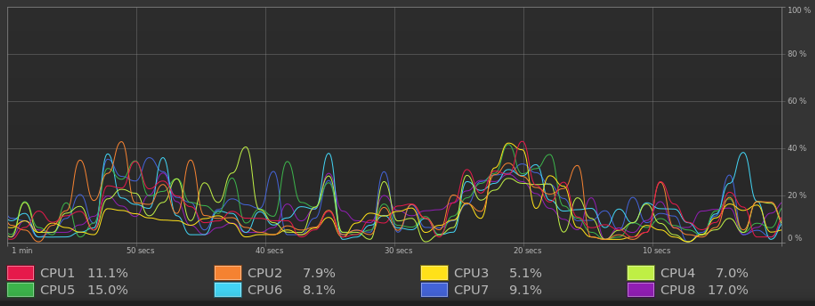
I can test more streams if anyone is interested but 6 seemed like way more than I would ever stream since every friend I’ve ever shared my library with only thinks Plex is commercial streaming content, and the only way they ever see my library items is if:
- Go to their house
- Install the Plex app for them
- Pin the libraries I shared with them (which is the only reason they got the invite to Plex)
- Hide internet content, so they don’t accidentally end up in Movies & TV on Plex
- Go into every library and change from Recommended to Library view so it doesn’t say there are no library items
I didn’t know that! Good reason to switch to Jellyfin I guess. I’m a paying customer of plex, but if the free route is better why stay? CPU’s and GPU’s are now shipping with AV1 HW encode support, and Intel’s HW encoder has been shown to look much better than the x264 HW encoders. It’s more on par with the very slow CPU preset for x264, but takes way less bandwidth obviously.
Nice! The question now is the perceivable quality difference between NVENC and QSV and power usage? I’m on a 1660Ti which is more than enough for my needs (only transcode for remote friends) but if ARC uses less wattage and the quality is pretty much the same I’d be down to change.
Back in earlier generations of QSV the quality was worse than NVENC, but you had to zoom in a lot on the image to see the difference. We’re taking CPU’s that are 10 years old at this point though.
QSV has gotten a lot better, I don’t notice a difference between the 2 but I went from a Maxwell era GPU to Intel 9th gen and then 10th gen and not to ARC. I still use the 9th gen for my remote server and don’t see a difference between the 2, but I only use the remote server when traveling (better upload bandwidth than my home).
Would be cool to see a newer quality comparison like Jason from Byte My Bits did (that was 5 or more years ago and if I remember right focused more on software vs NVENC).
With this setup:
- Unraid 6.12.14
- Linux kernel 6.11.9-thor-Unraid+ from GitHub - thor2002ro/unraid_kernel: Kernel repository for UNRAID(unofficial)
- Plex 1.41.3.9232
The Intel A310 GPU is finally tone-mapping HDR movies just fine. There was a crash, shown below, that looks to be GPU-related, but it’s working.
Nov 28 02:14:10 Tower kernel: WARNING: CPU: 4 PID: 5716 at fs/notify/fdinfo.c:51 show_mark_fhandle+0xf6/0x100
Nov 28 02:14:10 Tower kernel: Modules linked in: xt_CHECKSUM ipt_REJECT nf_reject_ipv4 ip6table_mangle ip6table_nat iptable_mangle vhost_net vhost vhost_iotlb tap tun xt_nat xt_tcpudp veth ipvlan xt_conntrack nf_conntrack_netlink nfnetlink xfrm_user xfrm_algo xt_addrtype br_netfilter xfs nfsd auth_rpcgss nfs_acl lockd grace sunrpc md_mod zfs(PO) spl(O) tcp_diag inet_diag nct6775 nct6775_core hwmon_vid iptable_nat xt_MASQUERADE nf_nat nf_conntrack nf_defrag_ipv6 nf_defrag_ipv4 wireguard curve25519_x86_64 libcurve25519_generic libchacha20poly1305 chacha_x86_64 libchacha ip6table_filter ip6_tables iptable_filter ip_tables x_tables efivarfs bridge stp llc ipv6 e1000e igb mei_gsc xe drm_gpuvm drm_exec drm_suballoc_helper gpu_sched drm_ttm_helper intel_rapl_msr intel_rapl_common intel_uncore_frequency intel_uncore_frequency_common intel_tcc_cooling x86_pkg_temp_thermal intel_powerclamp coretemp kvm_intel btrfs kvm polyval_clmulni polyval_generic aesni_intel crypto_simd xor i915 drm_buddy drm_display_helper ttm rapl raid6_pq mei_hdcp mei_pxp
Nov 28 02:14:10 Tower kernel: mxm_wmi drm_kms_helper drm nvme i2c_i801 intel_cstate i2c_mux intel_uncore nvme_core intel_gtt mei_me i2c_algo_bit agpgart i2c_smbus mei i2c_core video intel_pmc_core backlight wmi intel_vsec pmt_telemetry acpi_pad pmt_class [last unloaded: e1000e]
Nov 28 02:14:10 Tower kernel: CPU: 4 UID: 0 PID: 5716 Comm: lsof Tainted: P           O       6.11.9-thor-Unraid+ #25
In the process of building my new home server. Of course one of it’s main functions is Plex, and I was just wondering if anyone has had any positive experiences with Plex and Windows Server (2022 or later) with an Intel GPU?
I am currently looking at a P4000, but I thought I would try something new, and I know Intel cards have AV1, but I wasn’t sure if that’s something that Plex is using (yet).
Plex doesn’t do AV1 encoding yet, but HEVC encoding support is soon to be released. Haven’t seen anyone mention using server editions of Windows in the beta release forum thread, but I’m pretty sure it would work on arc cards.
+1 even though my a310 is working fine on my truenas server. Official support should be added.
