Server Version#: 1.22.1.4228
Player Version#: 4.54.4
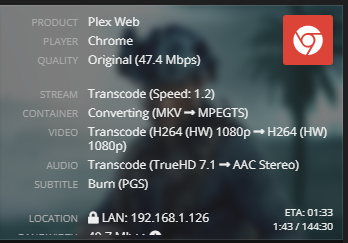
Hey Guys - So I recently built a new server (nothing fancy) with a i5-10400. I’ve enabled HW Transcoding and have confirmed that it’s working as I can see the HW next to items playing in the dashboard:
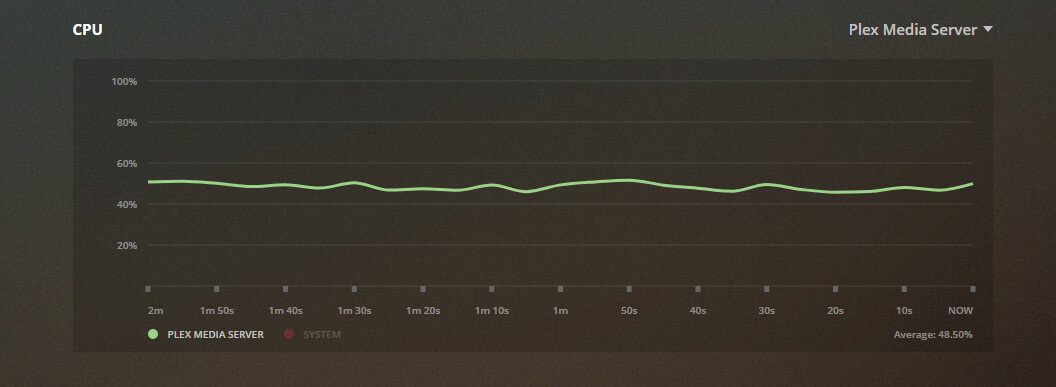
I won’t pretend like I know how everything works, but am i seeing that CPU usage because it’s using the cpu (albeit Quick Sync) for transcoding? Is it just lightening the load?
I have a GTX 1050ti that was using in my previous server that I can install in this. Would the general consensus be to use a dedicated GPU instead of quick sync?
Any thoughts on this topic would be appreciated. The more I read up on things in the forum the more i realize I don’t know much lol .
Burning in subtitles (ASS) uses a good amount of CPU even with HW transcoding. Disable the subs and you’ll see less CPU usage. I would stick with QuickSync on the CPU vs the power hungry nVidia GPU.
I thought if the subs were being burned (as opposed to playing directly) I’d see a thing saying they were being burned. But I’ll definitely try disabling them and see what difference that makes.
So you vote QuickSync over nVidia GPU? Do you know of any limitations to either one (besides nVidia’s hard limit on 2 transcodes - which i know can be patched)?
It is also visible in the log files: Mar 29, 2021 23:05:13.012 [0x7f7a3b159700] DEBUG - [Transcode] MDE: 13 Hours (2016): selected subtitle cannot be converted to a compatible format, burning into video stream
Intel QSV is quite capable. The 1050 Ti may not provide better performance.

 .
.