Is it possible to cache complete movie files on my plex media server?

Hello,
Is it possible to cache complete movie files on my plex media server? I’m having issues with my Unraid NAS, HDD I/O is my bottleneck currently. If multiple users start streaming different movies from the same HDD on my NAS, it maxes out the I/O and stutters.

My ideal solution:
When a user starts streaming a movie, it would copy over the full movie to my PMS-PC’s NVME SSD and stream from there. Is this possible?

Other information: Both machines on my local home network. I’ve run into this I/O issue with a single local 4K direct stream and 1 1080p remote stream from a single HDD.

The plex machine is a dedicated ubuntu build (64bit, 32GB ram, 500GB NVME, 10Gbe). My NAS is a local dedicated Unraid PC(64bit, 256GB ram, 500GB NVME, 10Gbe, 50TB HDDs)

Any help is appreciated.
Thank you,
Denis

the short answer is no.

the long answer is, a normal hard drive should easily be able to handle a few 4k streams before hitting any IO limit.

are you sure it is a disk IO limit, and not a transcoding situation that is overloading your cpu and/or gpu ?

if it is truly a disk io, then you probably should look at a different storage solution, or maybe add an SSD drive to store new and/or popular videos.

it looks like unraid has a support for ssd write caching, but I didn’t see anything about read caching.

So if a HDD’s bandwidth is optimistically 140MBps and a 4k stream is 70mbps, wouldn’t you expect that at 2 or more stream you’re going to run into an IO limit?

I know this isn’t a built in feature currently so it will probably end up having to be a third party solution. I’m curious if anyone else has run into this or figured out a way around it.

Edit: My units are wrong, updated HDD bandwidth. This doesn’t take into account bursts of bandwidth required for 4k: https://www.reddit.com/r/PleX/comments/eoa03e/psa_100_mbps_is_not_enough_to_direct_play_4k/

Perhaps, but videos are rarely constant bitrate, and clients have their own buffers, the server reads the files as needed on demand and sends them out as chunks as the clients request.

also… https://www.quora.com/Whats-the-recommended-speed-for-a-hard-drive-to-edit-in-10-bit-4K-in-Mb-S-MBPS

1 Like

Crap you’re right, I’m using wrong units in my example.

1 Like

again, how did you determine that it was disk io ?

it could be very possible if the disk is heavily fragmented, as random io will easily reduce the actual throughput.

but it could also be your pms server itself being overloaded.

or your upload bandwidth being maxed out

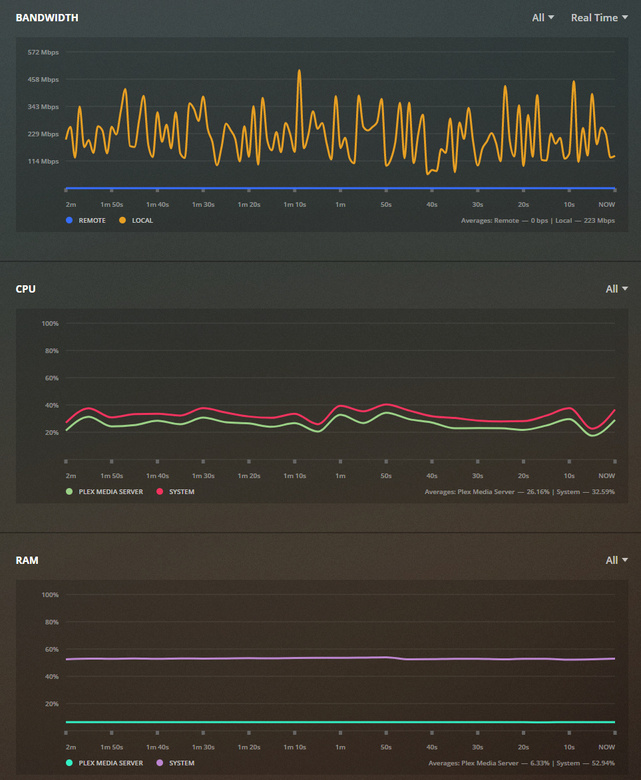
look at your plex dashboard while you have streaming problems

Plex Web > settings > dashboard

Sorry, I wasn’t ignoring you. Just on the move. I’ll replicate the issue and post my results when I get home. Roommate was watching a 1080 stream local 8n the bedroom (I believe it was a transcode) and I resumed my direct streaming 4k movie locally and experienced heavy stuttering. The only thing I found maxing out was the hard drive bandwidth just over 100MB/s.

does unraid give you a dashboard or something that you can use to monitor disk io?

is there any defragmentation utilities for unraid?

if you can’t improve the performance of the affected drive(s), then basically it will come down to ‘get better drives’ or storage system/raid system that provides better io using the same disks (zfs or mdraid).

Unix/Linux systems don’t have “defrag” for any of their native file systems.

If the drives are maxing out at 100 MB/sec:

  1. Verify the HDD interface is SATA-3.
  2. SATA-2 and USB-3 will max out just above 100 MB/sec
  3. Get the drive make & model, we can look up the performance specs.

From reading the above, it sounds like the drives are not up to the challenge but I would like to see the drive Make and Model information. With that info, we can be definitive.

They’re 10TB “shucked” easystores. They are plugged in via sata-3 ports and appropriate cables on a 3rd gen intel mobo.

btrfs has defrag, ext4 has a defrag.

I don’t know what other file systems may have, but google will probably help :slight_smile:

effectiveness may be questionable, but they certainly do exist for some FS.

“Shucked” might be the issue.

Are they “green” drives (eco-friendly) or more “NAS” (performance) ?

If one needs to defrag their ext4 or btrfs, there are much bigger problems.

I believe they are WD100EMAZ 10TB white label HDD drives, they appear to be bench marked here: https://www.servethehome.com/wd-wd100emaz-easystore-10tb-external-backup-drive-review/3/

You guys might be right. It’s performing a lot better than I expected.

Maybe I was having my plex scanning issue when I ran into this last time (resolved now). I haven’t retested since but it would be nice to find a way to accomplish this. I made sure to play these all off of the same drive.

Disk usage:

it should be easy to ‘benchmark’ them yourself, especially since unraid does not do any ‘striping’, just copy some large files to/from an SSD drive.

What type of CrystalDisk benchmark best represents the way Plex reads movie files for direct play and transcoding?

I ran the default crystal disk mark and the real world performance test.

What if I increase my plex transcode buffer? Does that apply to the direct play buffer as well?

Could I just set that to 10,000 [seconds] and it would essentially have to transcode the entire movie when playback begins?

Is this Linux or Windows?

The diskmark test above was done from windows. I don’t have a remote desktop set up yet and didn’t have access to the plex media server.

PMS is running on ubuntu.