I’ve recently been testing playing some higher bitrate “direct play” content, and noticed frames drop when the Plex server dashboard shows rates approaching 95Mbps. (CPU utilization is constantly under 20% for the system, less than 1% for Plex Server)
I’ve ran some iperf3 tests between the player (wifi) and the server (wired) and can get a good 500Mbps (upload or download), but that’s using 5 concurrent streams. Each stream is around 100Mbps. Is it reasonable to conclude then that Plex is limited to using a single network stream between the player and the server, and that I’m seeing the frame drops because it’s hitting the ceiling for a single stream?
I’m not sure I’ve seen a video with a bit-rate higher than 100Mbps. Seems improbable given that there are not FullHD/UHD TVs with anything more than 100Mbps NIC.
NICS aren’t the only source for video into a display device, and TVs aren’t the only display devices available for Plex to deliver to.
For instance, HDMI 2.1 supports 48 Gbps uncompressed. The latest generation 4K Apple TVs have gigabit ethernet and a HDMI 2.1 port (which apparently isn’t active at 2.1 speeds yet, but you get my point).
Apple iPad Pro’s latest generation (5th?) supports Wi-Fi 6 or a thunderbolt 3 10-Gbit Ethernet adapter, and so on.
For this test, I’m playing back the content on an iPad Pro 2021 over a 802.11 AC wifi network.
I assume the bitrate is variable since there seems to be a correlation between the frame skips and lots of motion / action in a scene. Will this screenshot suffice?
The source is tmuxed from a blu-ray. I believe that means no transcoding – it’s raw BD content packaged in a mkv container.
The various factoids you’ve assembled are all correct and frequently relevant but you failed to assimilate them.
The answer to my question is in your last screenshot. The bit-rate (average) of that video is 80 Mbps which is toward the high-end of any video stream.
If the point of your question wasn’t to verify my situation (you said “Seems improbable”), where are you going with this? My original post stated I get real world network transmission levels of 500 Mbps between the server and the player, yet you bring up 100 Mbps NICs which can’t possibly be part of that equation.
Any video stream? A Canon EOS R5 can create 8k content with a raw bitrate of 2600 Mbps (1300 Mbps compressed), and 4K content at 1880 Mbps (compressed). You’re stating “high-end” like there’s a hard limit I’m close to. 80 Mbps may be at the high-end of what’s currently the norm for 4k blu-rays, but surely the Plex developers haven’t decided to artificially bottleneck sending / receiving via “Direct Play” if the hardware is able and the player quality setting is set to “Maximum”?
This is Plex doing video streaming across a LAN to a television; not quantum entanglement.
If you can’t understand how the encoded bit-rate of the streamed video or your TV’s NIC aren’t crucially relevant then there’s obviously no value in my trying to steer you to any reasoned conclusion on your own.
In my first post I stated that the player was on wifi: “I’ve ran some iperf3 tests between the player (wifi) and the server (wired) and can get a good 500Mbps (upload or download), but that’s using 5 concurrent streams.” Even if it was on ethernet, if I’m getting 500Mbps, how can I possibly be using a 100 Mbps NIC?
In my follow up response, I state that I’m testing with an iPad Pro: “For this test, I’m playing back the content on an iPad Pro 2021 over a 802.11 AC wifi network.” So, not a TV.
You then follow up by accusing me of failing to assimilate various factoids instead of recognizing that you may have some reading comprehension issues / or made some false assumptions and double down by accusing me of lacking reasoning skills.
For anyone else not in “mute” mode , here’s a screenshot of playback of a 4k 60FPS video I recorded with my cellphone. No frame drops and at a much higher than “high-end” bitrate (whatever that even means for a network stream of compressed data – bitrate encoding shouldn’t matter for Direct Play network transmissions, right?)
Since that video transmitted at a far higher rate, it’s not clear to me what was responsible for those frame drops I originally experienced. Maybe just normal wifi instability. I’ve got a gigabit ethernet adapter coming that I’ll use for more tests.
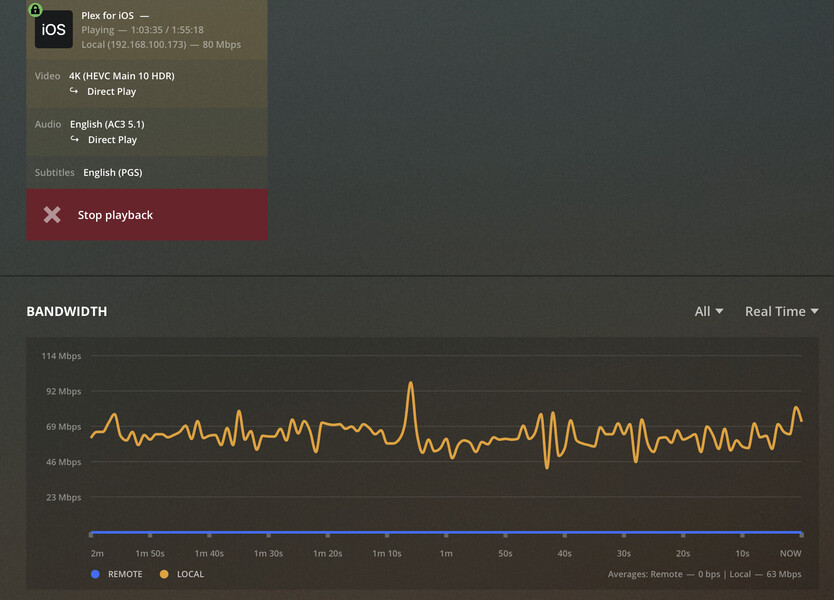

 , here’s a screenshot of playback of a 4k 60FPS video I recorded with my cellphone. No frame drops and at a much higher than “high-end”
  bitrate (whatever that even means for a network stream of compressed data – bitrate encoding shouldn’t matter for Direct Play network transmissions, right?)
