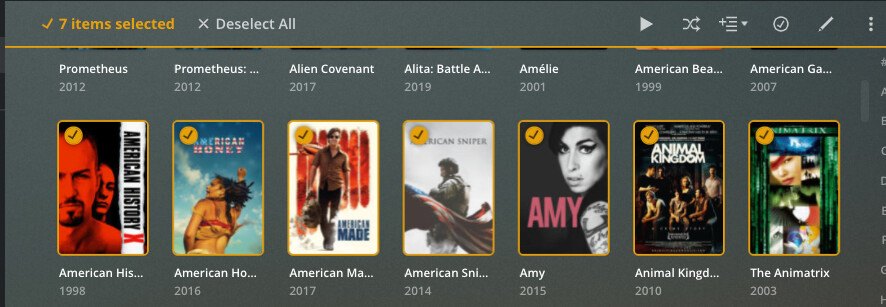
I have my movies organized by folder - that way of my 1700 movies when I search for action I don’t get 1200 responses (as some I’d think of as Bond, Superhero, Fantasy etc.
I’d love to remove the existing tag for genre of entire folders and replace it with a single tag. is there any easy way to do this?
This would solve 2 issues for me - currently you can’t customize a folder’s appearance and It would give me more sort options.
The How-To article linked below shows you how to select multiple items for editing. This will be most useful for adding a tag, as you can select as many as you want and add one or more tags to all of them. However, when you select multiple items, the Edit screen will only show you the tags that all selected items have in common. So if you want to remove a tag from, say, 50 movies, you have to select only those 50 movies. If you include a movie that doesn’t have that tag, it won’t appear, so you can’t remove it. https://forums.plex.tv/t/howto-selecting-multiple-items-for-edit-playlist-etc/149910/2
Thanks - but to put them in a collection as far as I know I have to edit each file and say it is a particular collection. Is there a way to highlight a group of them and make that change or is there a third party tool for that purpose? Even using the mouse and selecting one at a time is a bit of work trying not to open the movie - just select it and not unselecting etc. I’m not complaining about your answer - just looking to make sure I do it the most efficient way possible as I about 12 groups and several contain hundreds of movies.
Thanks for the response. If I refresh metadata will it overwrite my changes to their genre? Also is there a better way then selecting 1 at a time a few hundred movies and changing their dot to selected - e.g. use the mouse and highlight a group or something like CTRL A to select all?
When you add a label to the field, the padlock at the left end of the line turns orange. When it is orange, the field is locked, which protects the field from being overwritten by a refresh. There are some reports of this not always working, however.
Thanks so very much for the response. I’ll be honest, I was looking for a simple gui interface to select all the items in a folder and just change 1 field. Again, I appreciate the response - I just think I’d be better off putting that much effort into learning Mandarin or Sign Language.
You can shift click to select multiple items in a row.
Click the circle on the top left of the poster of the first one to select it
while holding down the shift key on your keyboard click the last one
click the edit button on top right of page ( the pencil)
enter something in the fields and it will affect all selected items when you save
Thanks everyone between this thread and another I have a much better understanding of collections. Once they add that sort by other feature, I’ll really be cooking with gas!