Server Version#: plexmediaserver_1.20.5.3583-309e93364_amd64
Player Version#: 1.23.0.1435-e10e14cf
I’ve recently had to reinstall my whole media server with a new OS since the root partition was too small. In doing so, I reinstalled Plex without keeping any of the existing data. Once I’d reinstalled, all James Bond movies got categorised into this; James Bond (2015) - IMDb
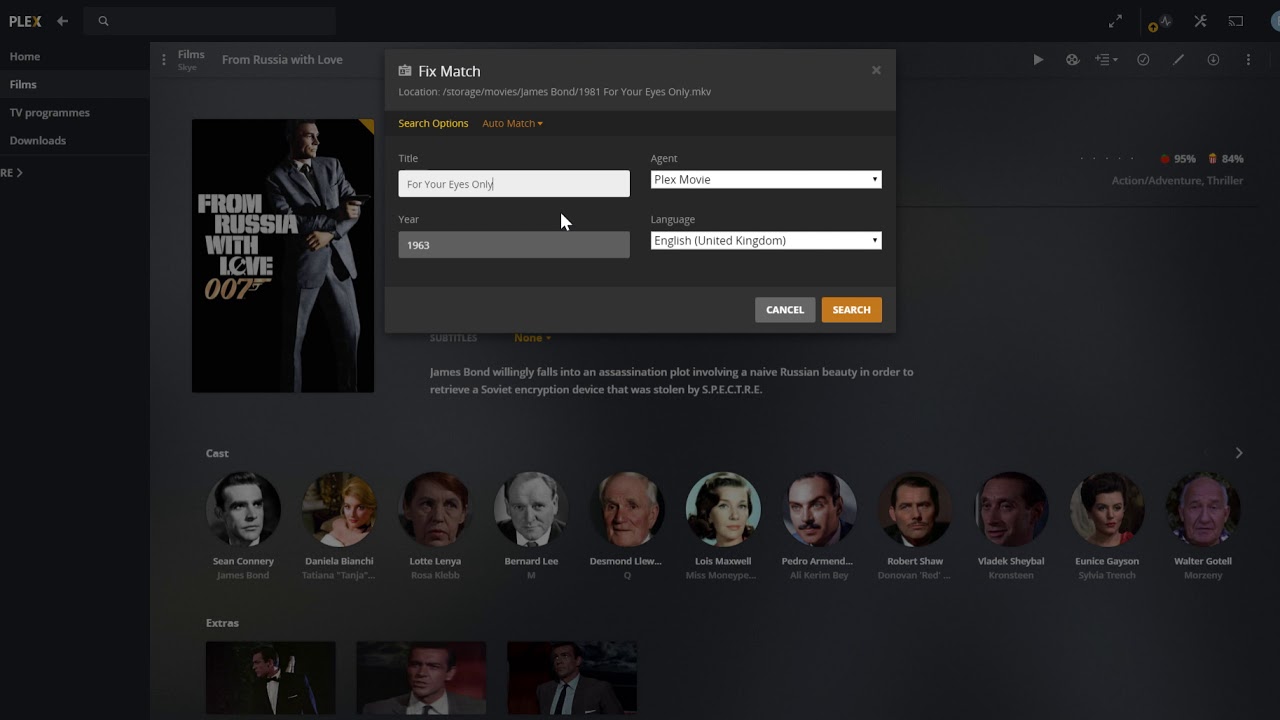
So I fixed the match of the first movie, From Russia With Love, then I Split the other movies out into their own From Russie With Love instances. Unfortunately, doing so has left me in a very weird state. Now I cannot fix the matches to their correct movies, and the search feature resets whatever I input to it. See the video below:
I’m quite sure this isn’t the only miscategorisation I’m going to find, but I don’t really want to get too involved in the process of debugging or diagnosing. Out of curiosity, I’ve just updated to 1.20.5.3600 and the issue persists.
If there are any helpful log files, point me at the default location for them on an Ubuntu 20.04 server and I’ll happily upload them.
The subdirectory with multiple James Bond movies will confuse the scanner.
This is bad:
/storage/movies/James Bond/1963 From Russia With Love.mkv
/storage/movies/James Bond/1981 For Your Eyes Only.mkv
This is the minimum recommended naming:
/storage/movies/For Your Eyes Only (1981).mkv
/storage/movies/From Russia With Love (1963).mkv
If you want to keep the Bond movies grouped on disk, you can move it out of the movies directory, and then add it as another directory to your Library.
I appreciate the reply but I intentionally left out asking that question (only mentioning that for context) - the media is organised as it is for various reasons and I have no objection to manually matching post-setup. The problem here is that I cannot search in the matching dialog for any value other than what it’s prepopulated with.
Filenames and subdirectories have meaning to Plex and contribute to the searching/matching process.
Plex is taking info from the directory and other files in it. If you don’t want Plex to do that, the most effective thing is to address the filenames and directory structure.
I don’t think you can tell Plex to completely ignore directories and override everything with a manual match. Although that might be nice I think it would be weird for the scanner.
You can try searching by IMDB ID, putting the “ttXXXXXXX” in the Title field. That might be weighted more strongly, despite the subdirectory structure. I’m not sure.