Issue upgrading plex - cannot create user "plex"

Server Version#: 1.30.1.6497
Player Version#: N/A

I have a server that has been running plex server on ubuntu for years without issue, thank you!

I’ve been having some play issues (no play on certain videos that had no problem a week ago) and thought a removal and re-installation may fix things.

Today I tried re-installing 1.30.1.6497 and the issue below of not being able to create the user “plex” appeared. Then I tried downgrading back to 1.30.0.6486 and the issue persisted.
So I manually added the user plex to the correct GID and tried installing 1.30.0.6486 again, this output is the second output. I’m not sure what to do next, and the initial error said “PlexMediaServer install: Assistance is available in our Support Forums.” so here I am.

sudo apt install plexmediaserver 
Reading package lists... Done
Building dependency tree... Done
Reading state information... Done
The following NEW packages will be installed:
  plexmediaserver
0 upgraded, 1 newly installed, 0 to remove and 0 not upgraded.
Need to get 85.1 MB of archives.
After this operation, 250 MB of additional disk space will be used.
Get:1 http://internal.server/repos/apt/debian jammy/main amd64 plexmediaserver amd64 1.30.0.6486-629d58034 [85.1 MB]
Fetched 85.1 MB in 1s (79.1 MB/s)           
Selecting previously unselected package plexmediaserver.
(Reading database ... 127276 files and directories currently installed.)
Preparing to unpack .../plexmediaserver_1.30.0.6486-629d58034_amd64.deb ...
PlexMediaServer install: Pre-installation Validation.
PlexMediaServer install: Pre-installation Validation complete.
Unpacking plexmediaserver (1.30.0.6486-629d58034) ...
Setting up plexmediaserver (1.30.0.6486-629d58034) ...
PlexMediaServer install: PlexMediaServer-1.30.0.6486-629d58034 - Installation starting.
PlexMediaServer install: 
PlexMediaServer install: Now installing based on:
PlexMediaServer install:   Installation Type:   New
PlexMediaServer install:   Process Control:     systemd
PlexMediaServer install:   Plex User:           plex
PlexMediaServer install:   Plex Group:          plex
PlexMediaServer install:   Video Group:         video
PlexMediaServer install:   Metadata Dir:        /var/lib/plexmediaserver/Library/Application Support
PlexMediaServer install:   Temp Directory:      /tmp 
PlexMediaServer install:   Lang Encoding:       en_US.UTF-8
PlexMediaServer install:   Processor:           Intel(R) Xeon(R) CPU E5-2630L v2 @ 2.40GHz
PlexMediaServer install:   Intel i915 Hardware: Not found
PlexMediaServer install:   Nvidia GPU card:     Found
PlexMediaServer install:  
PlexMediaServer install: Completing final configuration.
useradd: group plex exists - if you want to add this user to that group, use -g.
PlexMediaServer install: ERROR: Cannot create user "plex".  Error:  0
groups: ‘plex’: no such user
usermod: user 'plex' does not exist
PlexMediaServer install: ERROR: Cannot add 'plex' to video group 'video'. Error:  0
usermod: user 'plex' does not exist
PlexMediaServer install: WARNING:  Could not add 'plex' to video group 'video'.  Error  0
PlexMediaServer install: Plex Media Server: ver PlexMediaServer-1.30.0.6486-629d58034 - Installation failed. Final configuration not performed.
PlexMediaServer install: Assistance is available in our Support Forums.
PlexMediaServer install: both
dpkg: error processing package plexmediaserver (--configure):
 installed plexmediaserver package post-installation script subprocess returned error exit status 255
Processing triggers for mailcap (3.70+nmu1ubuntu1) ...
Errors were encountered while processing:
 plexmediaserver
E: Sub-process /usr/bin/dpkg returned an error code (1)

sudo apt install plexmediaserver 
Reading package lists... Done
Building dependency tree... Done
Reading state information... Done
plexmediaserver is already the newest version (1.30.0.6486-629d58034).
0 upgraded, 0 newly installed, 0 to remove and 0 not upgraded.
1 not fully installed or removed.
After this operation, 0 B of additional disk space will be used.
Do you want to continue? [Y/n] y
Setting up plexmediaserver (1.30.0.6486-629d58034) ...
PlexMediaServer install: PlexMediaServer-1.30.0.6486-629d58034 - Installation starting.
PlexMediaServer install: 
PlexMediaServer install: Now installing based on:
PlexMediaServer install:   Installation Type:   New
PlexMediaServer install:   Process Control:     systemd
PlexMediaServer install:   Plex User:           plex
PlexMediaServer install:   Plex Group:          plex
PlexMediaServer install:   Video Group:         video
PlexMediaServer install:   Metadata Dir:        /var/lib/plexmediaserver/Library/Application Support
PlexMediaServer install:   Temp Directory:      /tmp 
PlexMediaServer install:   Lang Encoding:       en_US.UTF-8
PlexMediaServer install:   Processor:           Intel(R) Xeon(R) CPU E5-2630L v2 @ 2.40GHz
PlexMediaServer install:   Intel i915 Hardware: Not found
PlexMediaServer install:   Nvidia GPU card:     Found
PlexMediaServer install:  
PlexMediaServer install: Completing final configuration.
useradd: user 'plex' already exists
PlexMediaServer install: ERROR: Cannot create user "plex".  Error:  0
PlexMediaServer install: Plex Media Server: ver PlexMediaServer-1.30.0.6486-629d58034 - Installation failed. Final configuration not performed.
PlexMediaServer install: Assistance is available in our Support Forums.
PlexMediaServer install: both
dpkg: error processing package plexmediaserver (--configure):
 installed plexmediaserver package post-installation script subprocess returned error exit status 255
Errors were encountered while processing:
 plexmediaserver
E: Sub-process /usr/bin/dpkg returned an error code (1)

Which version of Ubuntu?

I would also like you to perform the following from the terminal command line

sudo grep plex /etc/passwd /etc/group /etc/shadow
systemctl status plexmediaserver
ls -la /var/lib/plexmediaserver
cat /tmp/plexinstaller.log      (if it exists)

Highlight all the text with your mouse, right-click COPY, and then Paste here with your reply.

What you’re showing looks like you tried to invoke dpkg without being sudo or root

I was definitely root user.

OS was just upgraded last week, given the timing this may have something to do with the re-encoding issue that got me started with reinstalling plex.

Welcome to Ubuntu 22.04.1 LTS (GNU/Linux 5.15.0-56-generic x86_64)
sudo grep plex /etc/passwd /etc/group /etc/shadow
/etc/passwd:plex:x:1004:997::/home/plex:/bin/sh
/etc/group:video:x:44:plex
/etc/group:plex:x:997:zenon
/etc/shadow:plex:!:19353:0:99999:7:::
systemctl status plexmediaserver
Unit plexmediaserver.service could not be found.
ls -la /var/lib/plexmediaserver
total 12
drwxr-xr-x  3  997 plex 4096 Dec 26 20:40 .
drwxr-xr-x 60 root root 4096 Dec 20 16:43 ..
drwxr-xr-x  3 root root 4096 Dec 26 20:40 Library

tree
.
└── Library
    └── Application Support
        └── Plex Media Server

3 directories, 0 files

Ahhhhh, have all my thumbnails and media data been wiped???

cat /tmp/plexinstaller.log
# Plex Media Server installation configuration info:  Mon Dec 26 20:45:48 CST 2022
Init=0
Systemd=1
Custom=0
LinuxContainer=0
NewInstall=1
HaveOverride=0
OverrideFile=""
PlexUser="plex"
PlexGroup="plex"
VideoGroup="video"
AppSuppDir="/var/lib/plexmediaserver/Library/Application Support"
PlexTempDir="/tmp"
LangEncoding="en_US.UTF-8"
ExistingVersion=0
DistroName="ubuntu"
DistroVersion="2204"
HaveHardware=1
HaveTranscoderPref=0
NeedUser=1
NeedGroup=0
NeedVideo=1
Verbose=1
Running=0
Errors=0
Warnings=0
Havei915=0
HaveNvidia=1
Platform="Z9PE-D16 Series"
Processor="Intel(R) Xeon(R) CPU E5-2630L v2 @ 2.40GHz"
Distro="Ubuntu 22.04.1 LTS"
Kernel="Linux ubuntu-server 5.15.0-56-generic #62-Ubuntu SMP Tue Nov 22 19:54:14 UTC 2022 x86_64 x86_64 x86_64 GNU/Linux"
Memory="64352 2047 57510"

There is a lot going on here:

  1. ‘plex’ was created manually, as a normal user account
    with a home directory of /home/plex instead of /var/lib/plexmediaserver
    – The Installer will create all this configured as it should be

  2. From the ‘tree’ command above, supported by the directory listings, it appears as if the entire root partition of the machine was formatted with any previous PMS server instance in /var/lib/plexmediaserver wiped out at the OS level at time of OS install.
    Is the server instance elsewhere on the host ???

  • Was PMS previously customized by /etc/systemd/system/plexmediaserver.serviced/override.conf ?
  1. This was a manual ‘chown -R’ at some point ??
ls -la /var/lib/plexmediaserver
total 12
drwxr-xr-x  3  997 plex 4096 Dec 26 20:40 .
drwxr-xr-x 60 root root 4096 Dec 20 16:43 ..
drwxr-xr-x  3 root root 4096 Dec 26 20:40 Library

Trying to figure out what’s happening here:
Here’s where things stop making sense:

  1. The first thing preinstall does is take an inventory of what it has and what’s needed.; PlexUser(plex), PlexGroup(plex), AppSuppDir(/var/lib/plexmediaserver)

# Do we need to create the user?
if [ "$(getent passwd "$PlexUser" | wc -l)" -gt 0 ]; then
  NeedUser=0
fi

# Do we need to create the group (fix previous ill deeds done)
if [ "$(getent group "$PlexGroup" | wc -l)" -gt 0 ]; then
  NeedGroup=0
fi

# If we have a AppSuppDir & User & Group then it's an update.
if [ -d "$AppSuppDir" ] && [ $NeedUser -eq 0 ] && [ $NeedGroup -eq 0 ]; then
  NewInstall=0
fi
  1. If any of these exist, then we don’t have a ‘new’ installation condition. It’s an upgrade / fill in the blanks. The installer log shows a NewInstall
cat /tmp/plexinstaller.log
# Plex Media Server installation configuration info:  Mon Dec 26 20:45:48 CST 2022
Init=0
Systemd=1
Custom=0
LinuxContainer=0
NewInstall=1

This is NOT a new install by any means.

  1. ‘plex’ exists.
  2. ‘plex’ is a member of the video group (HW transcoding)
  3. ‘/var/lib/plexmediaserver’ exists (wrong owner but does exist)

This part looks like a previous attempt was interrupted before completing and resulted in a half-configured PMS

Preparing to unpack .../plexmediaserver_1.30.0.6486-629d58034_amd64.deb ...
PlexMediaServer install: Pre-installation Validation.
PlexMediaServer install: Pre-installation Validation complete.
Unpacking plexmediaserver (1.30.0.6486-629d58034) ...
Setting up plexmediaserver (1.30.0.6486-629d58034) ...
PlexMediaServer install: PlexMediaServer-1.30.0.6486-629d58034 - Installation starting.
PlexMediaServer install: 
PlexMediaServer install: Now installing based on:
PlexMediaServer install:   Installation Type:   New
PlexMediaServer install:   Process Control:     systemd
PlexMediaServer install:   Plex User:           plex
PlexMediaServer install:   Plex Group:          plex
PlexMediaServer install:   Video Group:         video
PlexMediaServer install:   Metadata Dir:        /var/lib/plexmediaserver/Library/Application Support
PlexMediaServer install:   Temp Directory:      /tmp 
PlexMediaServer install:   Lang Encoding:       en_US.UTF-8
PlexMediaServer install:   Processor:           Intel(R) Xeon(R) CPU E5-2630L v2 @ 2.40GHz
PlexMediaServer install:   Intel i915 Hardware: Not found
PlexMediaServer install:   Nvidia GPU card:     Found
PlexMediaServer install:  
PlexMediaServer install: Completing final configuration.
useradd: group plex exists - if you want to add this user to that group, use -g.
PlexMediaServer install: ERROR: Cannot create user "plex".  Error:  0
groups: ‘plex’: no such user
usermod: user 'plex' does not exist
PlexMediaServer install: ERROR: Cannot add 'plex' to video group 'video'. Error:  0
usermod: user 'plex' does not exist
PlexMediaServer install: WARNING:  Could not add 'plex' to video group 'video'.  Error  0
PlexMediaServer install: Plex Media Server: ver PlexMediaServer-1.30.0.6486-629d58034 - Installation failed. Final configuration not performed.
PlexMediaServer install: Assistance is available in our Support Forums.
PlexMediaServer install: both
dpkg: error processing package plexmediaserver (--configure):
 installed plexmediaserver package post-installation script subprocess returned error exit status 255
Processing triggers for mailcap (3.70+nmu1ubuntu1) ...
Errors were encountered while processing:

Please notice the exit code 255 -

 installed plexmediaserver package post-installation script subprocess returned error exit status 255

We get to error code 255 (Fall out the bottom of the script) when: It’s not init, or systemd, or docker and absolutely nothing else makes sense.

Here’s my code which generates this:


  # Output final message
  if [ $Fail -eq 0 ]; then
    Output "$PMSver - Installation successful.  Errors: $Errors, Warnings: $Warnings"
    exit 0
  else
    Output "$PMSver - Installation failed.  Errors: $Errors, Warnings: $Warnings"
    Output "Additional assistance and support is available in our forums."
    exit 1
  fi


else

  # Reaching this point is inpossible unless user hand-crafted the log file then ran plexmediaserver.postinst manually.  Error.
  Output both "Installation aborted. Catastrophic failure during installation.  Please save file: \"/tmp/plexinstaller.log\" and seek help in our Support Forums."
  exit 255

fi

What happened?

Where is the old Plex install? If it was in /var/lib/plexmediaserver, Ubuntu server install erased that.

I’ll read through this in more detail, beforehand I will add that this issue arose and I tried adding the plex user manually to see if that made any difference and it didn’t so I then posted here. That was my clueless attempt to resolve the issue.

The plex user was setup several years ago automatically by plex, and like I said in the original post the software has been great until the issues starting this week.

At one point in my notes I had made a comment about performing the following command if experiencing issues with plex upgrading, I did run the command after apt uninstall / install was failing.

sudo apt purge plexmediaserver

I never did anything with override.conf.

cat /etc/systemd/system/plexmediaserver.serviced/override.conf
cat: /etc/systemd/system/plexmediaserver.serviced/override.conf: No such file or directory

This was a manual ‘chown -R’ at some point ??

No, I was similarly shocked to see that ownership.

Where is the old Plex install? If it was in /var/lib/plexmediaserver, Ubuntu server install erased that.

I don’t think the Ubuntu upgrade from 20.04.5 LTS to 22.04.1 LTS did anything to plex, after the upgrade plex was functioning, the library and metadata all looked to be okay, but I was finding some movies weren’t transcoding. A transcode process would show in “nvidia-smi” but a black screen is all I would see in the web-browser interface, and android app, oddly iPad was able to play, I’m not sure if it was direct streaming.
I store everything with an archival quality h265 encode with complex encoder flags for high compression, most devices need the original transcoded down to a more digestible stream so I have pretty much all devices set to request server transcode. With NVENC everything runs very nice aside from a glitch that chops off the last couple minutes of every file.

This erases everything from your server — INCLUDING the full server instance / metadata

At this point, it’s probably best to do a full reset and let the installer start over.

I don’t know what you have in /home/plex but that’s not created by the installer under systemd.

I’ll leave ‘/home/plex’ for you to decide if you need/want to keep it or delete it.

I would like you to do the following

sudo bash

# Make sure PMS is completely gone
systemctl stop plexmediaserver
apt remove plexmediaserver --purge

# Make sure 'plex' is gone
userdel plex
groupdel plex
rm -rf /var/lib/plexmediaserver

# Now check for any 'plex' residuals  (should be nothing left)
grep plex /etc/passwd /etc/group /etc/shadow


## Now install PMS 
dpkg -i    filename.deb

## it will autostart PMS

Open an incognito browser window
http://127.0.0.1:32400/web

reclaim it / start setup

No problem by me with scorching the earth…

Here is the input/output for each command, if not output below then the system had no output to the command.

systemctl stop plexmediaserver
Failed to stop plexmediaserver.service: Unit plexmediaserver.service not loaded.
root@ubuntu-server:/home/zenon/debian-repo# 
root@ubuntu-server:/home/zenon/debian-repo# apt remove plexmediaserver --purge
Reading package lists... Done
Building dependency tree... Done
Reading state information... Done
The following packages will be REMOVED:
  plexmediaserver*
0 upgraded, 0 newly installed, 1 to remove and 0 not upgraded.
After this operation, 0 B of additional disk space will be used.
Do you want to continue? [Y/n] y
(Reading database ... 127276 files and directories currently installed.)
Purging configuration files for plexmediaserver (1.30.0.6486-629d58034) ...
userdel: user 'plex' does not exist
rm: cannot remove '/var/lib/plexmediaserver': Device or resource busy
dpkg: error processing package plexmediaserver (--purge):
 installed plexmediaserver package post-removal script subprocess returned error exit status 1
Errors were encountered while processing:
 plexmediaserver
E: Sub-process /usr/bin/dpkg returned an error code (1)
userdel plex
userdel: user 'plex' does not exist
groupdel plex
rm -rf /var/lib/plexmediaserver
rm: cannot remove '/var/lib/plexmediaserver': Device or resource busy
grep plex /etc/passwd /etc/group /etc/shadow
apt remove plexmediaserver --purge
Reading package lists... Done
Building dependency tree... Done
Reading state information... Done
The following packages will be REMOVED:
  plexmediaserver*
0 upgraded, 0 newly installed, 1 to remove and 0 not upgraded.
After this operation, 0 B of additional disk space will be used.
Do you want to continue? [Y/n] y^[[A
(Reading database ... 127276 files and directories currently installed.)
Purging configuration files for plexmediaserver (1.30.0.6486-629d58034) ...
userdel: user 'plex' does not exist
rm: cannot remove '/var/lib/plexmediaserver': Device or resource busy
dpkg: error processing package plexmediaserver (--purge):
 installed plexmediaserver package post-removal script subprocess returned error exit status 1
Errors were encountered while processing:
 plexmediaserver
E: Sub-process /usr/bin/dpkg returned an error code (1)
apt install plexmediaserver
Reading package lists... Done
Building dependency tree... Done
Reading state information... Done
The following NEW packages will be installed:
  plexmediaserver
0 upgraded, 1 newly installed, 0 to remove and 0 not upgraded.
Need to get 0 B/85.1 MB of archives.
After this operation, 250 MB of additional disk space will be used.
(Reading database ... 127276 files and directories currently installed.)
Preparing to unpack .../plexmediaserver_1.30.0.6486-629d58034_amd64.deb ...
PlexMediaServer install: Pre-installation Validation.
PlexMediaServer install: Pre-installation Validation complete.
Unpacking plexmediaserver (1.30.0.6486-629d58034) ...
Setting up plexmediaserver (1.30.0.6486-629d58034) ...
PlexMediaServer install: PlexMediaServer-1.30.0.6486-629d58034 - Installation starting.
PlexMediaServer install: 
PlexMediaServer install: Now installing based on:
PlexMediaServer install:   Installation Type:   New
PlexMediaServer install:   Process Control:     systemd
PlexMediaServer install:   Plex User:           plex
PlexMediaServer install:   Plex Group:          plex
PlexMediaServer install:   Video Group:         video
PlexMediaServer install:   Metadata Dir:        /var/lib/plexmediaserver/Library/Application Support
PlexMediaServer install:   Temp Directory:      /tmp 
PlexMediaServer install:   Lang Encoding:       en_US.UTF-8
PlexMediaServer install:   Processor:           Intel(R) Xeon(R) CPU E5-2630L v2 @ 2.40GHz
PlexMediaServer install:   Intel i915 Hardware: Not found
PlexMediaServer install:   Nvidia GPU card:     Found
PlexMediaServer install:  
PlexMediaServer install: Completing final configuration.
PlexMediaServer install: PlexMediaServer-1.30.0.6486-629d58034 - Installation successful.  Errors: 0, Warnings: 0
Processing triggers for mailcap (3.70+nmu1ubuntu1) ...

I then went to http://127.0.0.1:32400/web, logged into my plex ID. Now all I see is a grey screen and a yellow spinning icon, for several minutes already. Logging into my plex account it says my server is currently unavailable. It might be busy indexing, but I don’t think so since my media is not stored in any sort of default location and given the scorched earth approach I expected to be required to re-map my content location.

It does look like plex is running:

service plexmediaserver status
● plexmediaserver.service - Plex Media Server
     Loaded: loaded (/lib/systemd/system/plexmediaserver.service; enabled; vendor preset: enabled)
     Active: active (running) since Wed 2022-12-28 15:27:05 CST; 1min 53s ago
    Process: 802776 ExecStartPre=/bin/sh -c /usr/bin/test -d "${PLEX_MEDIA_SERVER_APPLICATION_SUPPORT_DIR}" || /bin/mkdir -p "${PLEX_MEDIA_SERVER_APPLICATION_SUPPORT_DIR}" (code=exited, status=0/SUCCESS)
   Main PID: 802778 (Plex Media Serv)
      Tasks: 112 (limit: 77089)
     Memory: 224.3M
        CPU: 31.479s
     CGroup: /system.slice/plexmediaserver.service
             ├─802778 "/usr/lib/plexmediaserver/Plex Media Server"
             ├─802824 "Plex Plug-in [com.plexapp.system]" /usr/lib/plexmediaserver/Resources/Plug-ins-629d58034/Framework.bundle/Contents/Resources/Versions/2/Python/bootstrap.py --server-version 1.30.0>
             ├─802924 "/usr/lib/plexmediaserver/Plex Tuner Service" /usr/lib/plexmediaserver/Resources/Tuner/Private /usr/lib/plexmediaserver/Resources/Tuner/Shared 1.30.0.6486-629d58034 32600
             ├─802954 "Plex Plug-in [com.plexapp.agents.thetvdb]" /usr/lib/plexmediaserver/Resources/Plug-ins-629d58034/Framework.bundle/Contents/Resources/Versions/2/Python/bootstrap.py --server-versio>
             ├─802957 "Plex Plug-in [org.musicbrainz.agents.music]" /usr/lib/plexmediaserver/Resources/Plug-ins-629d58034/Framework.bundle/Contents/Resources/Versions/2/Python/bootstrap.py --server-vers>
             ├─803141 "Plex Plug-in [tv.plex.agents.movie]" /usr/lib/plexmediaserver/Resources/Plug-ins-629d58034/Framework.bundle/Contents/Resources/Versions/2/Python/bootstrap.py --server-version 1.30>
             ├─803149 "Plex Plug-in [tv.plex.agents.series]" /usr/lib/plexmediaserver/Resources/Plug-ins-629d58034/Framework.bundle/Contents/Resources/Versions/2/Python/bootstrap.py --server-version 1.3>
             ├─803327 "Plex Plug-in [tv.plex.agents.music]" /usr/lib/plexmediaserver/Resources/Plug-ins-629d58034/Framework.bundle/Contents/Resources/Versions/2/Python/bootstrap.py --server-version 1.30>
             └─803509 "Plex Plug-in [com.plexapp.agents.imdb]" /usr/lib/plexmediaserver/Resources/Plug-ins-629d58034/Framework.bundle/Contents/Resources/Versions/2/Python/bootstrap.py --server-version 1>

Dec 28 15:27:05 ubuntu-server systemd[1]: Starting Plex Media Server...
Dec 28 15:27:05 ubuntu-server systemd[1]: Started Plex Media Server.
lines 1-21/21 (END)

The browser is stupid.

Control + F5

Refresh Reload and you’ll be fine.

Thanks!
I’m finally up and running.

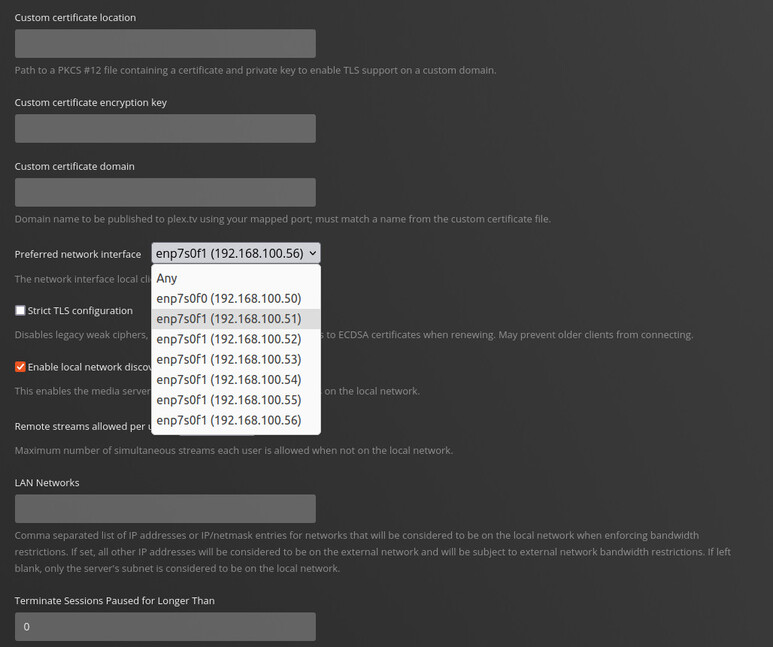
For some reason it’s not taking my preferred network interface selection of 192.168.100.51, it keeps reverting back to 192.168.100.56.

Also, it’s showing that my server is not reachable from outside my network, but I think this is just because my firewall routing is pointed to 192.168.100.51 and the plex keeps defaulting to 192.168.100.56.

What’s the default adapter for the host.

I’ve never had any luck with “preferred” adapter because there is no control in PMS over which port it sends from

It’s just defaulted to the interface, not the virtual IP

route -n
Kernel IP routing table
Destination     Gateway         Genmask         Flags Metric Ref    Use Iface
0.0.0.0         192.168.100.1   0.0.0.0         UG    0      0        0 enp7s0f1

Going in through plex.tv does work, so I think I’m all set for today.
Tomorrow I’ll see if the transcoding gremlins still exist…

It won’t use the aliases the way you want. It will always go with the real adapter.

The full purge has eliminated a few gremlins, so far all is good… I’ll keep testing… THANKS!!

This topic was automatically closed 90 days after the last reply. New replies are no longer allowed.