I am using Plex Web Version 4.33.1, and the Server version is Version 1.18.5.2309 and it’s running on a NAS Synology DS1019+. the server works great, and I have no issues playing content in every device, except for Plex Web (I’ve tried in both Safari and Chrome). I don’t know what the issue is, and I don’t even know how it’s called in English so I can’t look for it on Google. So I was hoping maybe someone here can give me the name of the issue in English or how to solve it. Basically what is happening is that the screen looks like a really old tv when cable was down.
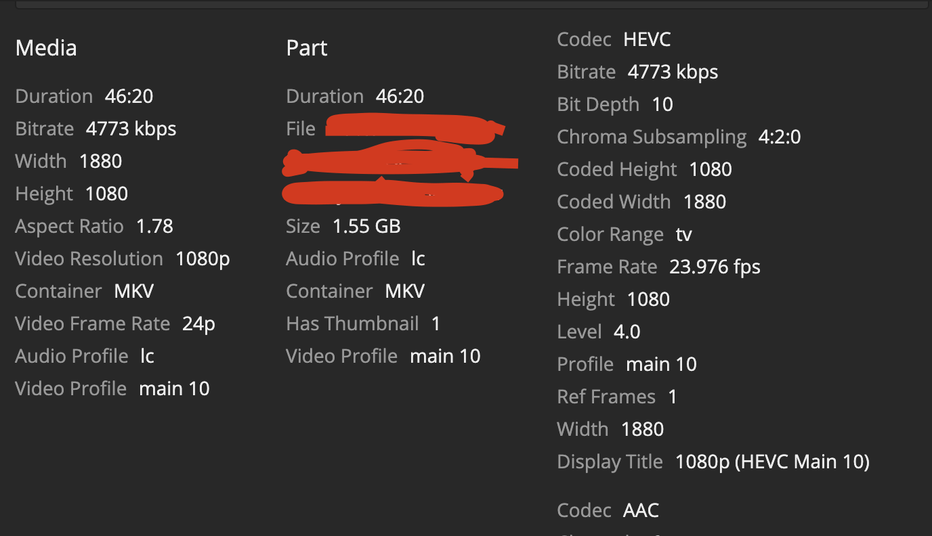
Also, the item plays, I can see changes in the screen and I have sound as well. But the images always look like this. Item’s that have this issue, are 1080p (HEVC Main 10) and with Audio (AAC 5.1). But here comes the interesting part. This issue doesn’t happen all the time. It’s random!
But then why does the same item in the same playing quality, plays normally in an iPad/iPhone/TV but not on Plex Web? I think it may be something going on with the Web Player for specific items. or maybe I have something in my own web player setup?
Keep in mind the Web Player has the most restrictions as browsers only support a small amount of codecs and audio/video formats. Therefore a video that can be played without transcoding in your other clients might still require to be transcoded for the playback in Plex Web.
Most browsers won’t direct play HEVC.
Have you made any changes to the settings in Settings > [server] > Transcoder?
Transcoder quality: Automatic
Transcoder default throttle buffer: 60
Background transcoding x264 preset: Very fast
Disable video stream transcoding: NO
Use hardware acceleration when available: YES
Use hardware-accelerated video encoding: YES
Maximum simultaneous video transcode: Unlimited
I am aware that re encoding the files with a different video codec such as x264 will solve the issue, but I’d rather not to, for 2 reasons. 1. File size and 2. I have too many files with that codec at this point of my life, I haven’t really noticed it because I mainly watched Plex on the Smart TV app, but recently I’ve added friends and they all see my content on Chrome, and they’ve just told me about this issue. Once I tried I realised it also happened to me.
What SE56 proposes is not to re-encode the content… it’s just re-packaging the file (re-muxing) into an mkv container with proper sequence of headers, tags etc. that might help the player to play the video after all.
The input format can be a multitude of containers like AVI, MP4, MKV , MPEG, TS, DIVX and several more. The quality of the files will remain the same, because mkvtoolnix only remuxes the files , it doesn’t re-encode them.
Consider upgrading to a current release. There is a transcoder problem that was fixed in 1.18.7.2415. The problem affects Apollo Lake CPUs, which is the type in your NAS (Celeron J3455).
(Transcoder) Hardware decoding could produce corrupt video when burning subtitles on Apollo Lake-based processors. (#10753)
As a test, disable hardware accelerated transcoding and see if the problem disappears. The video may buffer, as the CPU will have trouble keeping up, but it should be clear.
The current public release is 1.19.3.2764. The current beta release is 1.19.3.2793.