I continue to have issues with Plex. What is the best agent to use? I have tried practically all with issues with them all. When I refresh meta data I have found that it has deleted movies, some movies are put into a collection all of its own, some movies that are in a folder that plex looks in and have always found, in plex the movie is not found. I have even tried to move the actual movie file onto my desktop, delete the movie file, then copy the movie back into the scanned folder and plex does not recognize it. Some movies under original title shows a different language even though the language for the plex library is set to english. Some movie titles have been changed from the previous name of the movie that was correct, now the title is incorrect. Everytime I refresh metadata, it creates way more issues. Please someone help, I am frustrated and pulling my hair out over these issues. I am not that versed in plex settings .
For things not found you need to be specific about file names and folder structure which is 90% of the time the issue.
Plex Movie
Minimum automatic collection size settings are in the advanced library settings. set it to only be created when you have 2, 3 or 4 movies are in the collection. or disable for them to not be created ( you can still make them manually)
If the original title is not english then that is what is supposed to show for example
Im Westen nichts Neues is in the original title field for the title All Quiet on the Western Front
if all the metadata is in the wrong language for a particular movie then edit that particular film and check the language in the advanced setting for that movie
thanks for the response, for the movie not found, its superman 3. It is in the s folder that has been set up a while back and all my other s movies are in it and are recognized by plex. Even when moving the superman 3 file out of the s folder, scanning library, then moving the movie file back into the s folder where all my other s movies are located, then do a library scan, it still does not recognize the movie. It did recognize this movie before.
minimum collection size, i have this disabled and it still creates a 1 movie collection and when it does this, there is no way to delete the collection itself without deleting the movie too. I tried to delete the collection and have the movie by itself like the other movies but it also deletes the movie with the collection. When i try to erase the tag, it says unable to be saved.
What folders are set up for your movie library? if you have them in individual alphabetic subfolder then each subfolder really needs to be added to the library folder setting instead of the parent like below for each subfolder before the individual movie folders.

Filter the library by duplicates and you might find it merged it as a different version of the first Superman or some other movie
To be clear it will not disable/remove collections that are already created. but deleting one definitely should not be deleting the movie in the collection as well. possibly some DB corruption if it will not save.
but just to be sure I understand you are deleting the one with the X Movies below it correct?


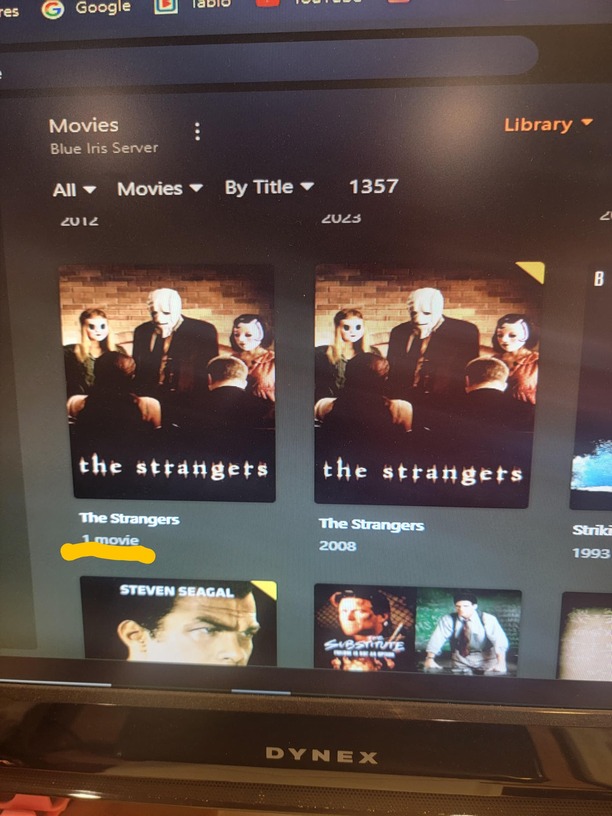
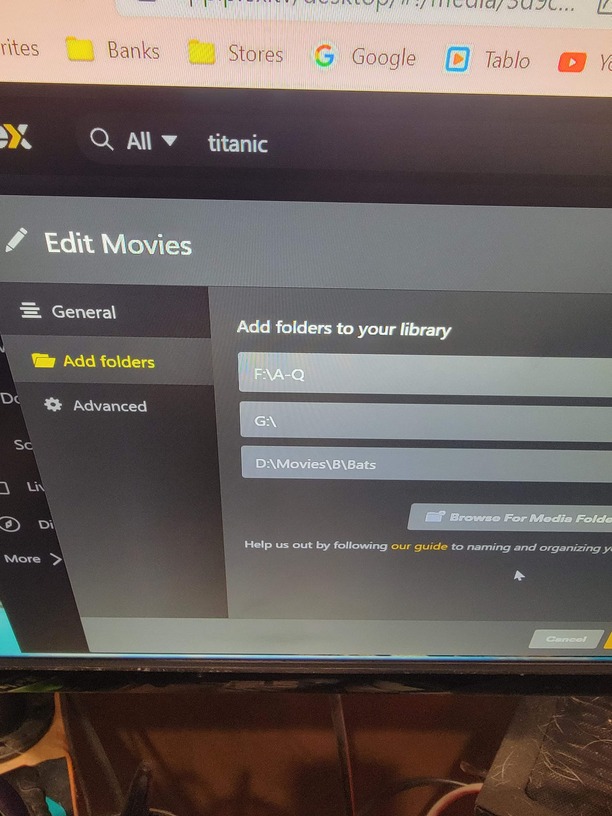
Also, when i go under duplicates it shows 45 movies, not quite sure what to do with that, am i suppose to delete the duplicates, that will not delete the orignals right
thank you for all the help and support you are giving appreciate it.
don’t do that . it will delete both.
I think you need to fix your folder structure and the folder paths you have. but I need to see what you actually have on the drives
If drive *F:* only goes to Q and Superman 3 is in the S folder which drive is that on?
You should not have the root of the drives listed there. So *G:* should not be on it’s own with movies at root of drive as it causes all sorts of problems. There should be a movies folder like you have in D:\Movies or alpha folders like you have with F
Can you take take a screenshot or give me the exact folder path to from the drive letter to the file name
Like if it is F:\S\Superman 3\Superman 3.mkv then F:\S\ should be listed there
This topic was automatically closed 90 days after the last reply. New replies are no longer allowed.
