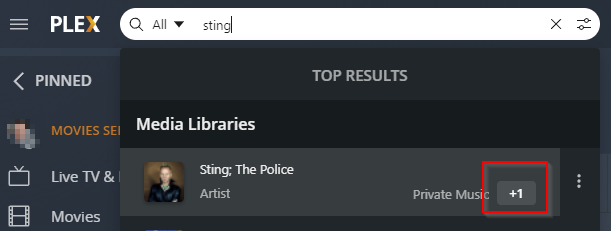
I recently removed my library and re-added the same source. I made sure that the database was cleaned and optimised, all metadata was scanned and refreshed several times and I am now noticing the PMS shows few entries in multiple duplicated databases and I can’t find a way to fix the issue
Hi, I have deleted only the Music Library. Most of the music content has been added just fine. The files that are shown in duplicated libraries don’t exist in the primary (and only one) Music library.
Here is the screen shot showing that I have only one Music library
If a search an Artist some artists have additional number next to a library name
If I click on the number I get the list of libraries with the same name
Ok, I have figured out why the issue only affects only certain songs.
I have just checked the NAS server and some artists exist in multiple folders, when PMS sees the same artist in another folder somewhat adds it to an a ‘new’ library.
Here’s how I have my Music folder structure:
ArtistA
ArtistB; ArtistA
ArtistA; ArtistC
In the above example PMS will show three libraries next to ArtistA
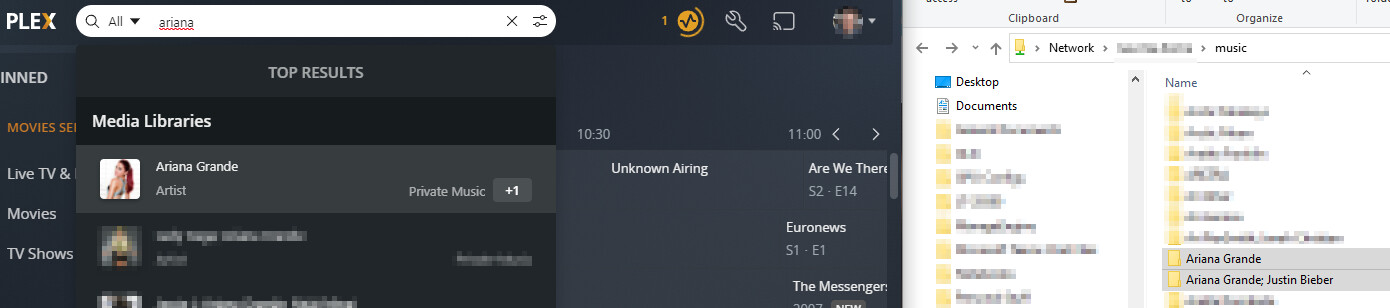
In the above example I am seeing “+1” in search results.
I have the main folder containing all albums of Ariana Grande, however there is an additional folder with an artist called “Ariana Grande; Justin Bieber”.
The same naming convention applies to the metadata.
This does not answer why I am seeing multiple sources when in reality I have only one.
Also I have never had this issue before and my music library hasn’t changed.
The issue only started when I re-created my Plex library. I think I have also updated PMS to its latest version at the same time.
You might have been using the older metadata agents in the older library. They behaved slightly different in some special cases.
But no, it isn’t a good idea to go back to these. They are already deprecated and won’t receive any bugfixes anymore.
Am I seeing that right? The music library is the only library on this server?
If that is the case, you could delete the database file completely. Just in case the database file is in some way damaged.
I do admit I juggled between the old and new agent at some point only because the new agent was a bit aggressive with overriding genres despite telling otherwise. All such changes were always followed by full rescan.
Yes only one. I could potentially delete the database. Will I lose server preferences also?
Depends on what you mean by that. Unless you delete the preferences.xml from your plex data folder, most preferences should survive.
That won’t do any good. Full rescan won’t help.
Go into the Advanced properties of the new library and set Genres to “Embedded Tags”.
Enable “Prefer local metadata” only if your embedded meta tags are immaculate.
I’m having the EXACT same issue. I’ve been tagging my music collection with mp3tag. I thought that maybe using musicbrainz was creating a problem. I have tried multiple “fixes” and none of them seem to work. I was trying to avoid the “nuclear” option of deleting the library and starting over. I’ve emptied the trash, changed the option of local metadata, logged out of the web app, etc… I’m beginning to believe it’s a problem with the server. I have albums where the odd numbered tracks will be under one source and the even tracks under another source.