Server Version#: 1.32.6.7371
Player Version#: does not matter
A little context.
I have three plex libraries, Movies, TV and Music.
Plex is running on physical hardware (Intel i7-9750H (12) @ 4.500GHz with NVIDIA GeForce RTX 2080 and 32GB RAM)
Weekly, I refresh the metadata of each of these to ensure I have the most up to date metadata. This typically runs flawlessly.
However, on Friday Aug 4th upon a refresh of the music library my PC lost all access to the network, both internal and external. I could not even ping my router. Upon checking I could see the network adaptor was unavailable.
Rebooted the machine and all everything came backup okay. So kicked off another refresh. Same thing happened, network became completely unavailable within approx 5 minutes. Couple more tries later I decided to rebuild the host OS so I done that.
Restored everything (I keep good backups) and all was well again UNTIL I force refreshed the metadata. Boom, same problem.
Watching stuff, listening to music etc… is all fine. Even scanning for new content is fine. It seems to manifest itself when doing large metadata refreshes.
One thing that might be a factor is that ubuntu 22.04 has moved this week to kernel 6.2.0-26. Maybe there is some bug in that kernel which plex is causing.
Anyhow, anyone else experiencing this ? @ChuckPa making you aware. Here is another one of those hard bugs which I always tend to find. Needless to say I have NEVER seen a network becoming unavailable like this, the only fix is a hard reboot of the OS.
Going to see if I can downgrade to kernel 5.19.0-32 when I have some time over the weekend.
There is a WiFi/BlueTooth driver problem which causes the network stack to fail from 5.17 & 5.19. It sounds like they still haven’t fixed it and now it’s worse on 6.2
Rather than downgrade, at startup, select the previous (5.19) kernel and run that way for a while.
Once you’ve regained stability. using another machine. setup iperf3 (one is the server process and one is the client). Use this to hammer the network stack and confirm status. Once confirmed, reboot to 6.2 and retest
Lastly,
Request you consider changing the title. This is a known Ubuntu issue and not a Plex issue
Thanks. I am aware of the wifi/bluetooth problems but this is the first time I’ve heard of it hitting the ethernet connection.
I’ll do as you suggest and change the title. I’m speculating the kernel is a factor and my gut feeling it is but then the question is if its the symptom or the cause
Regardless this could become a larger plex issue. I’d hate to have to setup my server from scratch as it would likely never finish the initial scan/metadata download. We’ll see I guess if others start to run into this.
For an application crashing your network stack, right after you graded an OS component, doesn’t point to the application in my eyes.
This very much has the “Who touched it last?” rule applicability.
The kernel and entire Ubuntu update is the latest change therefore it’s the biggest suspect.
FWIW, I have our lab machine on 23.04 (which is a different train) and it’s behaving correctly – HOWEVER – I have WiFi and BluTooth disabled on the host.
disabling bluetooth did not help – network became unavailable during force refresh of metadata
booted into 5.19 kernel – network did NOT become available – however, I need to re-validate this test as the nvidia drivers did not load correctly when I booted into a previous kernel
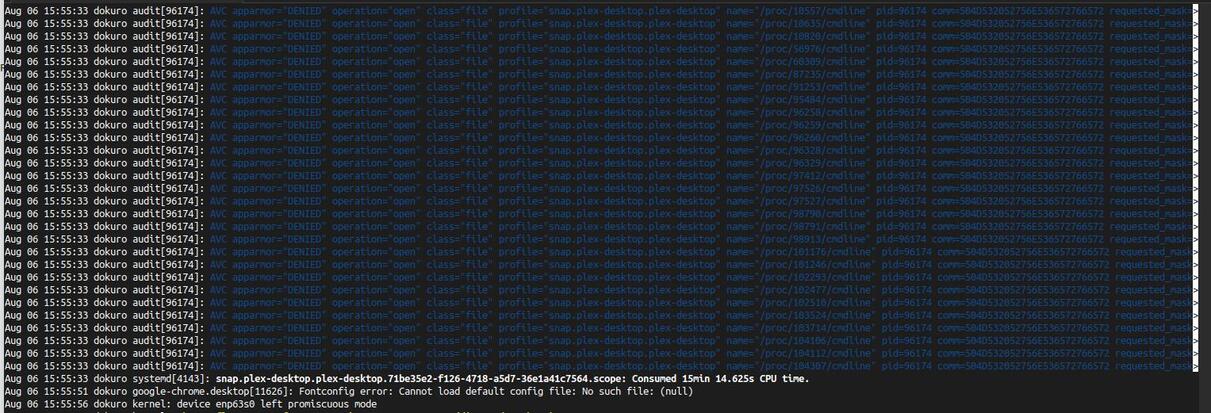
I also noticed something odd with snap.plex-desktop.plex-desktop right at the exact time the network becomes unavailable (screenshot below).
This appears to be the exact same issue I’m experiencing. Anyhow, making you aware in case anyone else on the forum starts to see network problems and blame plex
Another FYI… I had some time today to do responsible non rushed testing and can confirm this issue does NOT happen with kernel 5.19.0-50. For now I’m going to stick with that until a fix is identified with 6.2.0-26.
When 6.2 is fixed I’ll update this thread. Thanks.