@ChuckPa This still happens with server 1.31.2.6810 and app 5.55.2.
Please advice on how I can get this resolved. My offer to upload the full file that reproduces this issue stands.
If you cut a 100 MB sample using ‘dd’, will that sample reproduce it?
If so, please share. The transcoder team needs more than just my good looks to go on 
No, as I’ve written above:
Fair enough. I’ll send a PM so you can send the link.
IF, you run it through mkvtoolnix for a remux and it won’t fail anymore, that’s a solid indicator of damaged MKV index (which can happen)
Thanks, I’ll send you the link via PM.
It’s not damaged MKVs. As I’ve written above:
That’s a pretty badly banged up file in many regards.
Here’s what it should look like (rip from BluRay)
[chuck@glockner ~.1998]$ cd /vol/media/uhd/Jurassic\ Park\ \(1993\)/
[chuck@glockner Jurassic Park (1993).1999]$ ls -lah
total 50G
drwxr-xr-x   2 chuck chuck  46 May  9  2021 ./
drwxr-xr-x 304 chuck chuck 16K Mar 19 03:34 ../
-rw-r--r--   1 chuck chuck 50G May  9  2021 Jurassic Park (1993).mkv
[chuck@glockner Jurassic Park (1993).2000]$
Replace the file or use the remux
That file was just one example. I have at least 20 or 30 MKV files in my library that I know can trigger this bug.
In ALL the cases, is the problem remedied by remuxing the file (which corrects the timing markers in the file) ?
I’ll make my MKV into a MP4 for my LG to confirm I can’t break it that way.
No, in NONE of the cases that I tried did remuxing fix the problem.
My current theory is that all MKV files with SRT subtitles are affected. Because since that problem started to occur, I don’t remember a single MKV file (with SRT subtitles) that didn’t have that problem. But of course I can’t be sure because I don’t always seek when watching content.
Also, my findings are all for direct play. I nearly never have the need to transcode anything.
And I can’t say anything about containers other than MKV, because I only use MKV.
I’m sorry. I think I’ve been misunderstanding.
I’ve got all my required duties for the day complete.
I’m spinning the test files now for my LG (C1)
@ChuckPa Any news? Could you reproduce the problem with my sample?
I’ve not been able to make it fail.
Here, even now, with 1.32.0, all is fine.
[chuck@glockner media.2000]$ date;nvidia-smi
Thu 06 Apr 2023 09:09:58 AM EDT
Thu Apr  6 09:09:58 2023
+-----------------------------------------------------------------------------+
| NVIDIA-SMI 525.85.12    Driver Version: 525.85.12    CUDA Version: 12.0     |
|-------------------------------+----------------------+----------------------+
| GPU  Name        Persistence-M| Bus-Id        Disp.A | Volatile Uncorr. ECC |
| Fan  Temp  Perf  Pwr:Usage/Cap|         Memory-Usage | GPU-Util  Compute M. |
|                               |                      |               MIG M. |
|===============================+======================+======================|
|   0  Quadro P2200        On   | 00000000:07:00.0 Off |                  N/A |
| 58%   57C    P0    28W /  75W |    244MiB /  5120MiB |      1%      Default |
|                               |                      |                  N/A |
+-------------------------------+----------------------+----------------------+

+-----------------------------------------------------------------------------+
| Processes:                                                                  |
|  GPU   GI   CI        PID   Type   Process name                  GPU Memory |
|        ID   ID                                                   Usage      |
|=============================================================================|
|    0   N/A  N/A    154497      C   ...diaserver/Plex Transcoder      239MiB |
+-----------------------------------------------------------------------------+
[chuck@glockner media.2001]$

No more guessing here.
- DEBUG Logging ON
- VERBOSE logging OFF
- SAVE if changes made
- Playback and make it fail.
- Download Logs ZIP and attach
Here is the log file: Plex Media Server Logs_2023-04-06_15-42-00.zip (669.9 KB)
I’ve reproduced the error on the first try. You’ll find it in the log at timestamp Apr 06, 2023 15:40:38.670:
Apr 06, 2023 15:40:38.670 [0x7f6e46402b38] ERROR - [Req#15fb] [Plex for LG] [cremor:hn3o5tiz99m0tzx1cji9svgs] Playback error occurred. Reason: ServerTerminatedStream, Server terminated stream: Konvertierung fehlgeschlagen. Der Transcoder wurde aufgrund eines Fehlers beendet.
Konvertierung fehlgeschlagen. Der Transcoder wurde aufgrund eines Fehlers beendet is German for Conversion failed. The transcoder exited due to an error
I also want to mention again that the error message is missleading. There is no transcoding happening here! This is me playing the sample which reproduces the problem:

Plex Server 1.31.3.6868
Plex for LG 5.58.3
Du hast “DEBUG logging” vergessen
(Settings - Server - General - Show advanced )
(kann noch ein Bisschen lesen und schreiben)
Also have app version 5.58.3, platform 6.3.2 (with firmware update from LG last week)
Debug logging was enabled. Both on server and on client side.
I found it. had to go back further.
Apr 05, 2023 17:48:27.273 [0x7f6e4af9eb38] WARN - [MediaProviderManager] Unrecognized MediaProvider feature: availability-platforms
Apr 05, 2023 17:48:32.202 [0x7f6e4e11faa8] ERROR - Error creating directory "/transcode": Permission denied
Wherever the container is mapped to in the file system, there is no permission to create /transcode adjacent to /config
Recommend retesting with this value removed.
That must have been a leftover from old settings. I’ve cleared the “Transcoder temporary directory” field in the transcoder settings and now that error doesn’t show up in the log any more. But sadly the main problem is still there.
Here are new logs: Plex Media Server Logs_2023-04-06_21-12-00.zip (830.5 KB)
Those logs contain exactly the following steps:
- Server start (after I cleared the “Transcoder temporary directory” before).
- Reproducing the problem (without having debug logs enabled yet).
- Enabling debug logs (both on server and client)
- Reproducing the problem again (the error is at timestamp Apr 06, 2023 21:11:42.044)
Got it.
-
J3455 CPU (Syno or QNAP ?) –
-
Attempting subtitles
Apr 06, 2023 21:11:14.964 [0x7f034c561b38] DEBUG - [Req#49a] Audio Stream: 224, Subtitle Stream: 225
- As the video starts to come out – Player halts playback / exits app.
Apr 06, 2023 21:11:23.761 [0x7f034acdfb38] DEBUG - [Req#4ed/Transcode/xdxewo5wqafr7tulmzf0vn8k/8e98303a-6d18-4d75-831c-118bcc7513bf] Transcoder segment range: 0 - 2 (1)
Apr 06, 2023 21:11:24.172 [0x7f0350638b38] DEBUG - Failed to stream media, client probably disconnected after 20012808 bytes: 104 - Connection reset by peer
Apr 06, 2023 21:11:24.172 [0x7f0350638b38] DEBUG - Completed after connection close: [192.168.178.21:41286] 206 GET /library/parts/47/1385750412/file.mkv?Accept=application%2Fjson&Accept-Language=de (9 live) #4b9 3055ms 20012808 bytes (range: bytes=6794-)
The J3455 CPUs cannot burn subtitles – which is needed on that TV.
Turn OFF subtitles and play again.
On my machine:
- Direct stream without subtitles

- Forcing transcode from 61 Mbps → 20 Mbps
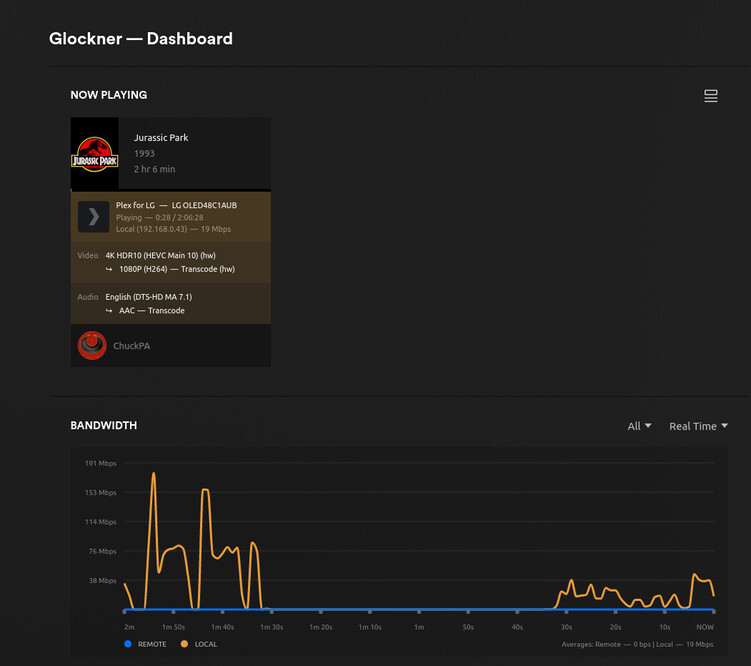
There is something in the LG (or any of the “Web TV” players AFAIK) that transcodes happen easily.
PGS , VOBSUB, DVDRIP guarantee it.
I’m using SRT with my LG and it will not accept them as overlay.
It is forcing a burn-in operation.

My Xeon has a lot of cores but no single core is fast enough to keep up with UHD.
Playback struggles but doesn’t fail
