LG C9 TV: Conversion failed. The transcoder exited due to an error happening occasionally

A) I don’t want the server to burn subtitles. I even have the “disable video stream transcoding” setting enabled on the server.

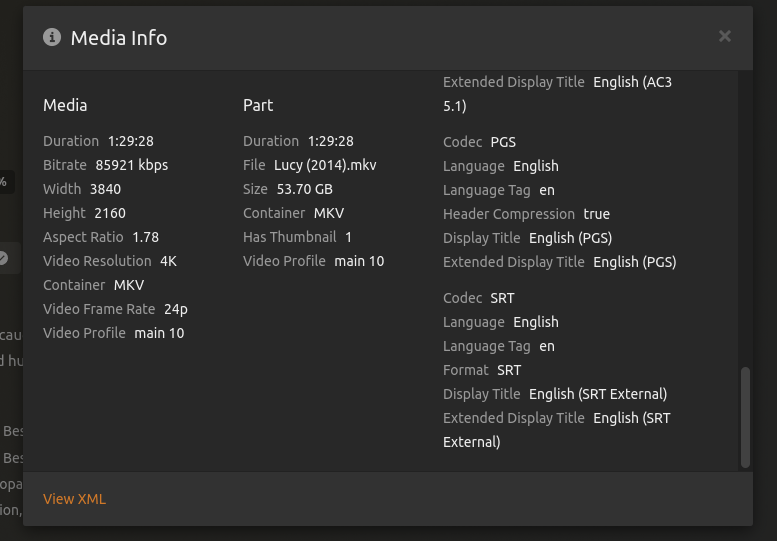
B) No, the TV does not need to burn SRT subtitles. I can watch all my media with SRT subtitles with direct play (as you can see in the screenshot in my post above) as long as I don’t seek during playback.

So I assume the bug is that something switches to subtitle burn in although it is not actually needed?

Yes, without subtitles I don’t have the problem. I’ve already written that before.
But that doesn’t help me. I want/need the subtitles.

This is what I’m trying to figure out now.

From their specs page:

Supported Embedded Subtitle Format
- Matroska (mkv) : Sub Station Alpha (SSA), Advanced Sub Station Alpha (ASS), SRT

It has to be a bug in the app.
I’m getting logs again now

Got it :smiling_imp:

Apr 06, 2023 15:52:54.052 [0x7f1f72622b38] DEBUG - Request: [192.168.0.43:38618 (Subnet)] GET /video/:/transcode/universal/decision?directPlay=0&directStream=0&directStreamAudio=0&protocol=hls&fastSeek=1&path=%2Flibrary%2Fmetadata%2F4582&session=92wfha31yb7g1pxg9kmfucjj&mediaIndex=0&partIndex=0&mediaBufferSize=50000&hasMDE=1&subtitleSize=100&videoQuality=100&videoResolution=3840x2160&audioBoost=700&subtitles=burn&location=lan (11 live) #b7a952 GZIP Signed-in Token (ChuckPA) (LG OLED48C1AUB)

It’s seeing the first subtitle and forcing the burn because it’s PGS.

Retesting with PGS removed.

To me, which I’ll check, is a bug.

The LG supports SRT subtitles when media is via USB. I would hope it’s supported streaming too.

Apr 06, 2023 16:47:05.751 [0x7f1f6799cb38] INFO - [Req#b90c3d] [Plex for LG] [ChuckPA:66jlprjwxbeah9s6ms59dozu] [MDE] Server decision, directPlay: false, directStreamVideo: false, directStreamAudio: false
Apr 06, 2023 16:47:05.751 [0x7f1f6799cb38] INFO - [Req#b90c3d] [Plex for LG] [ChuckPA:66jlprjwxbeah9s6ms59dozu]   reason: Direct play not available; Conversion OK.
Apr 06, 2023 16:47:05.751 [0x7f1f6799cb38] INFO - [Req#b90c3d] [Plex for LG] [ChuckPA:66jlprjwxbeah9s6ms59dozu]   videoStream: {
  "bitrate": 2147483647,
  "codec": "h264",
  "default": true,
  "displayTitle": "4K HDR10 (HEVC Main 10)",
  "extendedDisplayTitle": "4K HDR10 (HEVC Main 10)",
  "frameRate": 23.97599983215332,
  "height": 2160,
  "id": "458476",
  "language": "English",
  "languageCode": "eng",
  "languageTag": "en",
  "streamType": 1,
  "width": 3840,
  "decision": "transcode",
  "location": "segments-av"
}
Apr 06, 2023 16:47:05.751 [0x7f1f6799cb38] INFO - [Req#b90c3d] [Plex for LG] [ChuckPA:66jlprjwxbeah9s6ms59dozu]   audioStream: {
  "bitrate": 1032,
  "bitrateMode": "cbr",
  "channels": 8,
  "codec": "eac3",
  "default": true,
  "displayTitle": "English (TRUEHD 7.1)",
  "extendedDisplayTitle": "English (TRUEHD 7.1)",
  "id": "458477",
  "language": "English",
  "languageCode": "eng",
  "languageTag": "en",
  "selected": true,
  "streamType": 2,
  "decision": "transcode",
  "location": "segments-av"
}
Apr 06, 2023 16:47:05.751 [0x7f1f6799cb38] INFO - [Req#b90c3d] [Plex for LG] [ChuckPA:66jlprjwxbeah9s6ms59dozu]   subtitleStream: {
  "burn": "1",
  "codec": "srt",
  "default": true,
  "displayTitle": "English (SRT)",
  "extendedDisplayTitle": "English (SRT)",
  "id": "458479",
  "language": "English",
  "languageCode": "eng",
  "languageTag": "en",
  "selected": true,
  "streamType": 3,
  "decision": "burn",
  "location": "segments-av"
}
Apr 06, 2023 16:47:05.751 [0x7f1f6799cb38] INFO - [Req#b90c3d] [Plex for LG] [ChuckPA:66jlprjwxbeah9s6ms59dozu]   augmentations with profile: Generic

@cremor

I have the answer. I don’t like it so I doubt you’ll like it either

DirectPlay will always be good.

Everything else all comes down to one fatal combination.

DirectStream + HLS protocol to the TV + Subtitles = Audio Sync problems

Those 3, when present, FORCE a transcode.

They have an idea about solving it but didn’t share details (early in proof-of-concept stage)

In my example, SRT subtitles were burned into the image.
Doing so removes subtitles from the equation and avoids sync problems.

But why is it even falling out of direct play and switching to direct stream? If it wouldn’t switch to direct stream then it also wouldn’t need to burn the subtitles.

Plex always TRIES DirectPlay (that’s what it reports initially and opportunistically)
After 10 seconds or so , you’ll see what it really is.

I would rather it not show anything until the stream is established but that’s not my decision.

I meant, why does Plex fall out of direct play after seeking, even if it played the file for an hour in direct play before?

As far as I see it right now, this bug (falling out of direct play) only happens if all of the following conditions are true:

  • Play a file with Plex for LG. @Sptz87 and I have a LG C9, but further down multiple other users also confirmed the bug on a LG CX (see post #75, post #84, post #85).
    I couldn’t reproduce the problem with Plex for Samsung or Plex for Windows. But @Xorag also gets the error on a Samsung TV (see post #84).
  • Have an active SRT subtitle stream
  • Seek/jump in the timeline of the file
  • Have a app version (or maybe server version) that was released sometime in Q4 2022.
    (I never had this problem before Q4 2022.)

Especially the last point indicates that this is a bug in Plex.

This “falling out of direct play” then causes the transcoder error if video transcoding is disabled.

For logs see post #60.

@ChuckPa Do you have any information about the question in my last post?

@cremor

Sorry I didn’t see this until now.

Given the 4 conditions you’ve found , which all must be true for the problem to occur,

  1. I’ve not seen others report falling out of DirectPlay. With all I test, it’s never happened to me on my LG with all the interim builds of PMS I’ve tested as well , so I’m not inclined to suspect the server

  2. LG has been doing a lot of firmware updates on my TV in the past few months so maybe ??

  3. SRT w/ seeking with DirectPlay – If this were broken then every player regardless of platform would be reporting the problem.

  4. App version Q4 2022 ? There’ve been releases since Q4 2022. What’s the verdict there? (App bug is the most likely candidate)

  1. Yes, I also think that this is a LG client specific bug.
  2. I currently have LG C9 firmware version 05.30.25 installed, which is the latest version. That version was released Dec 14, 2022.
    I also had this problem with firmware version 05.30.11 (see post #12), which was released Oct 23, 2022.
    I’m not sure if I saw the problem before Oct 23, 2022, so I can’t say if a firmware update might have triggered it. But I doubt it. How could the LG firmware influence when the Plex app switches to direct stream?
  3. As I wrote, I also can only reproduce this with the LG app, but not with Windows or Samsung apps. So not all Plex apps are affected.
  4. Of course I’ve updated to newer versions since then, but the problem remains. I just mentioned this because I first noticed this issue in Q4 2022. So maybe a change in an update that was released in Q4 2022 triggered the bug. That would be a release of Plex for LG app between 5.48.1 and 5.49.3. (Maybe starting earlier if I don’t remember the timeline correctly.)

I’ve found the LG player to be fussy and fragile. I’m not a fan of it.

It’s one of the dumber “smart TV” apps out there.

Samsung has a good reputation for having a solid player in their units.
LG, imho, not so much.

In spite of having year-old unit, I still use my Nvidia Shield Pro as the player.

I let the Shield handle the app processing, I let the TV display the pixel stream.

@ChuckPa I’ve had (and am still having) a bad experience with the Plex app on Samsung TVs too. But that’s not the point.

What do the Plex for LG app developers say to this bug? Especially about post #68.

Also, there are client errors in the log file (see post #60) before the server tries to switch to transcoding. Could those not be an indication as to why the client aborts direct play?

@ChuckPa Did you get any response about these points?

The bug still happens with server version 1.32.2.7100 and app version 5.60.1.

I’m having similar issue on LJ CX TV
Started to appear 6 months ago or so…

1 Like

This started happening to me on my 2018 Samsung TV after I upgraded Plex Media Server from 1.31.3.6868 to 1.32.3.7162. Using the older version of PMS, playback on the Samsung TV was totally fine. However, ever since upgrading, I’m getting Conversion failed. The transcoder exited due to an error either near the end of every playback, or at the end of the playback. The server logs show a request to transcode the media that was just playing, even though the playback is nearly finished or already finished, and the media was direct playing/direct streaming.

I’m experiencing the same issue. I have an LG OLED C2 with the latest firmware and the internal LG WebOS Plex App. PMS on my Synology NAS is on the latest version as well.
I can watch nearly everything until a couple of minutes before the end I get the “Conversion failed. The Transcoder exited due to an error.” message. Everything I watch is direct streaming/playing. Started happening a couple of weeks ago.
When I disable subtitles for a movie/show everything works without issues. Must be something that changed with the subtitle handling?

Plex really needs to copy the subtitle handling from Emby, everything works wonderfully there. Even on WebOS, there are no limitations that forces to burn-in.

1 Like

Same problem on Samsung Smart TV NU8002.
Client ver: 5.62.0
Server ver: 1.32.3.7192

Always before credits tv show silos end with error, no problem on PC with video.

For the errors at the end of episodes/movies please see Playback suddenly stops when subtitles are over
This thread is about errors after seeking/skipping.

Hmm reposting here as i think i have the same issue. LG OLED G3 (latest model).

I also see this error in kernel / syslog output. Anyone else getting that?

I provided debug logs in another thread Plex Transcoder segfault libavformat.so.59 - #3 by JaysPlex7

[463692.815417] Plex Transcoder[693374]: segfault at 28 ip 00007fcf7cafc1c2 sp 00007fff84077150 error 4 in libavformat.so.59[7fcf7c97b000+1fe000] likely on CPU 1 (core 1, socket 0)
[463692.815432] Code: 89 ef e8 f1 a8 07 00 45 31 ed 85 c0 41 0f 94 c5 45 85 e4 74 60 83 bb 80 05 00 00 00 74 57 48 8b ab 70 05 00 00 48 89 6c 24 08 <48> 8b 7d 28 e8 65 a5 07 00 eb 62 48 8b bb 80 00 00 00 8b 93 7c 05```

It seems like your case is a bit different. From your Plex server log:

Jun 23, 2023 09:38:11.634 [140498730195768] DEBUG - Completed: [127.0.0.1:60274] 200 POST /video/:/transcode/session/85612714-88aa-4054-9679-9c8dee4e7b37/f407642f-d540-47f8-a893-9ef81fc9c276/progress/log?level=3&message=Throttle%20-%20Getting%20back%20to%20work. (19 live) #9a3583 0ms 195 bytes (pipelined: 14) (range: bytes=0-)
Jun 23, 2023 09:38:11.653 [140498732305208] VERBOSE - Didn't receive a request from 127.0.0.1:60260: End of file
Jun 23, 2023 09:38:11.653 [140498734873400] VERBOSE - JobManager: child process with handle 450054 exited
Jun 23, 2023 09:38:11.653 [140498734873400] DEBUG - Jobs: '/usr/lib/plexmediaserver/Plex Transcoder' exit code for process 450054 is -11 (signal: Segmentation fault)

From my Plex server log:

Apr 06, 2023 21:11:37.163 [0x7f0350638b38] DEBUG - Completed: [127.0.0.1:59598] 206 PUT /video/:/transcode/session/xdxewo5wqafr7tulmzf0vn8k/a3154d02-39be-48f0-985b-a5c641973b2d/progress?duration=7602.560000 (9 live) #5e6 0ms 371 bytes (pipelined: 1) (range: bytes=0-) 
Apr 06, 2023 21:11:37.163 [0x7f034c561b38] ERROR - [Req#5ea/Transcode/xdxewo5wqafr7tulmzf0vn8k/a3154d02-39be-48f0-985b-a5c641973b2d] [segment @ 0x7fd007d7f980] Failed to open segment 'chunk-00000'
Apr 06, 2023 21:11:37.164 [0x7f03482c9b38] ERROR - [Req#5eb/Transcode/xdxewo5wqafr7tulmzf0vn8k/a3154d02-39be-48f0-985b-a5c641973b2d] Could not write header for output file #0 (incorrect codec parameters ?): No such file or directory
Apr 06, 2023 21:11:37.165 [0x7f034acdfb38] ERROR - [Req#5ec/Transcode/xdxewo5wqafr7tulmzf0vn8k/a3154d02-39be-48f0-985b-a5c641973b2d] Error initializing output stream 0:0 -- 
Apr 06, 2023 21:11:37.165 [0x7f034aadcb38] ERROR - [Req#5ed/Transcode/xdxewo5wqafr7tulmzf0vn8k/a3154d02-39be-48f0-985b-a5c641973b2d] 
Apr 06, 2023 21:11:37.167 [0x7f035086eb38] DEBUG - Jobs: '/usr/lib/plexmediaserver/Plex Transcoder' exit code for process 413 is 1 (failure)

So your transcoder crashes with a segfault, while mine “just” exits with an error code.

From your other thread it seems like you have the crash at the end of files, after the last subtitle line is displayed. That is already discussed in other threads. This thread here is about the same error message, but when it appears after seeking in a file.