This will be a problem with the Plex LG app. It has very limited subtitle support. To avoid video transcoding when using subtitles, use only AC3 or EAC3 audio and SRT or VTT subtitles.
As mentioned above, if you enable image based subtitles it forces a video transcode. If the audio is transcoding and you enable any subtitles it forces a video transcode.
Check the LG Plex app settings. This will help minimize, but not eliminate transcoding when using subtitles.
Audio: Both AC3 and EAC3 should be selected.
Video: Quality = Original / Maximum and both Direct Play & Direct Stream enabled.
Subtitles: Burn = Automatic or Only Image Formats
For a long term solution, consider using a streaming device such as a Nvidia Shield Pro, Amazon FireStick 4K, etc. The Plex Android TV client will direct play PGS/VOBSUB/SRT subtitles even if the audio or video is transcoding.
The Shield is a high-end client (~$200 USD). It supports passthrough of TrueHD/TrueHD + Atmos and dts/dts-HD/dts:X audio. If you have an audio system that supports those formats, the Shield Pro may be an option.
The Amazon FireStick 4K (~$50 USD) is at the other end of the spectrum. It does not support passthrough for TrueHD or dts audio formats. However, as it runs Android TV, it still direct plays subtitles when the video or audio is transcoding.
Other streaming devices such as the Apple TV or Roku may also work for you.
I read in another thread that xplay client stopped working after server version 1.09. Maybe this is what causing the problem with this client also. Can’t manage to find old versions of the server to try it out though.
I’m also having the same issue. The client (LG G1) states it is playing everything at the original quality and subtitles are disabled, yet my server shows it is transcoding 4K HEVC Main 10 HDR to 1080p H264. The CPU usage on my server and network bitrate confirm that the Plex app on the LG is wrong.
It seems that Plex Server is missing appropriate Profile for LG UHD TV and it is trying to re-encode everything and failing:
Sep 29, 2021 00:04:05.978 [0x7fc30d60fb38] ERROR - Unable to find client profile for device; platform=webOS, platformVersion=3.9.0, device=webOS 3.9.0, model=65SJ850V-ZA
Attempt to transcode:
Sep 29, 2021 00:05:40.785 [0x7fc30df34b38] DEBUG - [Transcode] Codecs: Testing with profile 'High'
Sep 29, 2021 00:05:40.785 [0x7fc30df34b38] DEBUG - [Transcode] Scaled up video bitrate to 11862Kbps based on 1.500000x fudge factor.
Sep 29, 2021 00:05:40.785 [0x7fc30df34b38] DEBUG - [Transcode] MDE: Selected protocol hls; container: mpegts
Sep 29, 2021 00:05:40.785 [0x7fc30df34b38] DEBUG - [Transcode] MDE: analyzing media item 3
Sep 29, 2021 00:05:40.785 [0x7fc30df34b38] DEBUG - [Transcode] MDE: Adam's Apples (2005): Direct Play is disabled
Sep 29, 2021 00:05:40.785 [0x7fc30df34b38] DEBUG - [Transcode] MDE: Adam's Apples (2005): media must be transcoded in order to use the hls protocol
Sep 29, 2021 00:05:40.785 [0x7fc30df34b38] DEBUG - [Transcode] MDE: Adam's Apples (2005): selected subtitle cannot be converted to a compatible format, burning into video stream
Sep 29, 2021 00:05:40.785 [0x7fc30df34b38] DEBUG - [Transcode] MDE: Adam's Apples (2005): Direct Streaming is disabled, so video stream will be transcoded
Sep 29, 2021 00:05:40.785 [0x7fc30df34b38] DEBUG - [Transcode] MDE: Adam's Apples (2005): no remuxable profile found, so video stream will be transcoded
Sep 29, 2021 00:05:40.785 [0x7fc30df34b38] DEBUG - [Transcode] MDE: Cannot direct stream video stream due to profile or setting limitations
and also some arbitrary bandwidth (this is happening on local 1Gbit wired network):
Sep 29, 2021 00:05:40.788 [0x7fc30df34b38] DEBUG - [Transcode] Streaming Resource: Calculated bandwidth of 13128kbps exceeds bandwidth limit. Changing decision parameters provided by client to fit bandwidth limit of 2000kbps
Sep 29, 2021 00:05:40.788 [0x7fc30df34b38] DEBUG - [Transcode] Streaming Resource: Determining preferred transcode encoders through transcode only decision.
There is a second thread I started on LG, but it seems that no big attention is given.
The LG app makes the decision itself so it doesn’t use/need a profile.
Changing decision parameters provided by client to fit bandwidth limit of 2000kbps
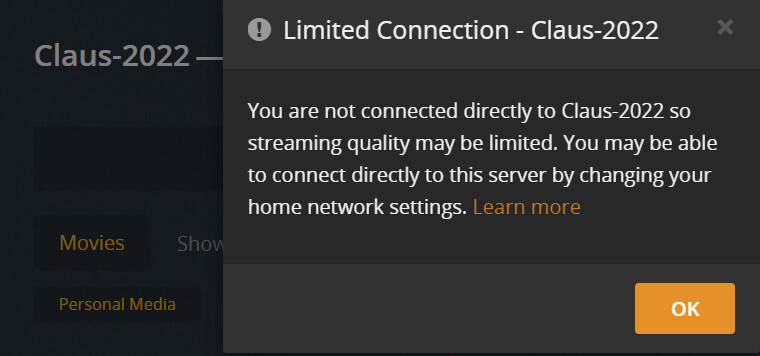
Your log shows that your TV is connecting to your server through a relay connection (i.e. remote access is not working properly) so the bandwidth is limited to 2 Mbps. Your file is well above this so it is transcoding. Double check your remote access settings.
Did you just make these changes or has it always been that way? If these are new, PMS doesn’t recognize network changes right away so a PMS restart would be needed.
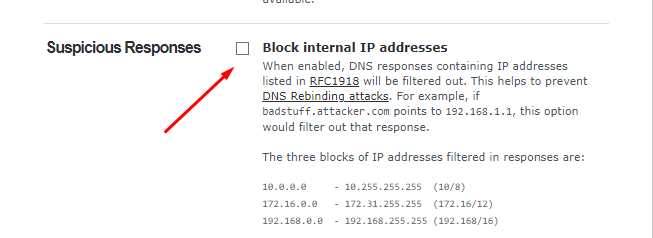
Specifically, is there somewhere in road map plan to overcome this? More and more routers will have this functionality and it can’t be expected all those to be changed for models which either do not have this or you can turn this (security!) feature off?
Furthermore, why Plex client is not connecting if you put exact IP in custom server field? In that case, no DNS resolution should happen, but no connection is possible anyway.
Sorry, missed your logs. I don’t see an LG app accessing your server. The last thing I see is an Android S9+ watching a movie. It does show the Android app connecting though a Relay (limited) connection. I can’t tell why though. I will need you to reproduce and get me the Android log. It’s the app that decides how it connects to the server.
When you use a Manual IP, the app can only connect to your server using an insecure connection. There is an app setting to “allow insecure connections”, make sure that is on.
There is not another way to view the LG logs. Your Android device appears to have the same issue, so my guess is that your remote access isn’t setup properly. Can you do the following:
restart PMS
wait 3 minutes without doing anything
start Plex for Android app
browse around your libraries for a bit (go to movie preplay, go to another movie preplay_, don’t actually need to play anything
Are you using both ethernet ports on your NAS? Plex doesn’t work well in that configuration. The server and clients are getting confused which port to use. Disconnect one of these, restart PMS, restart apps, try again.
Edit - Make sure your port forwarding is for the IP you end up keeping.