Yes, you can safely delete those. I’d recommend you run the database optimization and bundles cleanup command in the plex server backend.
1 Like
@ChuckPa, sorry it took so long to report back. To celebrate the 4th I finally got around to running your script ($$$ btw). DB went from 58gb down to 130mb in about ~15mins on my server.
Thank you again for sharing this. Easy to configure and understand.
1 Like
Thanks @ChuckPa! I ran your script and went from a 289GB to 233MB DB. It ran around 2 hours… got a little worried that it wasn’t working but noticed that a journal file in the same directory as the DB kept showing it was modified and grew to something just over 1.1GB before it wrote out the new database.
1 Like
Great to hear.
Correct in that you won’t see any output from Plex SQLite as it works.
( It’s part of the back-end and normally used as a library file built into PMS )
The 1.1 GB journal is a bit unusual but not surprising. Most folks report the journal to be about equal to the DB size. It seems your DB had a number of other records in it worth deleting.
Now that the DB is deflated, I’d run DBRepair (auto) to get everything back in sorted order with new indexes and restore the performance to optimal.
1 Like
thanks for this. not sure where my DB started at, but it has been running from 150GB to 200GB before falling back to 150GB. I ran this script (Version 1.41.9.9961 Ubuntu 24.04.2), took a couple hours and finished with “success” but looking at it, the drive size has not changed. any thoughts?
Which “script” please? ( Scripts don’t have versions which match 1.41.9.9961 )
From what I can see, none of them report “success”
I ran the script you have linked to this comment I am replying to. That version is current running plex version and OS it is on.
How much media do you have ?
If in doubt, you can use regular sqlite3 for this query. (can’t modify anything)
cd "/var/lib/plexmediaserver/Library/Application Support/Plex Media Server/Plug-in Support/Databases"
sqlite3 com.plexapp.plugins.library.db  'select count(*) from metadata_items;'
This will return a number.
Based on 150GB, it should be huge if you don’t have any bloat.
Otherwise I suspect you might have something else going on.
I looked back and found an older backup file and the “bloat” file were still in that folder. rm both and current working DB is 358M. Thanks for this! hopefully it wont creep up again.
Am i right that in order to get plexpass features I need to be running beta channel? this is just something I have always done, but the last few betas seem to be buggy.
PlexPass features are set in your account.
The software is the same whether Beta or Public.
What’s now Beta used to be called the ‘PlexPass release’.
Engineering changed this to mitigate the confusion
1 Like
Version 1.41.9.9961
After weekly scheduled task has successfully shrunk my database back to normal size. from 38.51GB to 223.7MB.
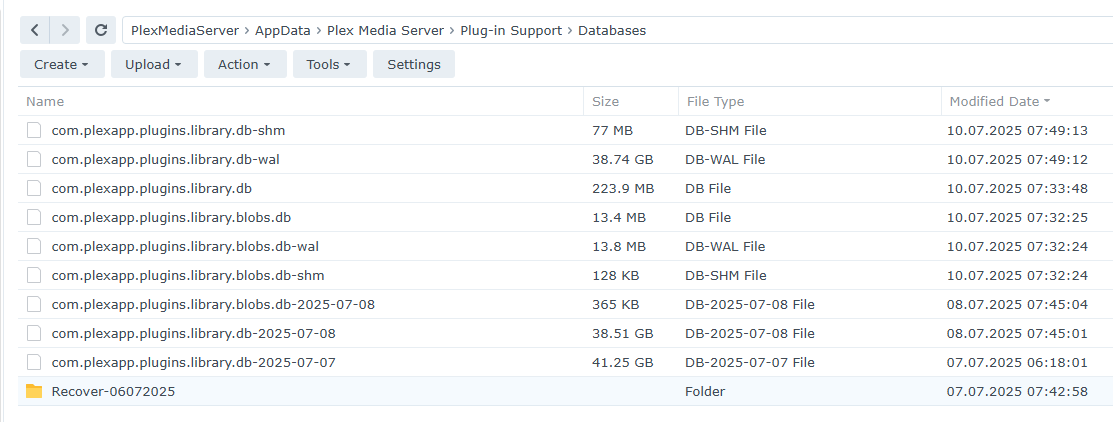
After restarting the server
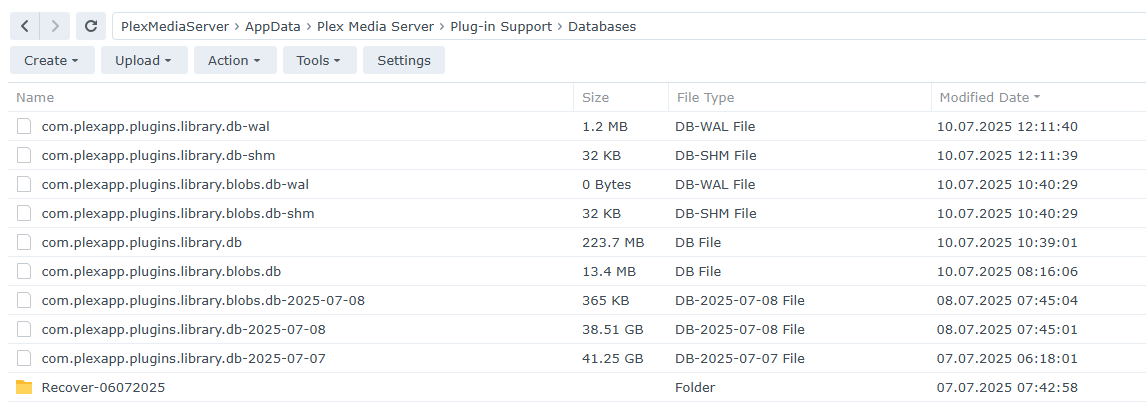
My com.plexapp.plugins.library.db went from 98G to 143M after these.
I don’t run any plugins.
1 Like
I’m going through the thread, but I’m having problems finding the current solution for Linux servers. Can anyone please link it, if possible?
This works great.
However, why is this magic not done automatically?

It is in PMS >1.41.7.
But since the server is kept running during that, it can take much longer. And it will only be done during the scheduled maintenance period.
The debloat script has a speed advantage here. But it requires manual intervention.
2 Likes
Hi All - I noticed a week or two ago that my Plex Server was struggling with library scans, etc. I think I narrowed the issue down to this database bloat problem (my database is around 85GB). I had been set to always get the latest Beta release, but I don’t know what I’d been up to. I also tried rolling back to an earlier release at some point in the last couple weeks, but I’m not sure what I went back to. Anyways, I have now got myself at the latest Public release (Version 1.41.9.9961) - I installed that on Wednesday last week. A full 7 days have now passed, and I was hoping the weekly maintenance would have happened in that time where it fixes the bloat (I don’t know what day weekly maintenance happens on, not sure if that’s something I can know?). However, my database is still at 85GB.
Is there something different I should be doing? Something I should be waiting for? (I see mention of a “script” in the thread above, but as far as I can tell, that is way beyond my technical skills and know-how).
“Optimize database every week” must be enabled in Settings → Scheduled Tasks.
You may also need to increase the window for scheduled tasks by adjusting their start/stop times.
I don’t know the exact order of scheduled tasks, but if the window is too small for Plex to finish prior tasks, it will never get to the database optimization task.
If desired, you can start the process immediately with WebTools-NG
In the Butler Scheduled Tasks section, select the Optimize Database task. This starts the same database optimization process as if you waited for PMS to run the task.
WebTools-NG runs on Windows, Mac, & Linux. It does not have to run on the same system as Plex Media Server. I run PMS on Ubuntu and run WebTools-NG on my Windows PC.
PMS will be non-responsive while the optimization is underway and assume it may take hours to complete, so time things accordingly.
There must be enough spare space for the database optimization to work. At least the size of the bloated database is required. If needed, move the database backups (the ones with the dates attached) to a different location to free up space (or just delete them).
1 Like
Thanks! I can confirm that “Optimize database every week” is already enabled in Settings → Scheduled Tasks. I have tasks set to start at 12:00 AM and end at 5:00 AM - is that enough time? If not, what should I change it to (not sure how much time is “enough”… or do I just change it to 12:00 AM to 12:00 AM (or 11:59 PM or whatever)?
And thank you for the instructions for manually running the process - I will look into that! (My hard drive only has 69GB free and the bloated database is 85GB, so I’ll definitely have to clean up/move things around.)
