I just notices that my Movies library has 337 movies, but only 336 of them will display on the Roku player. The last movie in the sort (however I sort it), does not show up. Is there a library maximum on Roku? I went into Plex using my Samsung Hub instead of Roku, and all 337 movies are showing up, so it looks like a Roku issue…or should I say ANOTHER Roku issue. I swear I’m done with Roku. Too many problems.
Do you have your Movies filtered somehow on the Roku? I have almost 700 movies and they all show just fine on the Roku. Also, I’m not aware of an actual limit.
1 Like
Same observation here. I’ve seen artificial libraries that were 10x as big. Good guess re: filtering.
When browsing the library, Plex doesn’t send all of the movies to the Roku at once, it sends chunks a page or two at a time. So there needn’t be an artificially low limit.
I’m curious if you add or remove a movie if it changes behavior. If it isn’t a filtering issue, are you always missing one movie? Or is 336 a magic number for you for some reason.
You may have one that is a mismatched duplicate.
Filter for Duplicates and see if you have an extra one:
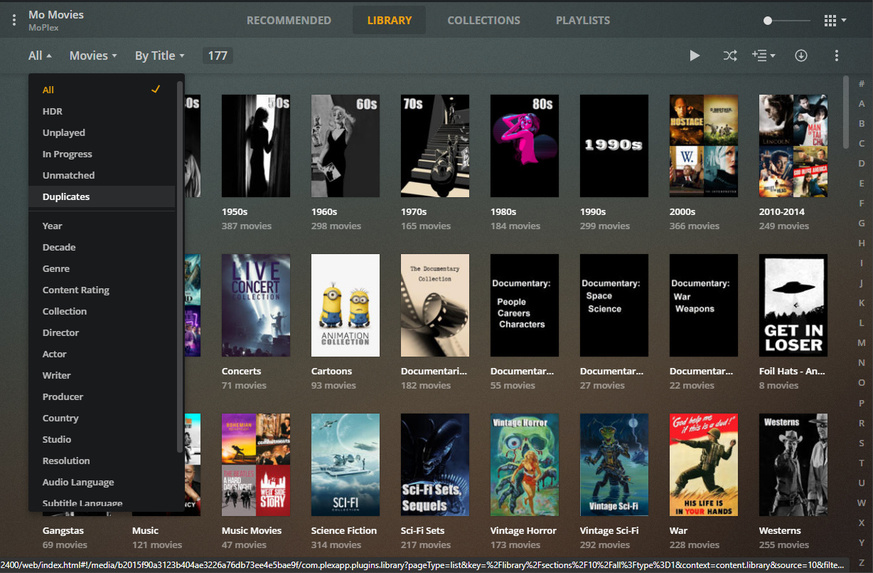
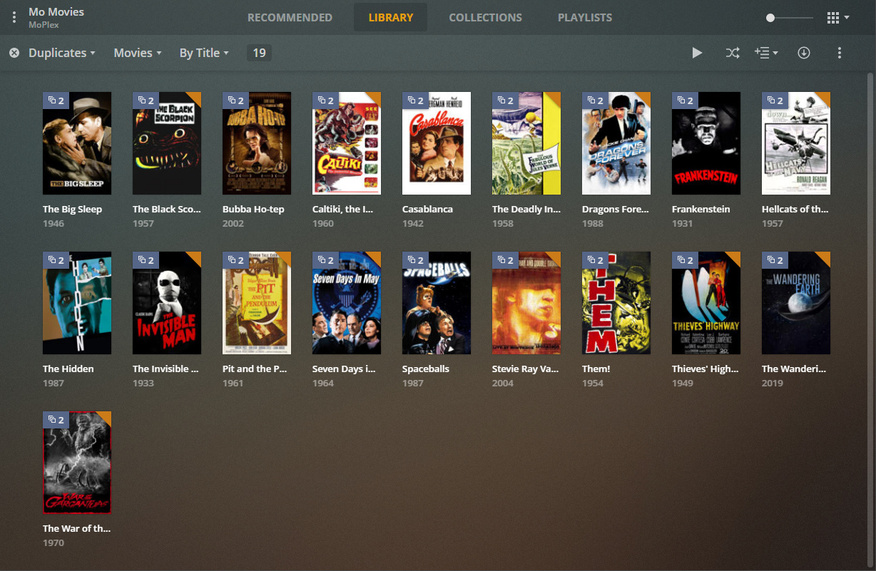
I know how many I ‘should’ have… when an extra one shows up - it’s go go gadget…lol
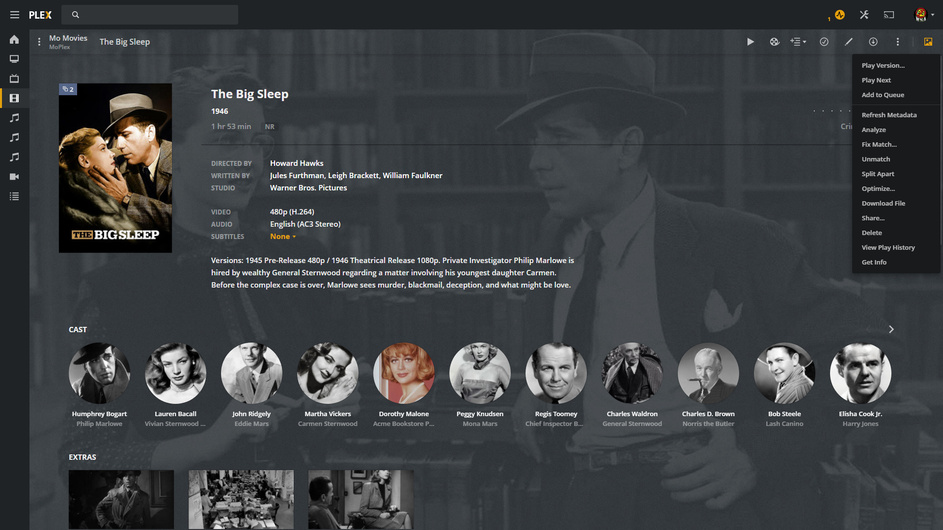
Identify Duplicate - Split Apart - Fix Match on the one that isn’t what it should be. Get Info shows your file name - to identify the file to Fix.
Also note: The Roku counts a Collection as a Movie to further confuse and infuriate. Take a look at my Movie Library that says I have 177. There are 177 Collections Visible. There are over 5000 Movies and If I want to know how many I filter for Folders - 'cause each movie is in one.
In short - it’s difficult to get an accurate accounting between a file manager and a Plex Page. There are a lot of moving parts.
1 Like
Thanks everyone! It looks like another phantom Roku problem. I restarted everything, and the last movie still did not show. I went to check for updates for the Roku - it was up to date - then I went back into Plex and all 337 movies showed. Weird! Roku phantom problems - phantom garbled audio, phantom audio sync problem, and now phantom movie disappear! If the Roku did not have such dynamic audio (much better than the Samsung hub), I’d get rid of it. But without the Roku, I have to crank my receiver so high it heats up my room, lol!
If ANYTHING strange happens - I do this:
Plex - Scan Libraries, Empty Trash, Clean Bundles, Optimize Database.
Reboot. <—routers, switches, ray guns, etc.
Roku/FireTVs/Phones/Tablets/etc. - Restart 'em all.
That usually puts an end to strangeness. <—for a while (I do have that ray gun if things go bad).
One other thing to add to the list.
If for any reason, your Roku or Fire TV starts loosing its lip sync. You have to turn off your TV, and the devices connected (IE PS3 PS4 XBox 1 Xbox360.
You have to unplug them from power for a minute. Then the only way I have found that fixes it is to turn the TV on first. Let it completely settle down. Then one at a time, turn on the others.
Someway somehow, a glitch in the audio sync from any one of the devices, starts a cascade problem. Even PLEX.
For the past year, I have had to reinstall ALL New updates from scratch. The system will not perform its own update.
Yes, It downloads the update, and starts. I get the Grab a cup of Tea and thats all I get. If I wait an hour or so, I still don’t get the update. I have to Close PLEX and start the latest Update Downloaded from the site by me. Then it updates. There is a hang in the passing of the torch to the update and it will not automatically update…
BTW, I’m not sending in MY Logs for disection.
If I have a persistent audio sync/latency issue, it usually means that either my TV or receiver has gotten stupid. I can often fix it by playing something in a different format - 2ch vs. 5.1. Or by streaming something to the receiver from a different source. Anything that causes the TV and receiver to identify the change in formats and resync is usually enough. But like you say - not always.
I never had to power cycle a receiver that didn’t have HDMI or DD or AirPlay.
I’m not using Windows but I’ve seen other posts where upgrades fail. I haven’t followed along.
It’s good-funny that you’re happy with Roku audio. I am too. I think that means you’re either getting pass through or correctly downmixed audio.
Some folks hate the “quiet” audio they get. I think it must have to do with how they’re connected and the audio settings of downstream components too.
Happy the missing media returned. Wish there was a resolution better than “I dunno, rebooted and it came back.” That’s always so unsatisfying.
This topic was automatically closed 90 days after the last reply. New replies are no longer allowed.
