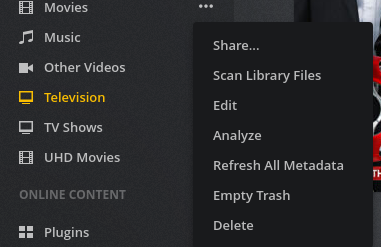
 Refresh all Metadata
Oh I’ve done that.
Brian Caouette
Moderator Edit Personal phone number removed for privacy protection.
Brian,
Please enable “DEBUG” logging. I only see “ERROR” and “INFO” records. This is insufficient.
DEBUG doesn’t use more disk space… It just shows me more.
- Enable DEBUG
- Refresh all again
- Gather the logs again.
Thanks Brian,
There are things it’s spitting out which I do not understand. I’m not at all familiar with the SSDP /Network browser services but it is causing PMS a lot of grief. This will slow down that little dual core Atom D2701 CPU. It looks like it’s advertising something but when PMS looks, it refuses to answer back. (nasService.xml)
Sep 14, 2018 19:04:57.969 [0x7fd7ea3f8700] DEBUG - NetworkServiceBrowser: found 0 SSDP devices via http://192.168.1.215:10000/nasService.xml
Sep 14, 2018 19:04:57.972 [0x7fd7ea3f8700] DEBUG - NetworkServiceBrowser: Parsing SSDP schema for http://192.168.1.215:10000/nasService.xml
Sep 14, 2018 19:04:57.973 [0x7fd7ea3f8700] DEBUG - HTTP requesting GET http://192.168.1.215:10000/nasService.xml
Sep 14, 2018 19:04:57.974 [0x7fd7ea3f8700] ERROR - Error issuing curl_easy_perform(handle): 7
Sep 14, 2018 19:04:57.974 [0x7fd7ea3f8700] WARN - HTTP error requesting GET http://192.168.1.215:10000/nasService.xml (0, No error) (Failed connect to 192.168.1.215:10000; Connection refused)
Sep 14, 2018 19:04:57.975 [0x7fd7ea3f8700] DEBUG - NetworkServiceBrowser: found 0 SSDP devices via http://192.168.1.215:10000/nasService.xml
Sep 14, 2018 19:04:57.976 [0x7fd7ea3f8700] DEBUG - NetworkServiceBrowser: Parsing SSDP schema for http://192.168.1.215:10000/nasService.xml
Sep 14, 2018 19:04:57.977 [0x7fd7ea3f8700] DEBUG - HTTP requesting GET http://192.168.1.215:10000/nasService.xml
Sep 14, 2018 19:04:57.978 [0x7fd7ea3f8700] ERROR - Error issuing curl_easy_perform(handle): 7
Sep 14, 2018 19:04:57.978 [0x7fd7ea3f8700] WARN - HTTP error requesting GET http://192.168.1.215:10000/nasService.xml (0, No error) (Failed connect to 192.168.1.215:10000; Connection refused)
Sep 14, 2018 19:04:57.979 [0x7fd7ea3f8700] DEBUG - NetworkServiceBrowser: found 0 SSDP devices via http://192.168.1.215:10000/nasService.xml
Sep 14, 2018 19:04:57.979 [0x7fd7ea3f8700] DEBUG - NetworkServiceBrowser: Parsing SSDP schema for http://192.168.1.215:10000/nasService.xml
Sep 14, 2018 19:04:57.980 [0x7fd7ea3f8700] DEBUG - HTTP requesting GET http://192.168.1.215:10000/nasService.xml
Sep 14, 2018 19:04:57.981 [0x7fd7ea3f8700] ERROR - Error issuing curl_easy_perform(handle): 7
Sep 14, 2018 19:04:57.981 [0x7fd7ea3f8700] WARN - HTTP error requesting GET http://192.168.1.215:10000/nasService.xml (0, No error) (Failed connect to 192.168.1.215:10000; Connection refused)
Sep 14, 2018 19:04:57.982 [0x7fd7ea3f8700] DEBUG - NetworkServiceBrowser: found 0 SSDP devices via http://192.168.1.215:10000/nasService.xml
Sep 14, 2018 19:04:57.982 [0x7fd7ea3f8700] DEBUG - NetworkServiceBrowser: Parsing SSDP schema for http://192.168.1.215:10000/nasService.xml
Sep 14, 2018 19:04:57.983 [0x7fd7ea3f8700] DEBUG - HTTP requesting GET http://192.168.1.215:10000/nasService.xml
Sep 14, 2018 19:04:57.985 [0x7fd7ea3f8700] ERROR - Error issuing curl_easy_perform(handle): 7
Sep 14, 2018 19:04:57.986 [0x7fd7ea3f8700] WARN - HTTP error requesting GET http://192.168.1.215:10000/nasService.xml (0, No error) (Failed connect to 192.168.1.215:10000; Connection refused)
I can see your other things trying to play Android, “300 Rise of an Empire”, etc.
In a nutshell though, your main PMS logs are overwhelmed with SSDP error messages. 192.168.1.215, port 10000.
Your scanner logs are clean. No errors. There are some items which do not return actor data. This is normal. (nothing published at TVDB)
Do you have “Update my library automatically” enabled and do you also have something which writes into one of your monitored directories? If so, this will cause it to keep scanning over and over (ever time a file is modified)
Update library automatically is currently on.
The only writes to it that I’m aware of is sabnzbd for new content.
How to we fix the ssdp flooding?
Any idea what it is?
SSDP = Simple Service Discovery Protocol.
I would think that’s something in the NAS settings / control panel itself.
If not, you’ll need to head over to their forums and find out how to control it.
FYI. To make it better for you, I’m going to move (retag) this to the ReadyNas area. More fellow ReadyNas users will see and hopefully help out.
So disable upnp?
Actually it’s off. Should it be on?
Something is on that shouldn’t be.
This is out of my league. I’m not a netgear expert.
This topic was automatically closed 90 days after the last reply. New replies are no longer allowed.
