When I look at my Plex home screen right now, I can see the “recently added” lists for Films and TV shows. These lists are pretty long and contain items I’ve added months and months ago. I can understand we don’t all have the same conception of what “recently” means for each of us but for me it doesn’t make sense to see lots and lots of old items into these lists. That’s why I’m suggesting to add some kind of display limitation feature to each of the recently added lists.
As example, we could imagine limit the display to :
the 30 most recent items ?
all items more recent than 90 days ?
other criteria ?
Since each Plex user may have different opinion about where to place the cursors, some customizable option would be great.
You can accomplish this using functionality already present in Plex: Smart Collections.
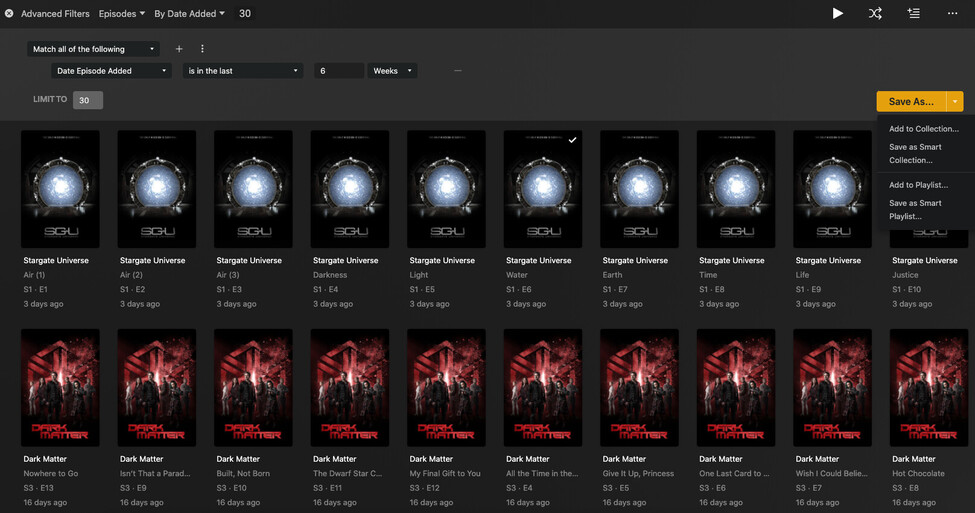
Select the library you’re interested in applying this to and select the Library view. Then select advanced filters and set the “Date Added” filter to “is in the last” and an appropriate time. You can also specify a “Limit To” value to constrain the number of results shown. Also, you can set the sort to “By Date Added” to have it sort most recent to oldest. This is for TV episodes, but the same could easily be done for movies:
Once you’ve got everything configured how you like, click the down arrow next to “Save As…” on the right; select “Save as Smart Collection…” and give it a name.
Finally, you can publish this new smart collection as a hub on your home screen (or a library) by selecting “Visible On → Home Screen” from the three-dot menu on the collection’s poster. More information on how to do that can be found here:
Thank you for your quick answer and your detailed explanations, it’s very clear. I didn’t use the smart collections so far indeed, I had a few tests this morning and I confirm it does the job perfectly. And as you say, it’s giving more ideas about how to filter and present content, that’s great.