On the home page, the link for “Recently Added Music” goes to a page that displays the CD covers with Movie cover shape/dimensions. See pics.

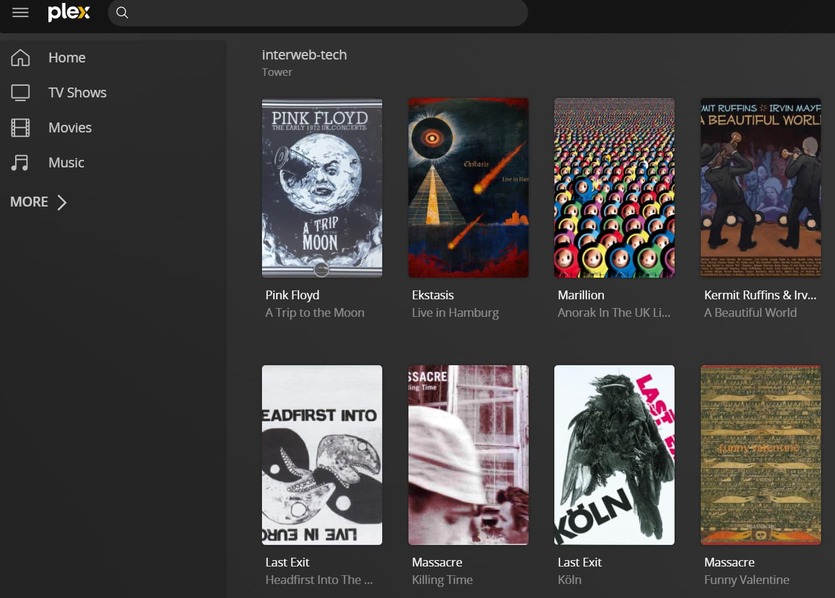
Thanks for report. Is that at https://app.plex.tv or the bundled one ip:32400.web ?
I have been using https://app.plex.tv (Chrome) exclusively at this end but in testing IP:32400 I see it also shows the issue.
I’ve been trying to reproduce this but cannot. Noticed in your screenshot it is not going to library and showing the filter by Date Added like it should.
You will have to re-pin your libraries to the app home screen but can you try going to Settings>Debug and hitting the “restore defaults” button at the bottom. (this only resets the web app, not your server settings)
You need Settings > Server > Libraries > Merge recently added items enabled. Because hubs are merged, the link cannot go directly to a specific library and shows a generic hub page.
2 Likes
This worked but by UNchecking the “Merge Recently Added items” box on Server - Libraries.
This did not have any effect on the cover dimensions.
Strange since there is only one music library you have pinned.
Thanks @SwiftPanda16 for thinking of that.
This topic was automatically closed 90 days after the last reply. New replies are no longer allowed.
