That seemed to work:

I shall repeat:
Please perform each of these steps, in sequence from the terminal window
sudo apt -y install gedit
sudo gedit /etc/fstab
The graphical editor will open, showing you the file /etc/fstab
You may now make the additions for the CIFS mount
Hi, sorry for the delay in responding to this.
I don’t know what you mean by “make additions for the CIFS mount” and I have been thinking that this really is too complicated for me. I thought it would be best to go to the direct connection method that you mentioned earlier. Unfortunately I’m having problems with that too.
I have successfully identified the disks I want to add in step A and I have got the block ID’s in step B. I’m having trouble with step C - " Create the locations where we will graft everything into Linux"
The instructions say:
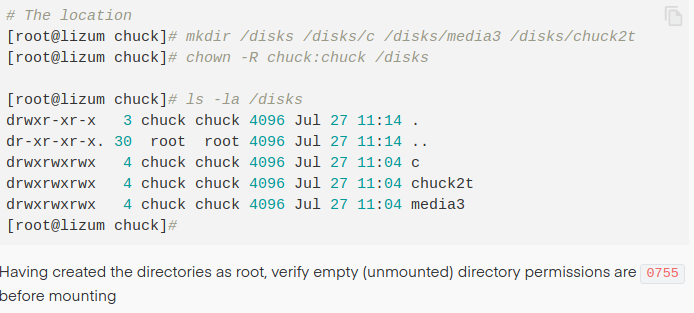
When I try to follow this step I get the error message “[root@lizum: not found”
Here is a screen-shot of what I have tried to enter:

Could you let me know where I’m going wrong with this step?
Thanks
Those ‘instructions’ are my example. You should be using the same bolded commands as I show. You should be substituting the names you want to use / find for what I provided in the example.
This topic was automatically closed 90 days after the last reply. New replies are no longer allowed.
