Server Version#: 1.40.1.8227
Player Version#: N/A
I’m running plex on Ubuntu Linux - 22.04.4. My server has run well for years. I’ve been having a problem recently where my server will announce “This application is at hostname and is not hosted by Plex.” The server also appears as unavailable to my external users when this happens. Restarting the plexmediaserver service will restore functionality.
I keep seeing the following in the logs:
Apr 04, 2024 09:29:56.714 [140476053658424] WARN - [HttpClient/HCl#50] HTTP error requesting GET https://plex.tv/api/v2/server/users/services?auth_token=xxxxxxxxxxxxxxxxxxxx (6, Couldn’t resolve host name) (Could not resolve host: plex.tv)
Apr 04, 2024 09:59:56.696 [140476053658424] WARN - [HttpClient/HCl#51] HTTP error requesting GET https://plex.tv/api/v2/server/users/services?auth_token=xxxxxxxxxxxxxxxxxxxx (6, Couldn’t resolve host name) (Could not resolve host: plex.tv)
Apr 04, 2024 10:27:13.105 [140476053658424] WARN - [HttpClient/HCl#52] HTTP error requesting GET https://v4.plex.tv/pms/:/ip (6, Couldn’t resolve host name) (Could not resolve host: v4.plex.tv)
Apr 04, 2024 10:27:13.105 [140475996244792] ERROR - PublicAddressManager: Unable to get public IP adddress from myPlex (httpCode=-6):
Apr 04, 2024 10:29:56.606 [140476053658424] WARN - [HttpClient/HCl#53] HTTP error requesting GET https://plex.tv/api/v2/server/users/services?auth_token=xxxxxxxxxxxxxxxxxxxx (6, Couldn’t resolve host name) (Could not resolve host: plex.tv)
Apr 04, 2024 10:59:56.677 [140476053658424] WARN - [HttpClient/HCl#54] HTTP error requesting GET https://plex.tv/api/v2/server/users/services?auth_token=xxxxxxxxxxxxxxxxxxxx (6, Couldn’t resolve host name) (Could not resolve host: plex.tv)
Apr 04, 2024 11:27:13.388 [140476053658424] WARN - [HttpClient/HCl#55] HTTP error requesting GET https://v4.plex.tv/pms/:/ip (6, Couldn’t resolve host name) (Could not resolve host: v4.plex.tv)
Apr 04, 2024 11:27:13.389 [140475992025912] ERROR - PublicAddressManager: Unable to get public IP adddress from myPlex (httpCode=-6):
Apr 04, 2024 11:29:56.608 [140476053658424] WARN - [HttpClient/HCl#56] HTTP error requesting GET https://plex.tv/api/v2/server/users/services?auth_token=xxxxxxxxxxxxxxxxxxxx (6, Couldn’t resolve host name) (Could not resolve host: plex.tv)
Apr 04, 2024 11:56:11.873 [140476053658424] WARN - [HttpClient/HCl#58] HTTP error requesting GET https://plex.tv/updater/products/5/check.xml?build=linux-x86_64&channel=8&distribution=debian&version=1.40.1.8227-c0dd5a73e (6, Couldn’t resolve host name) (Could not resolve host: plex.tv)
Apr 04, 2024 11:56:11.873 [140476036279096] ERROR - [Req#28f] HTTP -6 downloading url https://plex.tv/updater/products/5/check.xml?build=linux-x86_64&channel=8&distribution=debian&version=1.40.1.8227-c0dd5a73e
I can resolve plex.tv on the machine:
$ dig plex.tv
; <<>> DiG 9.18.18-0ubuntu0.22.04.2-Ubuntu <<>> plex.tv
;; global options: +cmd
;; Got answer:
;; ->>HEADER<<- opcode: QUERY, status: NOERROR, id: 27053
;; flags: qr rd ra; QUERY: 1, ANSWER: 2, AUTHORITY: 0, ADDITIONAL: 1;; OPT PSEUDOSECTION:
; EDNS: version: 0, flags:; udp: 1232
;; QUESTION SECTION:
;plex.tv. IN A;; ANSWER SECTION:
plex.tv. 50 IN A 52.17.160.217
plex.tv. 50 IN A 52.18.41.238;; Query time: 27 msec
;; SERVER: 192.168.86.100#53(192.168.86.100) (UDP)
;; WHEN: Thu Apr 04 13:44:58 PDT 2024
;; MSG SIZE rcvd: 68
My remote settings look good:
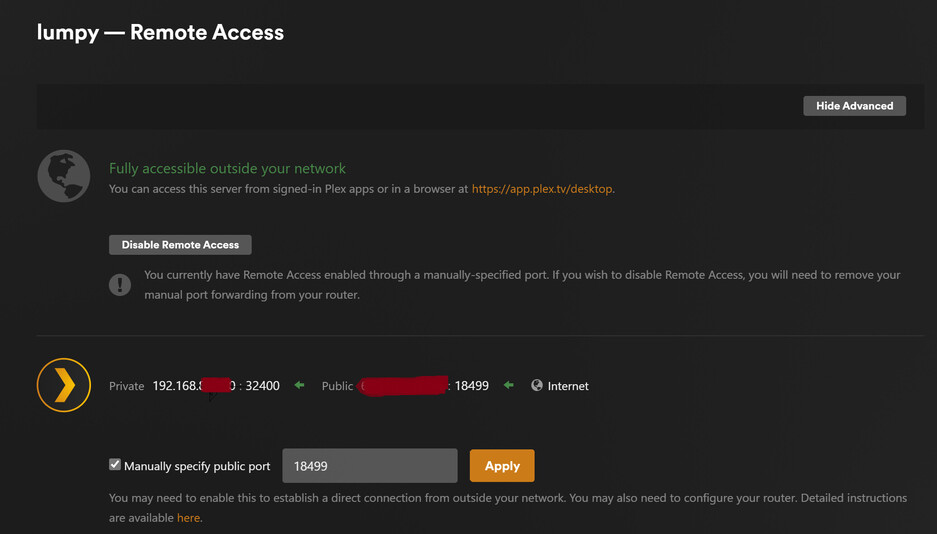
I double-checked by DNS settings on the server. I don’t have any other address resolution issues. I’ve tried disabling the ‘Enable Relay’ in the network settings. I’ve also ensured that the NTP sync is setting the correct time on the server, as I’ve seen that suggested as a remote access issue.
Not sure what else to try. Your help is appriciated.
Jamie


