Unable to claim server. "Could not resolve host: plex.tv" Resolves fine with nslookup

Server Version#: 1.30.1.6562

I noticed my server wasn’t online outside my local network. When I tried to conf through the web interface, my server was missing.
I did the Preference.xml trick to bring my server settings back in the web interface, but now I can’t claim my server.

Uninstalled/deleted all configs/reinstalled
I can log in, but cannot claim.

The errors say plex.tv cannot be resolved, but it is resolved via nslookup and dig on the terminal.

Jan 12, 2023 00:05:25.358 [0x7f7b4828cb38] DEBUG - [Req#20571] MyPlex: Got a token poked, let’s act on it.
Jan 12, 2023 00:05:25.359 [0x7f7b4828cb38] DEBUG - [Req#20571/HCl#2ab] HTTP requesting GET https://plex.tv/api/v2/user/privacy?X-Plex-To
ken=
Jan 12, 2023 00:05:25.364 [0x7f7b49b10b38] WARN - [HttpClient/HCl#2ab] HTTP error requesting GET https://plex.tv/api/v2/user/privacy?X-P
lex-Token=xxxxxxxxxxxxxxxxxxxxe host name) (Could not resolve host: plex.tv)
Jan 12, 2023 00:05:25.364 [0x7f7b4828cb38] WARN - [Req#20571] [Analytics] Couldn’t get analytics privacy settings. Trying again soon.
Jan 12, 2023 00:05:25.364 [0x7f7b4828cb38] DEBUG - [Req#20571/HCl#2ad] HTTP requesting GET https://plex.tv/api/v2/release_channels?X-Ple
x-Token=
Jan 12, 2023 00:05:25.365 [0x7f7b49b10b38] WARN - [HttpClient/HCl#2ad] HTTP error requesting GET https://plex.tv/api/v2/release_channels
?X-Plex-Token=xxxxxxxxxxxxxxxxxxxxe host name) (Could not resolve host: plex.tv)
Jan 12, 2023 00:05:25.365 [0x7f7b4828cb38] WARN - [Req#20571] [AutoUpdateRequestHandler] Couldn’t get update channels. Trying again soon
.
Jan 12, 2023 00:05:25.365 [0x7f7b4828cb38] DEBUG - [Req#20571/HCl#2ae] HTTP requesting GET https://plex.tv/api/v2/features?X-Plex-Token=
Jan 12, 2023 00:05:25.366 [0x7f7b49b10b38] WARN - [HttpClient/HCl#2ae] HTTP error requesting GET https://plex.tv/api/v2/features?X-Plex-
Token=xxxxxxxxxxxxxxxxxxxxe host name) (Could not resolve host: plex.tv)
Jan 12, 2023 00:05:25.366 [0x7f7b4828cb38] WARN - [Req#20571] FeatureManager: Couldn’t get features. Trying again soon.

OS
22.04.1 LTS (GNU/Linux 5.15.0-57-generic x86_64)

Plex
Version 1.30.1.6562 An update is available. Please install manually. (new version isn’t in repo yet?)

Installed via repo, not docker.
Hit:3 https://downloads.plex.tv/repo/deb public InRelease

$ nslookup plex.tv
Server: 127.0.0.1
Address: 127.0.0.1#53

Non-authoritative answer:
Name: plex.tv
Address: 54.73.181.143
Name: plex.tv
Address: 52.48.60.59
Name: plex.tv
Address: 52.19.183.102
Name: plex.tv
Address: 54.155.234.143

$ dig plex.tv

; <<>> DiG 9.18.1-1ubuntu1.2-Ubuntu <<>> plex.tv
;; global options: +cmd
;; Got answer:
;; ->>HEADER<<- opcode: QUERY, status: NOERROR, id: 20202
;; flags: qr rd ra; QUERY: 1, ANSWER: 4, AUTHORITY: 0, ADDITIONAL: 1

;; OPT PSEUDOSECTION:
; EDNS: version: 0, flags:; udp: 1232
;; QUESTION SECTION:
;plex.tv. IN A

;; ANSWER SECTION:
plex.tv. 10 IN A 54.73.181.143
plex.tv. 10 IN A 52.48.60.59
plex.tv. 10 IN A 52.19.183.102
plex.tv. 10 IN A 54.155.234.143

;; Query time: 0 msec
;; SERVER: 127.0.0.1#53(127.0.0.1) (UDP)
;; WHEN: Thu Jan 12 07:13:49 EST 2023
;; MSG SIZE rcvd: 100

adguard home is running in docker, upstream dns servers are Cloudflare and Google.
I’ve turned off all filters.
plex.tv is white listed.

Cloudflare zero trust tunnel running as well in docker.
i setup public hostnames for adguard and plex through the tunnel, when I connected to plex via public hostname, the server settings disappeared again. I’ll check if local IPs can still see the server settings or if it is persistent for all web clients.

when you go into the command line of the container,

Can you resolve it there ?

curl --max-time 5  https://app.plex.tv:33333/web

Timeout error = DNS resolved and curl behaved as expected.

Only adguard and the tunnel are in docker.

And adguard doesn’t have an interactive cli when I attach to the container.

Plex was installed via the repo, so it uses what the os uses for name resolution, or at least it should.

Here’s are the plex processes running on my Ubuntu server:

$ ps -ef | grep plexmediaserver
plex      506389       1  0 Jan12 ?        00:01:51 /usr/lib/plexmediaserver/Plex Media Server
plex      506417  506389  0 Jan12 ?        00:00:29 Plex Plug-in [com.plexapp.system] /usr/lib/plexmediaserver/Resources/Plug-ins-915986d62/Framework.bundle/Contents/Resources/Versions/2/Python/bootstrap.py --server-version 1.30.1.6562-915986d62 /usr/lib/plexmediaserver/Resources/Plug-ins-915986d62/System.bundle
plex      506457  506389  0 Jan12 ?        00:01:13 /usr/lib/plexmediaserver/Plex Tuner Service /usr/lib/plexmediaserver/Resources/Tuner/Private /usr/lib/plexmediaserver/Resources/Tuner/Shared 1.30.1.6562-915986d62 32600

The OS can’t connect to port 33333.
But it resolved the domain.

$ curl --max-time 5  https://app.plex.tv:33333/web
curl: (28) Failed to connect to app.plex.tv port 33333 after 3758 ms: Connection timed out

removing the port for that command returns this:

$ curl --max-time 5  https://app.plex.tv
<html>
<head><title>301 Moved Permanently</title></head>
<body bgcolor="white">
<center><h1>301 Moved Permanently</h1></center>
<hr><center>nginx</center>
</body>
</html>

Here’s the name server lookup for app.plex.tv
My DNS server, 127.0.0.1 found 2 DNS servers that answer for app.plex.tv

$ nslookup app.plex.tv
Server:         127.0.0.1
Address:        127.0.0.1#53

Non-authoritative answer:
Name:   app.plex.tv
Address: 104.18.18.96
Name:   app.plex.tv
Address: 104.18.19.96

when I shut down the adguard container, I get this.

$ nslookup app.plex.tv
;; communications error to 127.0.0.1#53: connection refused

I’ve changed my plax account’s password, that didn’t help.

when I get into the web interface, I’m unauthenticated.

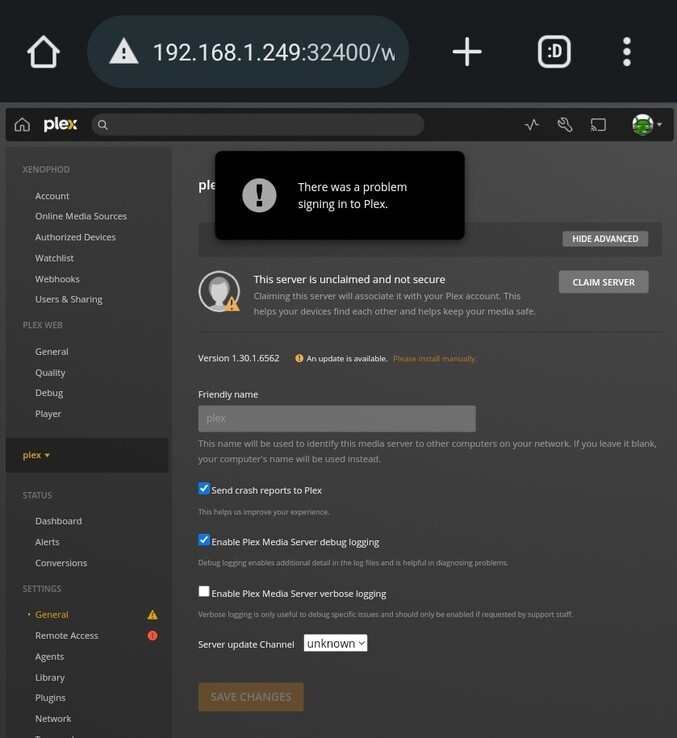
I click “claim”, I’m prompted to log into my account. Once I’m authenticated, the popup message “There was a problem signing into Plex” appears. My account is logged in though, and thr server isn’t claimed. While logged in, clicking “claim” results in the button changing for a second as if it’s working on it, but quickly returns to “claim”. The backend errors are already pasted above in the first post.

In my quest to get Adguardhome to bind to port 53 for DNS, I had to disable systemd-resolved, then remove /etc/resolv.conf so DNS queries would use Adguard at 127.0.0.1:53 (this advice was right and wrong, since it worked)

When I reversed this to see if Plex would be able to resolve DNS queries, I found that Plex indeed found plex.tv after stopping adguard, creating the symlink for /etc/resolv.conf again and starting systemctl-resolved.

What I then discovered was that I could kill systemd-resolved and still query the DNS servers listed in /etc/resolv.conf, which were still 8.8.8.8 and such.

I started adguardhome again, removed the symlink and created a /etc/resolv.conf file that points to 127.0.0.1 and all was happy.

I’ll see if this survives a reboot later today, but at least I know how to keep the rest of my system happy while still hosting Adguardhome in a docker container.

This topic was automatically closed 90 days after the last reply. New replies are no longer allowed.