HD HomeRun Connect DUO Model: HDHR5-2DT Firmware 1.18.3.2156
Hi,
I recently bought a HD HomeRun Connect DUO to use with my Plex for Live TV and DVR functionally. I have installed and set up as per HD HomeRun and Plex instructions, but it does not work as expected - in summary, the picture quality is very poor and unusable with Plex.
It typically buffers for about 10 to 90 seconds when you select a channel. You then get a very pixelated picture (sound seems ok) then it buffers again for another 30 seconds. Often followed by a Playback Error “This live TV session has ended” and sometimes “ An error occured trying to play Programme Error code: s3015 (media).
Both the NAS and HD HomeRun are plugged directly into my Virgin Media broadband router (Gigabit LAN) with Cat 8 cables. I have an excellent TV signal.
I have reached out for support from silicondust.com (HD HomeRun manufactures) and they have collected diagnostics and report “Everything looks fine on the HDHomeRun’s end - no reception or network issues indicated.” Also the live tv works perfectly using their HD HomeRun Mac application.
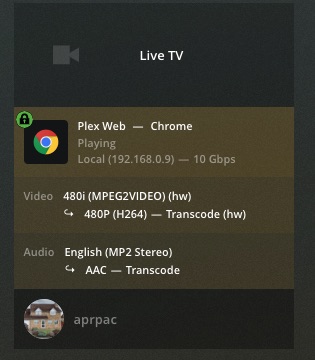
You have a two problems, your client doesn’t appear to support mpeg2 which leads to the server transcoding. Your server doesn’t have enough CPU power to support transcoding, even with Hardware Transcoding turned on it may not be possible but that would be the first step.
I have a similar question about my setup and I’m maybe a little confused about the Plex app on my Apple TV. I have no issues watching movies, etc. from my Synology but I do get stuttering, pixelation, etc. when watching Live TV. This is coming from an antenna and HD Extend. I also have the Channels app on the same Apple TV and the picture, etc. is amazing.
I was under the impression that the new versions of the Apple TV Plex client no longer need to transcode mpeg2 video streams, which WOULD be the cause of this. Is that not correct (yet)? I’d really like to try using the Plex DVR feature, but it appears I would get some really awful recordings if the Live TV is behaving this way.
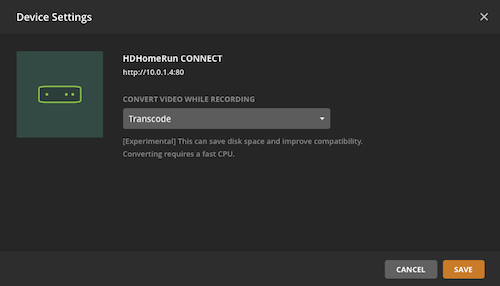
The HD Extend has the added capability to convert mpeg2 to h.264 before it gets to Plex, on the server go to Settings>Live TV & DVR > device settings and change the Transcoder Quality to Highest Quality.
Please be aware that Plex versions post 1.16 have an updated transcoder that is causing image issues when using hardware transcoding with the cpu’s that are in the Synologies. I have my fingers crossed that a new release will hit by the end of the month.
I don’t have any Apple products so I can’t offer any help with optimizing the Plex Client.
Thanks. I know I can have the Extend transcode as well, but I am expecting to replace it with the Quattro at some point to get more concurrent streams and the Extend has been discontinued.
I was under the impression that the most recent Plex app for AppleTV no longer used the built in video player but that Plex had included a function that would read MPG2 WITHOUT transcoding. That is how Infuse and Channels work and why they look so good. If this is not the case, I can understand the picture quality issues, but if they HAVE included a new player, then it shouldn’t be happening.
I have had the exact same problems as aprpac. The difference is my problems started after Plex cancelled EPG support in Australia. The same week as the announcement we had Foxtel move us from a cable connection to a satellite based connection (this is nothing to do with my ISP) but I can’t think of a way that could have had any impact on this issue. As aprpac stated it works fine using the HD HomeRun Mac app (I even tested with an old copy of the EyeTV application and likewise everything worked fine. I’m convinced the problem is Plex but either way support has done nothing to address the problem. By the way this failure was experienced on 2 different Synology NAS’s running different versions of DSM and each running different versions of Plex (updates were run after problem occurred but made no difference) but as I stated earlier problems started on both machines the week Plex cancelled EPG support. Up until then both machines streamed and recorded TV Live without any problems. The fact it worked flawlessly previously means the machines and Plex had worked fine dealing with mpeg2 video streams, so what changed?
Browsers definately don’t support mpeg2, you will want to use one of the Plex Clients. You can set the player quality instead of it starting low and switching up.
First up, is the Plex for Mac and Windows:
Next if you are not using the adware supported Movies and TV is the better client:
It’s not that they don’t work, it is that they have to transcode. Since most people clear their cookies you also have to remember to go to the player settings and set quality to original.
First link is tied to your Plex account.
For all other clients, be sure to go into the settings and change Local/Remote quality to maximum.
Since you have the server version sorted out and you only have 2 tuners you may want to test the experimental setting on the tuner that transcodes on the fly, this would at least convert the mpeg2 to h.264 which is native to all Apple devices.