The pixelation goes away and the crisp expected rendering returns.
As such, this now definitively seems it is due to hardware acceleration using my video card, correct? I am still thinking this is related to the drivers I have installed for NVidia for the issue above. My hunch is that even though I have uninstalled them they are sticking around somehow and it’s leading to this issue.
Had a moment of excitement here but turned out to be a false alarm. I went into Device Manager, and uninstalled the video card (checking the option to also delete the driver). After doing this the rendering was as expected. However, after rebooting for good measure the pixelation has returned.
The mystery deepens… after uninstalling the driver and rebooting, I am able to go into Windows Update and upgrade the video driver. Before this upgrade of the driver, I have pixelated renderings. After upgrading and installing the driver, I have expected renderings, no pixelation. But after rebooting it reverts back to pixelated renderings.
So, getting close here. This seems to be a driver issue – one that can and seems to be corrected until reboot.
BTW I recently repaired this Windows 10 image so we can rule out any zaniness from that regard (but who knows).
Alright one last update here, I tried installing the latest drivers from NVidia and forcing a clean install. Everything is the same: after installing the driver everything works as expected, but after reboot the pixelation returns.
This is great progress! I agree that if turning off hardware transcoding, which forces software transcoding, consistently results in clear rendering then we have narrowed it down to a problem with hardware transcoding when using your NVidea card. You have done some strong work on problem solving the video card. I’m decent with Windows, but I run Plex on Linux and I don’t have a NVidia card anywhere to test with - I use the GPU that is on my Intel processor.
Is there anything different in your Plex logs for when the picture is clear (before reboot) versus after reboot? In the NVidia Control Panel do you see anything different from before reboot vs after? (I’m just reading about the NVidia Control Panel… I don’t really know what I’m talking about.)
Edit: It is possible that after uninstalling the NVidea drivers and video card that Plex then couldn’t see your NVidia GPU, and so Plex fell back to using software transcoding. The reboot may force Win to check hardware and reinstall drivers, so Plex then sees the GPU again. You can usually tell if Plex is using software transcoding because the CPU use will be higher while software transcoding - or check the Plex dashboard. If you don’t see “(hw)” next to transcoding, then it is software transcoding. I don’t really understand the scenario where upgrading the driver results in clear rendering, and then reboot causes pixelation. Check the version of the NVidia drivers before and after reboot, are they the same?
Does anyone with Win/NVidia experience have recommendations?
This is a good guess. However, I can confirm that uninstalling the device and scanning for changes (reinstalling) without rebooting shows that CPU is minimal and GPU is active while the crisp (non-pixelated) rendering occurs.
With MPEG2 streams the CPU is probably the best choice for transcoding since it isn’t considered a priority for Intel, AMD or NVidia to focus on.
Is there a way to direct MPEG2 streams to CPU while everything else goes to GPU? I am all ears
I don’t know of a way to direct transcoding based on the source type.
If your primary clients are Roku and Plex for Win, then I believe that you can get near to the functional equivalent of what you want to accomplish by working to get your Rokus and Plex for Win to Direct Stream MPEG2. Then there will be no need to transcode MPEG2, and other source types would still use the GPU to transcode as needed.
I know this isn’t the answer you were looking for and may not meet your need, but I’m throwing it out for consideration!
A long shot but others have had mysterious Nvidia problems and doing a “Reset to Default” on the Nvidia settings has cleared it up. If you want to be absolutely sure you can use DDU Display Driver Uninstaller Download version 18.0.5.8 to clear out anything video driver related that tends to hang around on Windows.
No worries it is appreciated nonetheless. Please feel free to share anything else that you think of as well.
I am definitely interested in trying things out since it feels like there’s a bad install here, especially how everything was working and now it’s not.
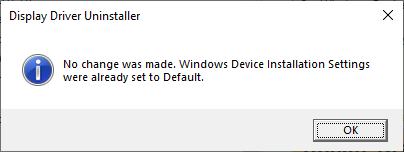
That stated, I did try that option and it looks like I am already set to that
FWIW I also tried the clean/reboot feature of the uninstall application and that didn’t do much good, either.
Far out thought here… but is there a cheapish but Plex-recommended GPU that might work well with my CPU that is better than I already have? I am curious if there’s a GPU that Plex users recommend that I might investigate and see if getting it addresses this issue.
The basic problem for Hardware manufacturers is their is no incentive to update the driver/quality regarding mpeg2 and H264 codecs unless it is broken for everyone.
For Intel, their was steady improvement on video quality moving from the HD iGPU to the UHD630. UHD’s are now “Legacy” and HD’s are obsolete. Even if you go with the new ARC gpu the old codecs didn’t get any attention for improving quality. AMD GPU’s are only focusing on H265 and newer, same for Nvidia.
So basically if I understand you correctly @pl_5309 is that it doesn’t matter if I get new hardware everything is essentially the same in this department?
Such a bummer that this worked before but now it doesn’t That stated I did do CPU-based hardware transcoding and it’s only a 5-10% CPU hit… so not that bad?
I have the same issue with the pixelated/vertical lines in both local server playback or webplayback in both DVR recordings or live tv.
I don’t see it in the native HDHomeRun playback software which leads me to leaning toward something with the Plex end. I have yet to spend much time messing with NVidia drivers yet, but that’s a good approach.
The Nvidia encoder didn’t change until the release of the RTX4000’s and it was to add AV1 support. The Intel Arc 380 is showing good results coming close to software quality on H264, drivers still seem to be an issue.
Getting back to the original issue though, why is the Roku not direct playing mpeg2?
I had some time to go back in time and here’s where I DON’T notice the problem. These are 32 bit Windows versions, BTW.
Reverted back to:
1.29.2.6364 (11/08/2022 release?) - No pixilation/vertical lines
Upgraded to:
1.30.0.6359 (11/08/2022 released?) - Pixilation/vertical lines returned.
I don’t have any links to versions in-between those versions, but I can confirm the issue exists in 6406 and 6442 also.
FWIW… I’m going back to 1.29.2.6364 and will spot check future releases until I deem that Plex has fixed their problem. Stay tuned for further reports.
If anyone on the Plex team wants to test with me, feel free to reach out. If you’re even listening.
However, there’s a not-well known location of previous releases stored locally, but the version i needed was already rotated out.
Stop Plex Server using its tray icon.
Uninstall Plex Server with the regular ‘Apps’ control panel of Windows. Do not use 3rd party ‘uninstaller’ software like Revo etc. Do not use Registry cleaners/optimizers.
1.29.2.6364 is available at plex.tv. Turn off the Plex Pass download option.
On Windows, Plex keeps prior versions in the Updates folder of the Plex Data Folder, %LOCALAPPDATA%\Plex Media Server. I’m not sure how many older versions are retained. I’ve three on my PC (and just noticed @thechad6 posted this as well).
Thank you @thechad6 + @FordGuy61 for your assistance. I was able to get the 1.29 download by unchecking Plex Pass option on the download page.
However, when I run this exe it is asking to install in C:\Program Files\Plex\Plex Media Server and I have this folder already installed in another location. It is strange that it’s not picking up the existing install and has me worried to continue.
Do I point it to the existing location or am I doing something very wrong here?



 That stated I did do CPU-based hardware transcoding and it’s only a 5-10% CPU hit… so not that bad?
