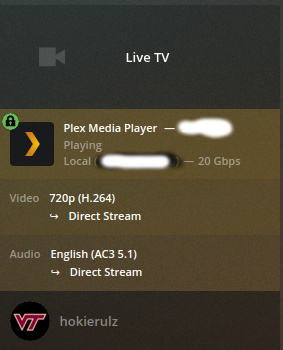
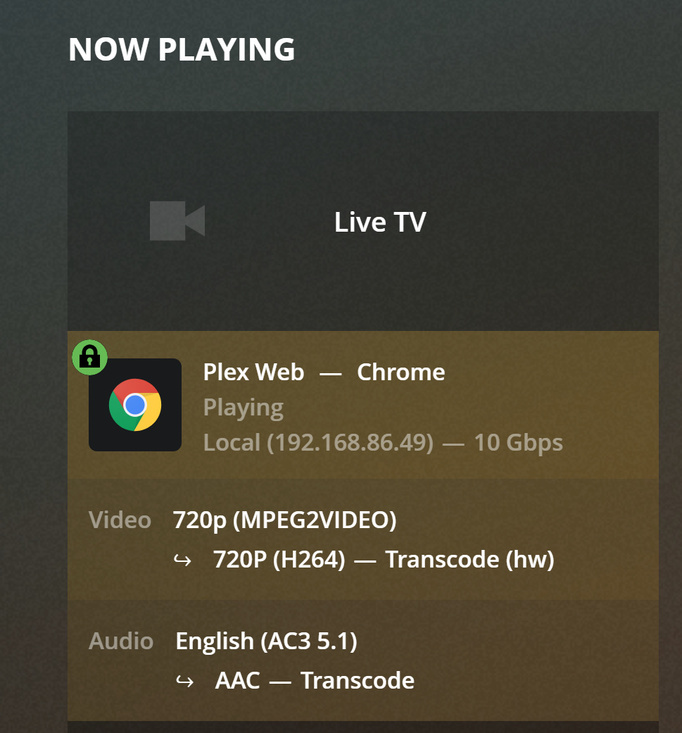
About 3 weeks ago, I noticed that the picture quality on live TV and recorded TV became really poor on all Plex clients. I tried deleting the DVR and adding it back and that did nothing. Viewing TV through HDHomeRun looks perfect. All Plex viewing looks like 480p or something. Screenshots below.
What video quality is the dashboard in Plex web showing when you are playing live TV (or recorded) and seeing the poor quality? Is it showing that it is transcoding?
Likely more information will be needed to proceed (tuner used, server version, client versions), but confirming the above is the first step.
Thank you, as darcilicious mentioned above, the “Now Playing” section is what I meant. Please make sure “Show Details” is clicked. It would be helpful to see something like below.
Plex Media Server running on Windows 10
Version 1.18.1.1973
Running on a Roku TV Client, but it looks bad on all clients. Web client, Android, etc.
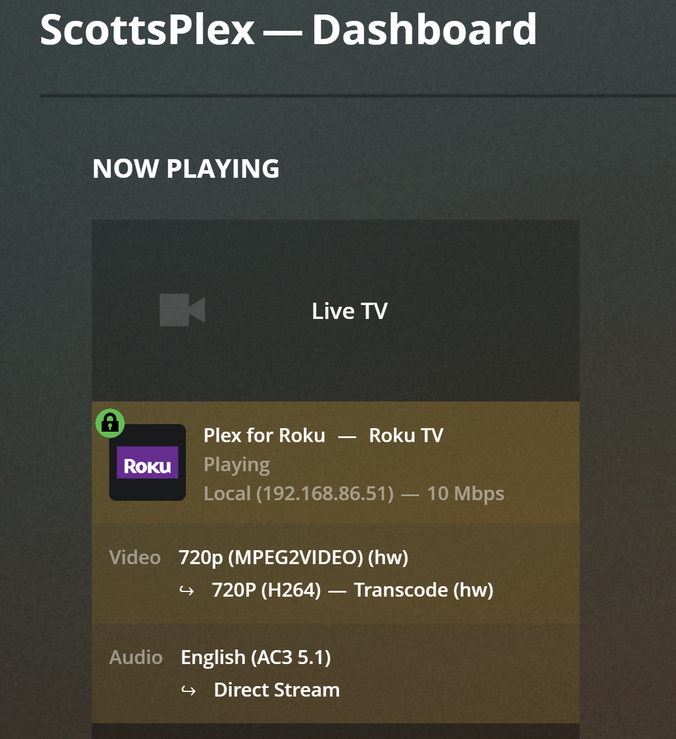
Dashboard below.
For video it’s doing hardware transcoding from MPEG2 to H.264, but from what you posted it looks lower resolution than 720p h.264 should. That makes me think your hardware transcoding isn’t great, but that is going to be based on what your GPU is, or your video card, which I don’t know.
For Roku, most models can play MPEG2 directly, so I don’t see a reason to transcode to h.264. Without full details on your hardware, Roku model, etc I’m guessing some but an idea to try:
In your Roku Plex app click on your user name, then select “Settings”. Scroll down to “Video” and set “Local Quality” to “Original”. Make sure “Allow Direct Stream” is checked. Make sure “Allow MPEG2” is checked. Try playing it again, and again look at it in now playing in your dashboard. The goal is to get the video direct streaming the MPEG2 with no transcoding.
If that doesn’t work… hmmm, you used to be able to turn off hardware accelerated transcoding in the Plex Web settings under “Transcoder”, but I don’t see that any longer. So, on the “Transcoder” page try changing the “Transcoder Quality” from “Automatic” to “Prefer higher quality encoding” or “Make my CPU hurt”. Again, I don’t know your hardware, so if it isn’t high spec you might get buffering and have to switch back.
I’ve always had issues with Plex Web forcing transcoding. For that one I’d suggest downloading and installing either the Plex app for Windows or Plex Media Player for Windows. Again, the goal is to get the video direct streaming with no transcoding.
I’m in exctly the same place. I’d spent time yesterday on this issue, I’d noticed it about 3 weeks ago as the LiveTV is now very ‘block’ based and poor quality.
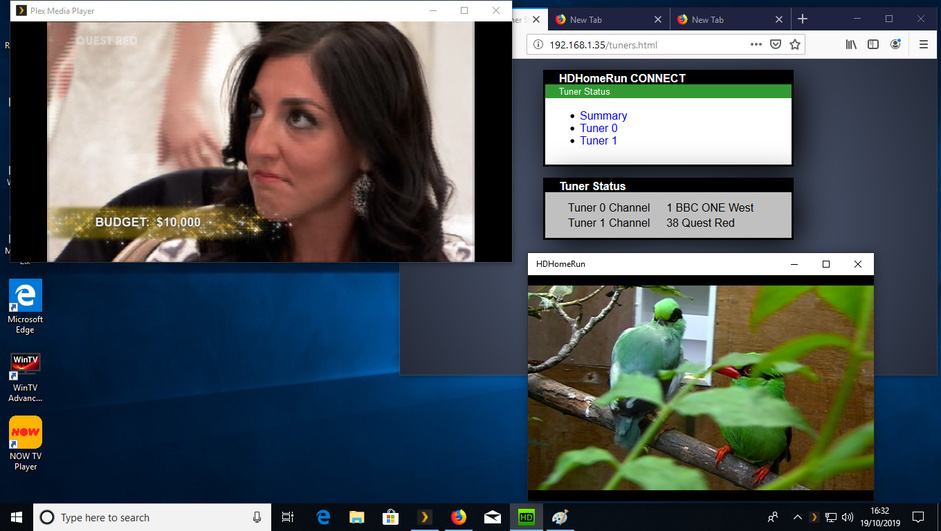
I know it’s the Plex Server issue as I’ve tested it on local machine with a HD Homerun and watched two feeds, One via plex and 1 via HDHomeRun own software the Plex picture is poor. It’s not a client end as I get the same issue on Apple, FireTV, Samsung, IOS, Windows regardless.
I’ve totally removed my devices and re installed, I’ve updated all drivers and no different, Normal clients I use to watch Live TV is a iPad Pro Gen 3.
I often watch Live TV over the internet and this makes the quality even worse.
I’ve added the logs from my machine at exactly the point these screen shots where taken.
Oh and I’ve also tested this on WinHD Quad tuner card from Hauppage, whcih also presents the same result, on the same devices. Again I’ve tried WinTV client against Plex and Plex quality is much lower res and block’ie’ too. Again all drivers have been updated and tested on actual machine with card inwith so transcoding should not be an issue.
I know starting with v1.17 there were significant changes to the transcoder to attempt to improve Plex’s hardware transcoding support. It would be interesting to know if before that release you were hardware transcoding or software transcoding. Possibly the improvement allowed your Plex server to start hardware transcoding, but now that hardware transcoding is problematic, or that change messed up hardware transcoding for you.
Perhaps someone else will jump in to help out with details on how to optimize your hardware transcoder - I’m not an expert there. My only suggestion to improve transcoding quality is in my previous post to set the transcoder from automatic to either “Prefer Higher Quality” or “Make my CPU hurt”. Perhaps others will jump in that have more transcoding knowledge for me. Turning on/off hardware transcoding doesn’t show for me on this page, likely because my hardware doesn’t support. If it shows for you, try turning off hardware transcoding to force software transcoding just for testing purposes.
Using the HDHomeRun app will always show whatever your HDHR is outputting without additional transcoding. If you have an HDHR Extend you may have it set to do transcoding on the Extend, but the HDHomeRun app will still just show what your tuner is outputting. Plex tries to be smarter and optimize the audio/video, sometimes making the decision to transcode video. Clearly that doesn’t always work out.
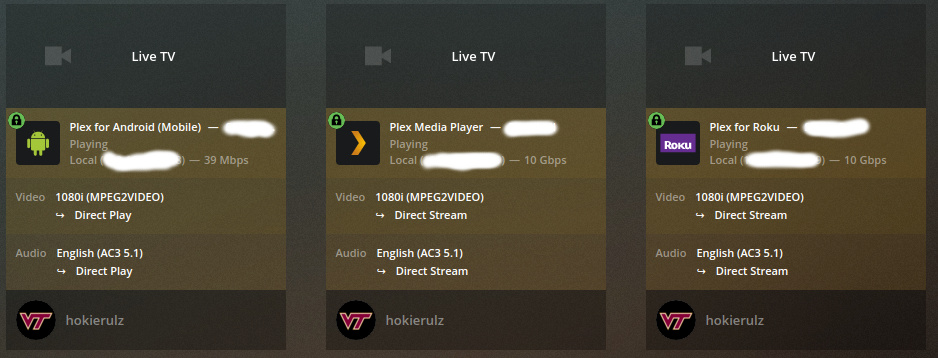
Not saying this is what you should have to or want to do, but my approach is to simply avoid Plex transcoding and seek to have Plex just pass through the video stream (as close as possible), making it as similar to the HDHR app as possible in respect to (not) transcoding. My hardware can’t support more than one transcoding stream at best anyway. I’ve been able to get all of my clients to either direct play or direct stream (multiple Rokus, PMP on Win and Linux, Plex app for win, android mobile), which avoids the potential Plex hardware transcoder issue and any associated transcoding resolution loss. I do have an HDHR Extend, so I’m usually working with h.264 encoded .ts files vs MPEG2 encoded .ts files, but I think I’ve been able to get MPEG2 to direct play and direct stream as well. I’ll be happy to try to help share how I did that, much of which I already posted above.
Overall I agree it most like started around 1.17. And given the hdhomerun available here in the UK, Aka no HDhomerunExtend. Of course this would resolve the issue by off loading this to the tuner, however since that tech doesn’t work here and again using other tuners from other manufacturers, I feel we need to look at how plex is working, for me I have two servers. One for playback of my media library, the second for DVR only, this is a rather good spec machine but still it’s now very very poor on a single stream.
I’m tried turning off hardware support on the DVR server (inside transcoding setting. The enable hardware ttranscoding) so I will see if this improves the issue.
The second reason is assist with the diagnostics by confirming it’s not signal strength, tuner errors, drivers etc. Therefore we know where to look.
Please post if turning off hardware transcoding helped. If you look in Now Playing in the Dashboard you will likely see it is now software transcoding, assuming nothing else changed.
Is your tuner producing MPEG2 encoding in .ts files for your UK broadcasts? (I don’t want to assume it is the same as we typically get in the USA.) If so I would still encourage looking at changing settings to get out of unnecessary transcoding. Transcoding has places that it is needed, but at home, and a good local network to watch live or recorded TV, I just typically don’t see a need. Save your processor some work and save some electricity.
To verify I turned off transcoding on my Extend. On my old server hardware I was able to play 1080i MPEG2 Live TV concurrently to three devices (Roku, PMP, and Android mobile), all direct play or direct stream. No transcoding. I watched for about 10 minutes and all three were flawless. All three client devices had strong wifi signals. Server is connected to my network with a wired gigabit connection.


 is clicked. It would be helpful to see something like below.